“This comparison has been reviewed for accuracy by Leanne Grant, Enrolled Agent, specializing in cryptocurrency tax compliance.”
Two tools, nearly identical names, completely different products. Most investors pick the wrong one because they cannot tell them apart.
We hear it every week from new clients. "I signed up for CoinTracker, wait, or was it CoinTracking?"
It matters. A lot.
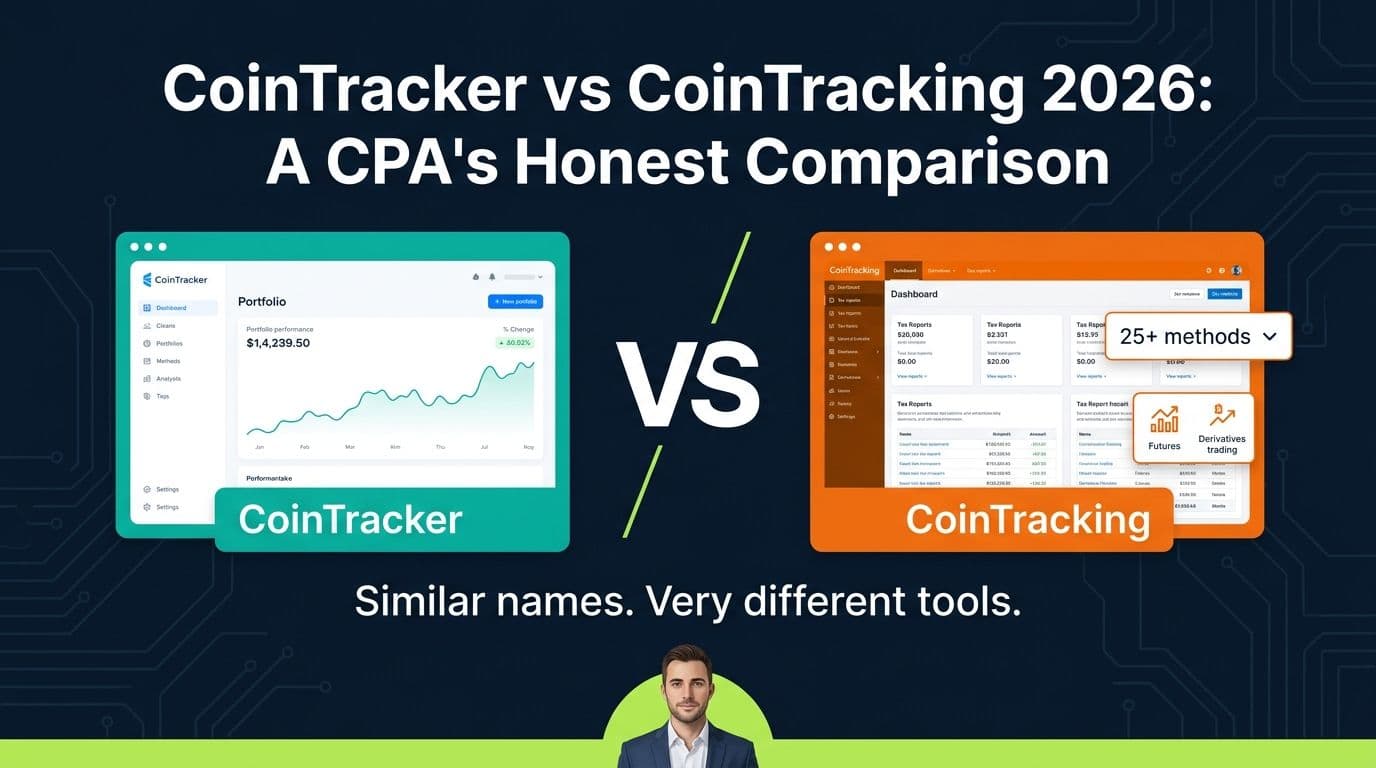
CoinTracker is a San Francisco-based platform with a clean, modern interface, deep Coinbase integration, and a real mobile app. CoinTracking is a German-founded power tool with a dense, dated interface built for tax professionals managing dozens of accounts.
Same first eight letters. Completely different products. Completely different audiences.
We've filed returns using both platforms across 500+ client engagements. After all those reps, the answer is clear for most filers. CoinTracker is the better tool for nearly every individual crypto investor in 2026.
Here is why.
The Quick Verdict: CoinTracker Wins for Most Investors
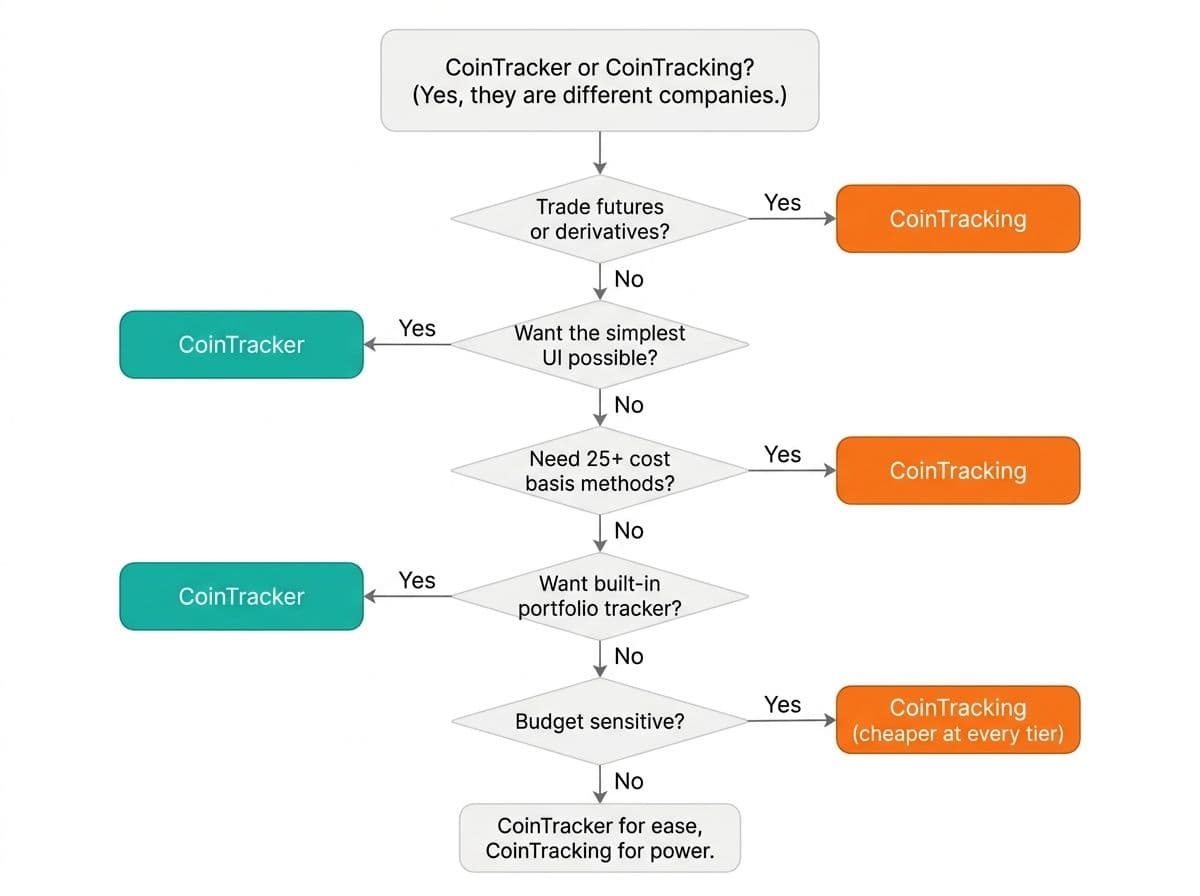
Before we get into the details, here's the framework we use internally when onboarding new clients.
Pick CoinTracker if (this is most people):
- You hold or trade crypto on any mainstream exchange (Coinbase, Kraken, Gemini, Binance.US, Robinhood, etc.)
- You have anywhere from 10 to 10,000 transactions per year
- You want a clean interface that does not require a tutorial
- You want a mobile app for portfolio checks
- You want your CPA to be able to review your data without learning a new tool
- You want fewer categorization errors and a cleaner Form 8949
Pick CoinTracking only if:
- You trade heavily on Section 1256 futures and need automated classification
- You file in 3+ countries and need formats like ELSTER, HMRC, or ATO
- You need a niche cost basis method like ACB, Share Pooling, or AVCO
Pro Tip
**Still not sure?** Here's the one-sentence rule. If you are an individual crypto investor, pick CoinTracker. If you are an active futures-and-derivatives trader filing in multiple countries, look at CoinTracking. That is the entire decision.
Head-to-Head Spec Comparison
| Feature | CoinTracker ✅ | CoinTracking |
|---|---|---|
| **Founded** | 2017, San Francisco | 2013, Munich |
| **Interface** | Modern, clean, easy to learn | Functional but dated, dense menus |
| **Mobile App** | Yes (iOS + Android) | No, web only |
| **Onboarding Time** | Under 2 minutes via setup wizard | 30+ minutes, no guided setup |
| **Coinbase Integration** | Deepest in the industry | Standard API |
| **Exchange Integrations** | 500+ (all major exchanges and wallets) | 13,000+ (mostly obscure or defunct platforms) |
| **DeFi Auto-Categorization** | Cleaner, fewer manual fixes | More chains, more manual labeling |
| **NFT Support** | Yes | Yes |
| **1099-DA Reconciliation** | Visual dashboard with color-coded flags | Deeper drill-down, dated UX |
| **Accountant Portal** | Yes, Premium+. Best CPA handoff in the industry. | Tax Professional License, built for firms not individuals |
| **Portfolio Tracker** | Built-in, real-time, replaces standalone trackers | Basic, report-focused |
| **Cost Basis Methods** | FIFO, LIFO, HIFO, Spec ID (covers 95% of US filers) | 25+ methods (overkill for most) |
| **Tax Forms** | Form 8949, Schedule D, TurboTax direct export | Form 8949, Schedule D, ELSTER, 20+ country formats |
| **TurboTax Integration** | Direct one-click export | CSV only |
| **Customer Support** | Email + priority on Premium, polished docs | Email + community forum, smaller team |
| **International Support** | US, UK, Canada, Australia | 100+ countries |
| **Free Tier** | 25 transactions (demo) | 200 transactions (full reports) |
| **Paid Plans** | $59 to $599/year | $0 to $189/year |
CoinTracking wins on raw spec sheet items like total integration count and method count. CoinTracker wins on every dimension that affects whether you actually file an accurate return without pain.
Let's go category by category.
Deep Dive: Why CoinTracker Wins for Most Investors
1. Interface and User Experience
Winner: CoinTracker, decisively.
CoinTracking's interface looks like it was built in 2015 and has not had a major redesign since. Dense menus. Nested navigation. Terminology that assumes you already know what FIFO vs ACB means. For a first-time user, CoinTracking can feel overwhelming.
CoinTracker, by contrast, feels like a modern SaaS product. Clean dashboard. Intuitive navigation. Contextual help text. A setup wizard that walks you through connecting your first exchange in under two minutes.
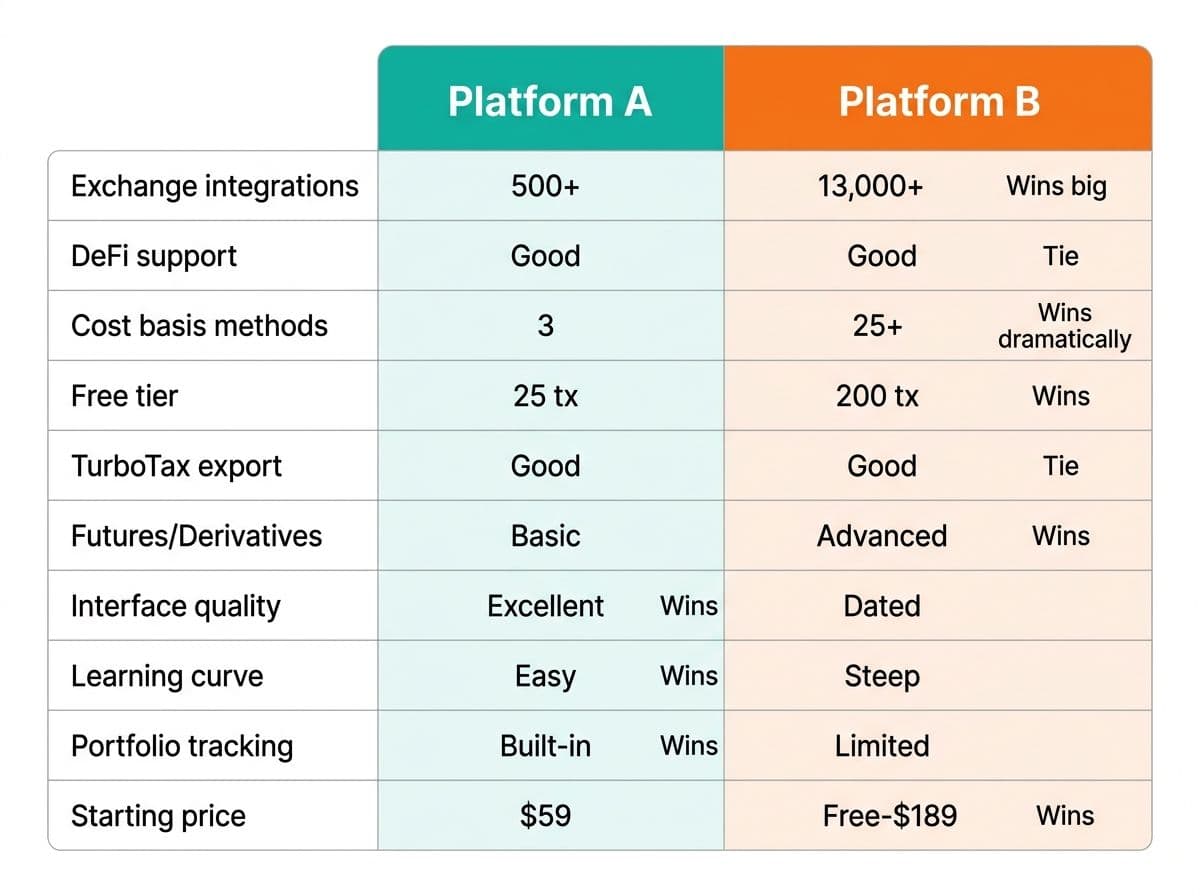
This is not just aesthetics. Interface quality directly affects error rates. In our practice, clients who self-prepare using CoinTracker make significantly fewer categorization mistakes than those using CoinTracking, simply because CoinTracker's UI makes the right choices more obvious.
When you are mapping a thousand-plus transactions to the correct tax treatment, fewer errors per hour is the only metric that matters.
2. Mobile App
Winner: CoinTracker. CoinTracking does not even compete here.
CoinTracker has a genuine mobile app on both iOS and Android. You can check your portfolio, review new transactions, and tag activity from your phone. Real-time price tracking is baked in.
CoinTracking is web only. There is no mobile app. If you want to glance at your tax position or portfolio mid-year, you are opening a browser tab on your phone and squinting at a desktop interface.
For any investor who actually pays attention to crypto during the year, this gap is significant. CoinTracker is built for how people actually use their phones in 2026.
3. CPA and Tax Professional Collaboration
Winner: CoinTracker for individuals (which is most readers).
CoinTracker offers an Accountant Portal on Premium plans and above. Your CPA gets read-only access to your full transaction history, tax reports, and reconciliation data through a dedicated dashboard. It is clean, well-organized, and requires zero setup from your side. One click to share, your CPA sees everything they need, and they do not need to learn a new tool.
This is the cleanest CPA handoff in the entire crypto tax software category. Period.
CoinTracking offers a Tax Professional License instead. It is designed for CPAs and EAs managing many client accounts at once. Powerful for a firm. Overkill and clunky for an individual trying to give their accountant access.
If you are an individual sharing data with your CPA (which is most readers), CoinTracker's portal is faster, simpler, and friendlier to both sides of the relationship.
If you are running a CPA firm with twenty or more crypto clients on your roster, CoinTracking's license is built for your workflow. Outside of that narrow professional use case, CoinTracker wins.
4. Coinbase Integration and Major Exchange Coverage
Winner: CoinTracker, by a clear margin.
Most US crypto investors live primarily on Coinbase. A meaningful share also use Kraken, Gemini, Binance.US, or Robinhood. CoinTracker has invested years in deep integrations with these platforms. API sync is fast, transactions classify correctly out of the box, and complex events like Coinbase Earn rewards, staking, and Coinbase One features auto-categorize properly.
CoinTracking covers Coinbase too. But its integration is a generic API connector with the same dated polish as the rest of the tool. You will spend more time fixing incorrectly classified transactions on CoinTracking, even though it technically supports the same exchange.
When 70% to 90% of your activity is on mainstream US exchanges, CoinTracker's deeper integrations save real hours during tax season.
5. Cleaner DeFi Auto-Categorization
Winner: CoinTracker for most users.
Both platforms have invested heavily in DeFi support, and both still have gaps. No crypto tax tool handles DeFi perfectly in 2026.
The honest difference is how much manual cleanup you have to do. CoinTracker handles Ethereum mainnet DeFi with cleaner auto-categorization. Uniswap swaps, Aave lending, Lido staking, and basic L2 activity import and classify with fewer manual corrections needed. L2 chains (Arbitrum, Optimism, Base) are improving fast, and Solana DeFi support has gotten meaningfully better in the last twelve months.
CoinTracking covers a broader range of chains thanks to its massive integration library. But its DeFi categorization is less polished. You will import more raw data and spend more time manually labeling transactions.
For someone with a typical DeFi footprint (ETH mainnet, an L2 or two, maybe Solana), CoinTracker is the cleaner experience.
6. Portfolio Tracking Built In
Winner: CoinTracker. No real competition.
CoinTracker is the only crypto tax tool with a portfolio tracker good enough to replace a standalone product like CoinStats or Delta. Real-time prices. Performance analytics. Tax-loss harvesting dashboards. Cost basis visibility on every position.
If you would otherwise pay $5 to $15 per month for a portfolio tracker, that cost effectively disappears when you use CoinTracker for taxes.
CoinTracking has a basic portfolio view that is report-focused. It is fine. It is not a product anyone would use as a daily portfolio tracker. It exists to support the tax engine.
7. TurboTax and Tax Filing Workflow
Winner: CoinTracker.
CoinTracker has a one-click direct export to TurboTax. Form 8949 lines flow straight into your TurboTax return. For investors who self-file, this turns the painful part of crypto taxes into a five-minute step.
CoinTracking exports CSV files that you then have to upload to TurboTax separately, often with formatting tweaks. It works, but it is friction that CoinTracker simply does not have.
For the millions of crypto investors who use TurboTax as their filing software, CoinTracker is the smoother path from raw transactions to a filed return.
8. Customer Support and Documentation
Winner: CoinTracker.
CoinTracker offers email support on all paid plans, with priority support on Premium and Unlimited tiers. Response times in our experience average 24 to 48 hours. Their help documentation is well organized, beginner-friendly, and gets updated with new features.
CoinTracking offers email support and an active community forum. Response times are similar, but the team is smaller and the knowledge base is less polished. Forum answers from other users are common, which is helpful but inconsistent.
For an individual investor who occasionally needs help, CoinTracker is the better-supported product.
9. 1099-DA Reconciliation
Winner: CoinTracker for ease of use. CoinTracking for power-user drill-down.
Both platforms shipped 1099-DA reconciliation tools in 2026 after the IRS began requiring brokers to issue 1099-DA forms for digital asset dispositions starting in the 2025 tax year.
CoinTracker's implementation is visual and immediately legible. A dashboard shows matched, unmatched, and discrepant transactions with color-coded flags. You can see at a glance whether your records match what the exchange reported to the IRS, and click into any flagged item to resolve it.
CoinTracking's implementation offers deeper export options and granular drill-down for tax professionals reconciling many accounts at once. Powerful, but overkill for a typical individual filer.
For most readers, CoinTracker's visual reconciliation is the better experience.
Where CoinTracking Still Wins (Honest Edge Cases)
Being honest about where CoinTracking is the right call:
1. Heavy Futures and Derivatives Traders
CoinTracking auto-classifies Binance Futures, dYdX, GMX, and similar perpetual contract activity as Section 1256 contracts with proper 60/40 treatment. CoinTracker imports these transactions but does not always classify them correctly for Section 1256.
If futures and derivatives are a meaningful share of your activity, CoinTracking handles them more cleanly out of the box. For everyone else, this is not a real factor.
2. Multi-Country International Filers
CoinTracking supports 100+ country tax formats, including ELSTER (Germany), HMRC (UK), and ATO (Australia). If you file in multiple countries or outside the US-UK-Canada-Australia set that CoinTracker supports, CoinTracking is the only realistic choice.
3. CPA Firms Managing 20+ Crypto Clients
CoinTracking's Tax Professional License is built for firms running batch operations across many clients. If you are a practitioner, this is a real advantage. If you are an individual investor, it does not apply.
4. Truly Niche Cost Basis Needs
If you genuinely need ACB (Canadian filers), Share Pooling (UK), AVCO, or CoinTracking's Optimized method that automatically selects the lowest-tax allocation across all your lots, CoinTracking is unmatched. For US-based individual investors, the four methods CoinTracker offers (FIFO, LIFO, HIFO, Spec ID) cover 95% of optimization scenarios.
5. Importing Defunct Exchange History
CoinTracking's 13,000+ integration library is mostly obscure or shut-down platforms. If you traded on FTX, Mt. Gox, Cryptopia, or any other defunct exchange and need historical data imported via CSV templates that have not been touched in years, CoinTracking is your best bet.
For everyone else, CoinTracker is the better tool.
Read our full CoinTracker review
What About Switching?
Good news: both platforms support CSV export and import, so migrating from one to the other is possible.
Bad news: it is not seamless. Cost basis history, manual categorizations, and custom labels do not transfer cleanly. Expect to spend 2 to 4 hours on a migration for a portfolio with 1,000+ transactions.
If you are on CoinTracking today and the workflow is fighting you, the time to switch to CoinTracker is the start of a new tax year. Migrating mid-year creates cost basis reconciliation headaches that even experienced CPAs find tedious.
The Tools We Did Not Compare (and Why)
If you are also considering Koinly, CoinLedger, or ZenLedger, we have reviewed those separately:
- Best Crypto Tax Software 2026, full roundup with rankings
- CoinTracker Review 2026, deep dive on CoinTracker alone
- CoinTracking Review 2026, deep dive on CoinTracking alone
This comparison focused specifically on CoinTracker vs CoinTracking because the name confusion causes real problems. We have seen clients sign up for the wrong one, spend hours importing data, and then realize it does not support what they actually need.
Do not be that person. Pick the right one the first time. For nearly every reader of this post, that is CoinTracker.
Final Verdict: CoinTracker for Most, CoinTracking for the Edge Cases
After 500+ client engagements, here is where we land.
CoinTracker is the better product for the vast majority of crypto investors in 2026. Modern interface that does not require a tutorial. Mobile app. Real Coinbase integration. Cleaner DeFi categorization. The industry's best CPA handoff via the Accountant Portal. One-click TurboTax export. Better support. Better documentation.
For someone holding or trading crypto on mainstream US exchanges, with anywhere from a few dozen to several thousand transactions per year, the answer is CoinTracker.
CoinTracking is the better product only for a narrow set of users. Heavy futures and derivatives traders. Multi-country international filers. CPA firms running 20+ crypto clients. People with niche cost basis needs like ACB or Share Pooling. Investors needing to import history from defunct exchanges.
If you fit one of those profiles, CoinTracking is built for you. If you do not, CoinTracker is the cleaner, faster, more accurate way to file.
Our recommendation for most readers: Start with CoinTracker. You will not outgrow it. If you ever do, you will know exactly why and you can migrate then.
Our recommendation for power users in the edge cases above: CoinTracking is the right tool for your workflow.
Either way, run your output past a CPA before filing. These tools aggregate data. They do not replace tax judgment.
Free Crypto Tax Health Check
Not sure if your software is set up correctly? We'll review your exchange activity, flag any classification errors, and confirm whether your cost basis method is optimal before you file. No commitment. No sales pitch. Just a straight answer from a practicing CPA.
Book Your Free ReviewFree 15 minute call. No commitment.
Frequently Asked Questions
Which is better for most crypto investors, CoinTracker or CoinTracking?
CoinTracker. For the vast majority of individual crypto investors trading on mainstream exchanges like Coinbase, Kraken, or Gemini, CoinTracker has a cleaner interface, deeper exchange integrations, a real mobile app, one-click TurboTax export, and the best CPA handoff in the industry via the Accountant Portal. CoinTracking is the better choice only for a narrow set of power users (heavy futures traders, multi-country filers, and CPA firms managing many crypto clients).
Are CoinTracker and CoinTracking the same company?
No. CoinTracker is a San Francisco-based company founded in 2017. CoinTracking is a German-founded company launched in 2013. They are completely separate products with different teams, pricing, and feature sets. The similar names cause frequent confusion.
Does CoinTracker have a mobile app?
Yes. CoinTracker has a real native app on both iOS and Android, with real-time portfolio tracking and the ability to review and tag transactions from your phone. CoinTracking does not have a mobile app at all. For investors who check their crypto during the year, this is a significant advantage for CoinTracker.
How does CoinTracker compare to CoinTracking for working with a CPA?
CoinTracker wins clearly for individuals. CoinTracker's Accountant Portal lets you share read-only access to your full data with one click. Your CPA logs in, sees everything they need, and does not have to learn a new tool. CoinTracking offers a Tax Professional License built for CPA firms managing many clients, which is powerful for practitioners but clunky for an individual sharing data with their accountant.
How does CoinTracker handle Coinbase compared to CoinTracking?
CoinTracker has the deepest Coinbase integration in the industry. API sync is fast, and complex events like Coinbase Earn rewards, staking distributions, and Coinbase One activity auto-classify correctly. CoinTracking supports Coinbase via a generic API connector and tends to require more manual cleanup on Coinbase activity. For US investors with significant Coinbase usage, CoinTracker is the cleaner experience.
Which is better for DeFi transactions?
CoinTracker, for most users. Both platforms handle basic DeFi (swaps, lending, staking) on Ethereum mainnet, and neither is perfect. CoinTracker has cleaner auto-categorization on ETH mainnet and L2s like Base, Arbitrum, and Optimism, which means less manual cleanup. CoinTracking covers more chains but requires more manual labeling. For a typical DeFi footprint, CoinTracker is the smoother workflow.
Which exchange integrations matter more, 500 or 13,000?
CoinTracker's 500+ integrations include every major exchange and wallet that an individual US investor will ever use. CoinTracking's 13,000+ number is real, but most of those integrations are for obscure regional exchanges and defunct platforms like Mt. Gox or Cryptopia. The big number only helps you if you have historical data on a niche or shut-down exchange. For nearly all current activity, CoinTracker covers what you need.
Does CoinTracker support futures and derivatives?
CoinTracker imports futures and derivatives transactions but may not correctly classify them for Section 1256 (60/40) tax treatment in every case. If derivatives are a meaningful share of your trading activity, CoinTracking handles automatic Section 1256 classification more cleanly. For investors who do not actively trade futures, this is not a real factor in choosing between the two.
Which cost basis methods does each platform support?
CoinTracker supports FIFO, LIFO, HIFO, and Specific Identification, which covers about 95% of US individual filer optimization scenarios. CoinTracking supports 25+ methods including LOFO, ACB (Canada), Share Pooling (UK), AVCO, and Optimized methods. For US individual investors, CoinTracker's four methods are sufficient. CoinTracking's extra methods matter for international filers and complex multi-jurisdiction reporting.
Which has better TurboTax integration?
CoinTracker. It offers direct one-click export to TurboTax, with Form 8949 lines flowing straight into your TurboTax return. CoinTracking exports CSV files that you upload to TurboTax separately, sometimes requiring formatting adjustments. For investors who self-file via TurboTax, CoinTracker is the smoother end-to-end workflow.
Which is cheaper, CoinTracker or CoinTracking?
CoinTracking is cheaper on paper. CoinTracking's paid plans top out at $189/year, while CoinTracker ranges from $59 to $599/year. However, CoinTracker includes real-time portfolio tracking that effectively replaces a $5-15/month standalone portfolio tracker. When you factor in the time savings on tax prep and cleaner CPA handoff, CoinTracker's total cost of ownership is competitive for most investors.
Which platform handles 1099-DA reconciliation better?
Both shipped 1099-DA reconciliation in 2026. CoinTracker's implementation is more visual and immediately legible, with a dashboard showing matched, unmatched, and discrepant transactions in color-coded flags. CoinTracking offers deeper drill-down for tax professionals reconciling many accounts. For individual filers, CoinTracker's reconciliation is the easier experience.
Can I switch from CoinTracking to CoinTracker?
Yes. Both platforms support CSV export and import. However, custom labels, manual categorizations, and cost basis history do not transfer cleanly. Plan 2-4 hours for migration on a 1,000+ transaction portfolio, and ideally switch at the start of a new tax year to avoid mid-year cost basis reconciliation headaches.
Which is better for beginners?
CoinTracker, significantly. Its modern interface, setup wizard, and contextual tooltips make it accessible to first-time crypto tax filers. CoinTracking's dense menus and technical terminology assume prior knowledge of cost basis methods and tax concepts. For anyone filing crypto taxes for the first time, CoinTracker is the right choice.
Do I still need a CPA if I use CoinTracker?
For simple portfolios (under 100 transactions on 1-2 exchanges), CoinTracker can handle your filing independently. For complex portfolios involving DeFi, multiple exchanges, staking, or more than $50K in gains, a CPA review catches errors that save multiples of their fee. CoinTracker's Accountant Portal makes that review faster and cheaper than any competitor.