CoinTracking Review 2026: A CPA's Honest Walkthrough

By Garrett Taylor, CPA #133092
Reviewed by Leanne Grant, EA #00167954-EA

Key Takeaways
- ✓CoinTracking is the most powerful crypto tax tool on the market, with 25+ accounting methods and best-in-class futures/derivatives handling
- ✓The learning curve is steep and the interface is dated, so most users never unlock the features that justify the price
- ✓For derivatives traders and tax professionals, CoinTracking is the clear winner over Koinly, CoinLedger, and CoinTracker
- ✓API imports on large accounts frequently time out, and re-imports create silent duplicates that inflate your tax bill
- ✓If you know what reports you need, CoinTracking gives you more control than any alternative. If you don't, start with Koinly.
“This guide has been reviewed for accuracy by Leanne Grant, Enrolled Agent, specializing in cryptocurrency tax compliance and derivatives reporting.”
If you trade futures, manage a crypto fund, or have a portfolio complex enough to make your CPA sweat, you've probably already heard of CoinTracking.
It shows up on every "best crypto tax software" list. Power users swear by it. And its feature set reads like a tax nerd's wish list.
But here's the question nobody asks:
Is CoinTracking actually worth the complexity for your situation?
For the right user, it's unbeatable. For the wrong user, it's a maze of settings and menus that produces the same output as a $49 Koinly plan.
This is a CPA's honest walkthrough.
Let's break it down.
The 30-Second Verdict
CoinTracking is the most powerful crypto tax tool available in 2026. It supports more accounting methods, more report types, and more granular control than any competitor.
But power and usability are two different things.
The interface looks like it was designed in 2017 (because it was). The learning curve is real. And for 80% of crypto holders, the extra firepower is overkill.
Here's who actually needs CoinTracking:
- Derivatives and futures traders who need Section 1256 reporting
- Tax professionals managing 10+ client accounts
- Crypto funds and businesses that need custom P&L reports
- Anyone running Specific Identification across 5+ exchanges
12+ accounting methods
CoinTracking supports more cost basis methods than any competitor. Most tools offer 3-4. CoinTracking offers FIFO, LIFO, HIFO, LOFO, Spec ID, ACB, Share Pooling, and many more. The problem: most users don't know which to pick.
The bottom line: CoinTracking is the Ferrari of crypto tax tools. If you know how to drive it, nothing else comes close. If you don't, you're better off with something simpler.
CoinTracking Free vs Paid: What You Actually Get
The pricing question is the first thing people search. CoinTracking's tier structure is more generous than most competitors on the free plan, but the jump to paid is steep.
CoinTracking Plans: Free vs Pro vs Expert vs Unlimited
| Feature | Free ($0) | Pro ($169/year) | Expert ($259/year) | Unlimited ($899/year) |
|---|---|---|---|---|
| Transaction limit | 200 (view only) | 3,500 | 20,000 | No |
| Exchange integrations | All | All | All | All |
| Tax reports (Form 8949, Schedule D) | 20 | No | ||
| Cost basis methods | 12+ | 12+ | 12+ | 12+ |
| 10 | Yes | Yes | ||
| API imports | No | Unlimited | Unlimited | Unlimited |
| Expert Session | Yes | Yes | Yes | |
| No | No | Yes | Yes | |
| Priority support | No | No | No | Yes |
| Bulk CSV import | Yes | Yes | Yes | Yes |
| Custom report builder | No | No | Yes | Yes |
| Backups of data | No | No | No | Yes |
Here's the honest take on each tier:
Free tier (200 transactions): This is genuinely useful, unlike most competitors. You get real tax reports with actual Form 8949 output. The 200-transaction cap is tight for active traders, but if you had a quiet year with just spot buys and sells, you can file for free. That's a meaningful advantage over CoinLedger (free tier doesn't include reports) and Koinly (free tier doesn't include reports either). The limitation: no futures, portfolio view only and no ability to get backups of your data.
Pro ($169/year): The sweet spot for individual traders. You unlock all 12+ accounting methods, futures support, and unlimited API connections. At $169/year, it's competitive with Koinly and cheaper than CoinTracker's comparable tier. Most of our individual clients land here.
Expert ($259/year): This is where CoinTracking starts to differentiate. Multiple portfolios, CPA access, and the custom report builder are features no competitor offers at this price. If you work with a tax professional, you need this tier at minimum.
Unlimited ($899/year): Enterprise-grade. Unlimited transactions, white-label reports, and priority support. This is for funds, tax practices managing client accounts, and businesses with tens of thousands of monthly transactions.
Who CoinTracking Is (Actually) Best For
We've identified three personas where it genuinely outperforms every alternative.
Persona 1: The High-Volume Derivatives Trader
You trade BTC and ETH perpetual futures on Bybit, Deribit, or OKX. You have hundreds of open and close positions per month. You need to distinguish between Section 1256 contracts and non-1256 crypto futures for your tax return.
CoinTracking is one of the strongest options for active derivatives traders. It tracks futures P&L separately from spot, applies the correct 60/40 long-term/short-term split for qualifying contracts, and generates Form 6781 data. Koinly treats all futures as short-term capital gains. CoinLedger barely supports futures at all.
Persona 2: The Tax Professional Managing Multiple Clients
You're a CPA or EA with 20+ crypto clients. You need to manage separate portfolios, apply different accounting methods per client, and generate professional-grade reports.
CoinTracking's Expert and Unlimited tiers offer multi-portfolio management, advisor access controls, and the ability to export client-ready reports in PDF, CSV, or API format.
Persona 3: The Crypto Business or Fund with Custom Reporting Needs
You run a trading fund, a crypto treasury, or a business that accepts crypto payments. You need custom P&L reports, GAAP-compliant gain/loss calculations, and the ability to reconcile across dozens of wallets and exchanges.
CoinTracking's custom report builder lets you create reports that match exactly what your accountant or auditor needs. Koinly and CoinLedger generate fixed-format reports. CoinTracking lets you define the columns, the date ranges, the cost basis method, and the output format.
Pro Tip
If you bought crypto on Coinbase, sold some on Coinbase, and file with TurboTax, CoinTracking is massive overkill. You want CoinLedger or Koinly. Similarly, if you're new to crypto taxes and don't know what "cost basis method" means, CoinTracking's interface will overwhelm you before you generate a single report.
\
The 5 Most Common CoinTracking Errors (and How to Fix Each)
CoinTracking's power creates unique failure modes. These aren't the same errors you see in simpler tools. They're specific to CoinTracking's architecture and how it processes data.
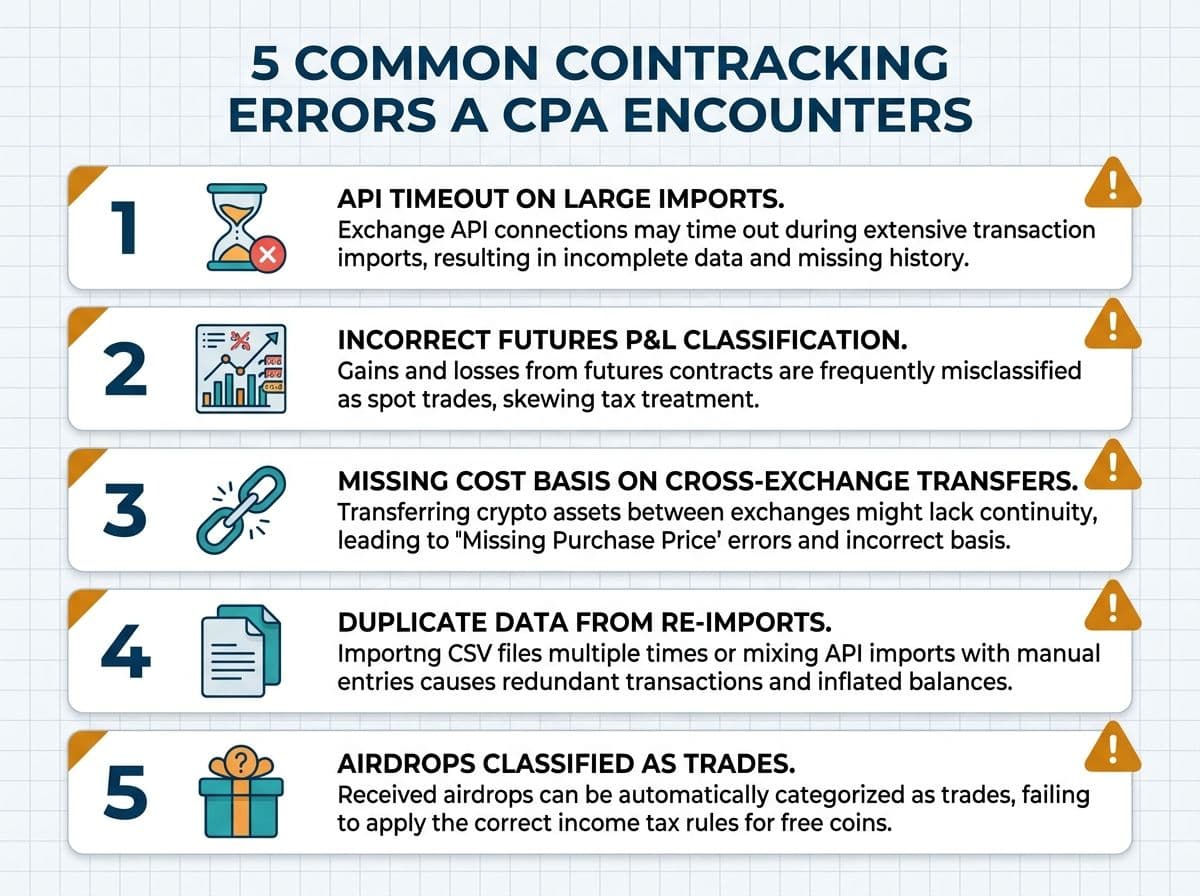
1. API Timeout on Large Imports
CoinTracking's API imports frequently time out on accounts with more than 10,000 transactions per exchange. The import appears to complete, but silently drops transactions beyond the timeout threshold. You end up with incomplete data and don't know it.
How we catch it: Compare the transaction count in CoinTracking against the exchange's own transaction history export. If the numbers don't match, the API dropped data.
Fix: For large accounts, skip the API entirely. Download a full CSV export from the exchange and upload it manually. The CSV import is more reliable for high-volume accounts.
2. Incorrect Futures P&L Classification
CoinTracking distinguishes between spot trades and futures trades, but the automatic classification isn't always right. We've seen Bybit perpetual futures imported as spot trades, which throws off your entire Section 1256 calculation.
Fix: After importing, filter your transaction list by "Trade Type" and verify that futures positions are tagged correctly. CoinTracking lets you reclassify individual transactions. Do this before generating reports.
3. Missing Cost Basis on Cross-Exchange Transfers
You bought BTC on Coinbase at $42,000, sent it to Binance, then sold on Binance at $68,000. CoinTracking sees the Binance BTC but can't trace it back to the Coinbase purchase. Result: $0 cost basis and a $68,000 gain instead of a $26,000 gain.
Fix: Use CoinTracking's "Enter Coins" feature to manually create a deposit record on Binance that matches the Coinbase withdrawal. Link the cost basis explicitly. This is the same problem every crypto tax tool has, but CoinTracking's fix requires more steps than Koinly's simpler "match transfers" button.
4. Duplicate Data from Re-Imports
If you re-run an API import or upload a CSV that overlaps with existing data, CoinTracking does not automatically deduplicate. It adds everything again. We've seen clients with doubled transaction histories who didn't notice until the tax bill came back twice as high as expected.
Fix: Before re-importing, delete the existing data for that exchange and time period. CoinTracking has a "Bulk Delete" tool, but use it carefully. Alternatively, use the "Duplicate Transactions" feature under under the Analysis tab, which scans for identical transactions.
5. Airdrops Classified as Trades
CoinTracking sometimes imports airdropped tokens as purchases at market value, creating a fake cost basis entry. The correct treatment under IRS Revenue Ruling 2023-14 is to recognize the airdrop as ordinary income at fair market value on the date received, with that value becoming your cost basis for future sales.
Fix: Recategorize airdrop transactions as "Airdrop/Fork" in CoinTracking's transaction editor. This ensures the income is reported correctly and the cost basis is set properly for the eventual disposal.
Pro Tip
After every import and every manual fix in CoinTracking, run the built-in "Validate Transactions" tool (under Analysis> Validate Transactions). This catches orphaned transactions, missing cost basis, and classification errors that would otherwise flow silently into your tax report.
12+ Accounting Methods: Which One Should You Pick?
This is CoinTracking's single most overwhelming feature. Where Koinly offers 4 methods and CoinLedger offers 3, CoinTracking offers more than 12. Most users see this list and freeze.
Here's what actually matters.
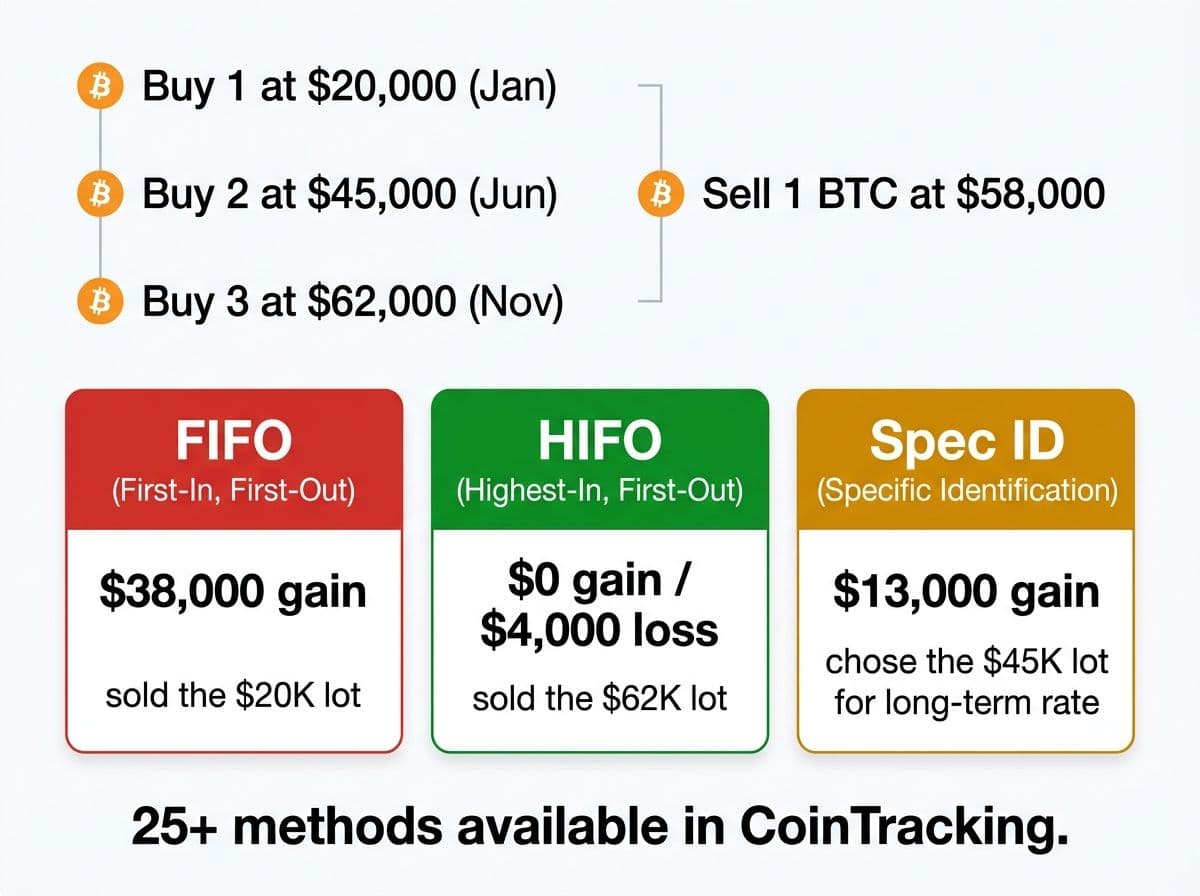
The 4 methods that matter for taxpayers:
FIFO (First In, First Out): Sells your oldest lots first. This is the IRS default method. If you don't specify otherwise, this is what the IRS assumes you're using. Safe, simple, but often produces the highest current-year tax bill in a rising market.
LIFO (Last In, First Out): Sells your newest lots first. In a rising market, this produces lower gains (or higher losses) than FIFO because your most recent purchase price is closer to the current price. Must be consistently applied.
HIFO (Highest In, First Out): Sells your highest-cost lots first, regardless of purchase date. This almost always minimizes your current-year tax bill. It's the most popular method among our clients.
Specific Identification (Spec ID): You choose exactly which lot to sell for each transaction. Maximum flexibility, maximum tax optimization. Requires adequate records per IRS Publication 550 and consistent identification at the time of sale.
The ones you can ignore (as a US filer): Share Pooling (UK method), LOFO (Lowest In, First Out), FILO, Optimized HIFO, per-wallet methods, and the various country-specific variants. These exist for CoinTracking's international user base, not for you.
Worked example: Why the method matters
Let's say you made three ETH purchases over the past two years:
- Lot A: 1 ETH at $1,800 on March 15, 2024 (long-term)
- Lot B: 1 ETH at $3,200 on August 10, 2025 (short-term)
- Lot C: 1 ETH at $2,400 on January 5, 2026 (short-term)
You sell 1 ETH today at $3,900. Here's the tax impact by method:
| Method | Lot Sold | Gain | Holding Period | Tax Rate (24% bracket) | Estimated Tax |
|---|---|---|---|---|---|
| FIFO | Lot A ($1,800) | $2,100 | Long-term | 15% | $315 |
| LIFO | Lot C ($2,400) | $1,500 | Short-term | 24% | $360 |
| HIFO | Lot B ($3,200) | $700 | Short-term | 24% | $168 |
| Spec ID | Lot A ($1,800) | $2,100 | Long-term | 15% | $315 |
HIFO wins here, even though it's taxed at the higher short-term rate. The $700 gain at 24% ($168) beats the $2,100 gain at 15% ($315). This is exactly why HIFO is popular.
But Spec ID gives you the choice. If you have other short-term losses to offset, you might choose Lot A for the long-term rate. If you want to minimize the raw gain number, you pick Lot B. Spec ID is the only method that lets you make that decision trade by trade.
Pro Tip
For most individual crypto investors, start with HIFO. It produces the lowest current-year tax bill in the majority of scenarios. Switch to Specific Identification only if you (a) have a CPA managing your trades in real time, or (b) are willing to document your lot selection for every single sale. The IRS requires adequate identification at the time of the trade, not after the fact. See IRS Publication 550, Section on Identifying Stock Sold (https://www.irs.gov/publications/p550).
Futures and Derivatives: CoinTracking's Killer Feature
This is where CoinTracking leaves every competitor behind. If you trade crypto futures, options, or perpetual swaps, this section is why you're reading this review.
Why derivatives are different:
Spot crypto trades are straightforward: you buy at one price, sell at another, report the gain or loss on Form 8949. Derivatives add layers of complexity:
- Perpetual futures have no expiration date and generate funding rate payments
- Options have premiums, exercise events, and expiration scenarios
- Regulated futures contracts may qualify for Section 1256 treatment (60% long-term, 40% short-term, regardless of holding period)
- Mark-to-market accounting may apply to certain trader classifications
CoinTracking handles all of this. Here's how.
Pro Tip
Some regulated crypto futures (CME Bitcoin futures, CME Ether futures) qualify for Section 1256 treatment. This means a 60/40 split: 60% of gains taxed at the long-term rate and 40% at the short-term rate, regardless of how long you held the position. CoinTracking is one of the only consumer tools that lets you flag specific contracts as 1256-eligible and generates Form 6781 data. If you trade CME futures, this alone can save thousands in taxes. A $50,000 gain on CME BTC futures taxed at 60/40 in the 24% bracket saves $2,700 compared to full short-term treatment.
Funding rates, liquidations, and edge cases:
CoinTracking also handles scenarios that other tools ignore entirely:
- Partial liquidations are tracked correctly as realized losses
- Insurance fund deductions are categorized as fees
- Socialized losses (exchange clawbacks) are tracked as separate loss events
- Cross-margin vs isolated-margin positions maintain separate P&L tracking
For any serious derivatives trader, this level of granularity isn't optional. It's the difference between an accurate return and one that falls apart under examination.
One more thing worth noting: CoinTracking's derivatives reports export cleanly to CSV format, which means your CPA can pull the data directly into their professional tax software without retyping anything. That's a workflow advantage that saves real time and reduces transcription errors during filing season.
Related reading: crypto tax guide.
CoinTracking vs Koinly: Side-by-Side
This is the comparison that drives most of the "CoinTracking review" searches. Both tools are well-regarded, but they serve fundamentally different users.
CoinTracking vs Koinly (2026)
| Feature | CoinTracking | Koinly |
|---|---|---|
| Exchange integrations | 400+ | 1,000+ |
| Automatic | Automatic | |
| NFT support | Basic | Strong |
| Futures / derivatives | Best in class | Basic |
| Cost basis methods | 12+ | 4 (FIFO, LIFO, HIFO, Spec ID) |
| TurboTax / TaxAct export | Yes | Yes |
| Custom report builder | Yes (all plans) | No |
| CPA / advisor access | Yes (Expert+) | Yes (all paid plans) |
| Free tier | 200 txns but view only (with reports) | 10,000 (no reports) |
| 1099-DA reconciliation | Manual comparison | Automated matching |
| User interface | Dated, complex | Modern, intuitive |
| No | Yes | |
| Starting price (paid) | $49/year | $49/year |
| Best for | Power users, derivatives, CPAs | All-around, DeFi, beginners |
The quick summary:
Choose CoinTracking if: You trade futures or derivatives, you need advanced cost basis methods (especially Spec ID with granular lot selection), you're a tax professional managing multiple client accounts, or you need custom reports for a fund or business. CoinTracking gives you more control, more methods, and better derivatives handling than any alternative.
Choose Koinly if: You want a modern interface, broad DeFi support with automatic categorization, easy CPA collaboration, and a tool that works well without a manual. Koinly covers 1,000+ integrations compared to CoinTracking's 400+, and its automated 1099-DA reconciliation saves significant time.
Where CoinTracking wins decisively:
- Futures and derivatives reporting (not close)
- Number of accounting methods (12+ vs 4)
- Custom report generation
- Free tier that includes actual tax reports
Where Koinly wins decisively:
- User interface and ease of use (not close)
- DeFi auto-categorization
- Exchange coverage (1,000+ vs 400+)
- Mobile app
- 1099-DA automated reconciliation
- Onboarding experience for first-time users
If you're torn between the two, ask yourself one question: do you trade derivatives? If yes, CoinTracking. If no, Koinly is almost certainly the better fit unless you specifically need custom reports or 25+ accounting methods.
Related reading: Koinly guide and CoinLedger review.
When CoinTracking Isn't Enough
Even the most powerful tool has limits. Here's when CoinTracking alone won't get you to a defensible tax return:
- Your portfolio spans DeFi protocols across 5+ chains and you need automatic categorization, not manual tagging of hundreds of transactions
- You've received an IRS notice (CP2000, Letter 6173, or Letter 6174) and need professional representation, not software output
- You have international accounts that trigger FBAR (FinCEN Form 114) reporting requirements
- You need to amend prior-year returns going back 2-3 years and the historical data requires reconstruction
- Your tax situation involves staking rewards, mining income, and DAO compensation across multiple income categories that need professional judgment on classification
CoinTracking is the best tool for generating the raw data. A CPA is the best tool for turning that data into a defensible return. They're not substitutes. They're complements.
The complexity threshold is personal, but here's a useful rule of thumb: if your CoinTracking error checker returns more than three warnings you don't immediately understand, you need professional help. The software found the problems. You need someone who can fix them correctly.
Related reading: how to choose crypto tax CPA.
Action Steps
Here's what to do next, based on where you are:
If you're evaluating CoinTracking for the first time:
- Create a free account and import your two most active exchanges via API
- Check the transaction count. If you're under 200, you can generate reports for free
- Run the "Validate Transactions" tool immediately after import
- Try switching between FIFO and HIFO to see the tax impact difference
- If you trade derivatives, test a futures import before committing to a paid plan
If you're already using CoinTracking:
- Run through the 5 common errors above and check your data
- Verify that your futures positions are classified as derivatives, not spot trades
- Compare your CoinTracking transaction count against each exchange's records
- If you've re-imported data at any point, run the duplicate checker
- Reconcile against your exchange 1099-DAs before filing
If you're a tax professional considering CoinTracking for your practice:
- Start with the Expert tier to evaluate the multi-portfolio and advisor access features
- Import a test client's data and compare the output to your existing workflow
- Test the custom report builder for your specific deliverable format
- Evaluate whether the 110 exchange integrations cover your client base (if not, pair with Koinly for broader coverage)
If you want a professional to handle it: Book a call. We'll review your CoinTracking data, catch the errors the software missed, optimize your cost basis method, and file your return.
Frequently Asked Questions
Is CoinTracking free to use?
Yes. CoinTracking's free tier supports up to 200 transactions and includes actual downloadable tax reports (Form 8949, Schedule D), which is more generous than most competitors. Most active traders will need the Pro plan ($169/year) or higher.
Is CoinTracking accurate for crypto taxes?
CoinTracking is highly accurate when the data is imported correctly. The main accuracy risks come from API timeouts on large imports, unmatched cross-exchange transfers, and duplicate data from re-imports.
What is the best cost basis method in CoinTracking?
For most US taxpayers, HIFO (Highest In, First Out) minimizes your current-year tax bill. It sells your highest-cost lots first, reducing the taxable gain. Specific Identification offers even more control but requires documenting your lot selection at the time of each trade. FIFO is the IRS default and the safest choice if you haven't been tracking cost basis previously.
Does CoinTracking handle futures and derivatives?
Yes. CoinTracking has the best futures and derivatives handling of any consumer crypto tax tool. It tracks perpetual futures, options, and regulated futures contracts separately from spot trades, classifies funding rate payments as income, and supports Section 1256 treatment for qualifying contracts like CME Bitcoin futures.
How does CoinTracking compare to Koinly?
CoinTracking wins on power features: 12+ accounting methods, superior derivatives handling, custom report builder, and more granular control. Koinly wins on usability: modern interface, 1,000+ exchange integrations (vs 400+), better DeFi auto-categorization, and automated 1099-DA reconciliation. Choose CoinTracking for complex portfolios and derivatives. Choose Koinly for DeFi-heavy portfolios and ease of use.
Does CoinTracking work with TurboTax?
Yes. CoinTracking exports TXF files compatible with TurboTax, as well as CSV files for TaxAct and other platforms. The export process is straightforward once your data is clean. Always review the CoinTracking report for errors before exporting, as TurboTax will file whatever data you import without validation.
Why does CoinTracking show incorrect cost basis?
The most common cause is unmatched cross-exchange transfers. When you move crypto from one exchange to another, CoinTracking may not link the deposit to the original purchase, resulting in $0 cost basis and inflated gains. Use the 'Enter Coins' feature to manually match transfers, and always run the built-in error checker after importing.
Is CoinTracking good for tax professionals?
Yes. CoinTracking's Expert and Unlimited tiers offer multi-portfolio management, advisor access controls, and a custom report builder.. It's the most capable platform for CPAs and EAs managing multiple crypto clients, especially those with derivatives-heavy portfolios.
How many exchanges does CoinTracking support?
CoinTracking supports 400+ exchange integrations via API and CSV import. This is fewer than Koinly (1,000+) but covers all major centralized exchanges including Coinbase, Kraken, Binance, Bybit, OKX, and Deribit. For DEX and DeFi transactions, CoinTracking supports Ethereum and major EVM-chain wallet imports.
Can CoinTracking handle the new 1099-DA form?
CoinTracking can import and display 1099-DA data, but the reconciliation process is more manual than Koinly's automated matching. You'll need to compare CoinTracking's calculated figures against the 1099-DA line by line. For 2026, this is a meaningful limitation given that exchanges are now reporting directly to the IRS.
What are CoinTracking's biggest weaknesses?
The three main weaknesses are: (1) a dated, complex user interface with a steep learning curve, (2) fewer exchange integrations than Koinly (400+ vs 1,000+), and (3) weaker DeFi auto-categorization that requires manual transaction tagging. If you don't trade derivatives or need custom reports, simpler tools like Koinly offer better value for less effort.
Should I use CoinTracking or hire a crypto tax CPA?
They're complements, not substitutes. CoinTracking is the best tool for aggregating transaction data and generating raw tax reports. A CPA provides the judgment calls: which cost basis method to use, how to classify ambiguous transactions, whether specific positions qualify for Section 1256 treatment, and how to defend your return if examined. For portfolios with derivatives, multiple entities, or $100K+ in crypto, use both.

About the author
Garrett Taylor, CPA
Former Big Four CPA. CPA #133092. Garrett answers his phone. Led by expertise. Powered by precision.
Related Articles

Best Crypto Tax Software 2026: A CPA's Honest Review of Every Major Platform
A CPA who files 500+ crypto returns reviews Koinly, CoinTracker, CoinLedger, CoinTracking, ZenLedger, and Summ. No affiliate links. Just honest verdicts.
Koinly Guide: A Crypto Tax CPA's Complete Walkthrough (2026)
A CPA's step-by-step Koinly walkthrough. Learn how to set up Koinly, avoid the 7 most common errors, and know when DIY is enough vs. when you need a pro.

CoinLedger Review 2026: A Crypto Tax CPA's Honest Walkthrough
A CPA's honest CoinLedger review for 2026. Free vs paid breakdown, TurboTax export workflow, DeFi limitations, common errors, and how it compares to Koinly.