CoinLedger Review 2026: A Crypto Tax CPA's Honest Walkthrough

By Garrett Taylor, CPA #133092
Reviewed by Leanne Grant, EA #00167954-EA
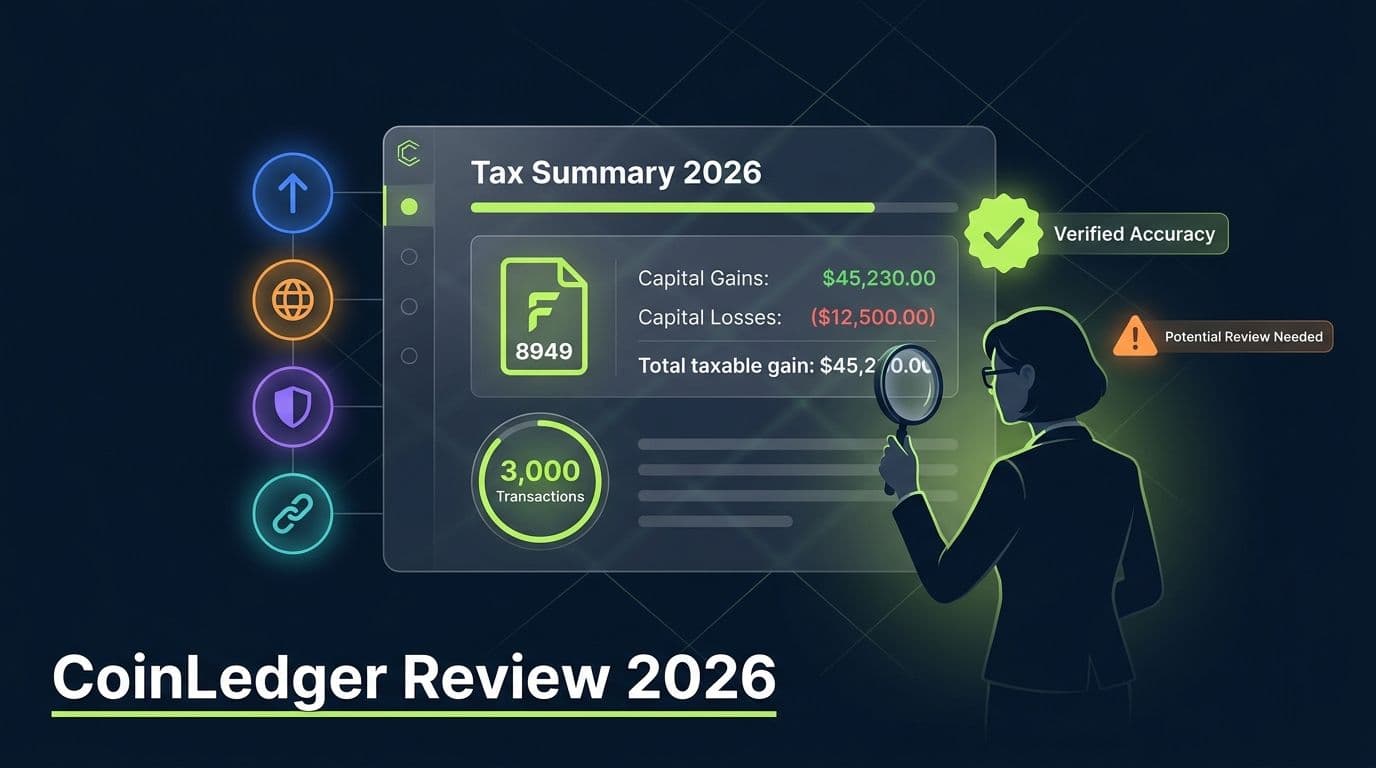
Key Takeaways
- ✓CoinLedger is a solid crypto tax tool for straightforward portfolios, but its free tier is too limited for most real-world filers
- ✓The TurboTax integration is CoinLedger's biggest selling point and works well for simple returns, though edge cases still require manual cleanup
- ✓DeFi support lags behind Koinly and CoinTracker, making CoinLedger a weaker choice for heavy DeFi users
- ✓Exchange sync reliability has improved in 2026, but Binance, KuCoin, and several DEX imports still require CSV workarounds
CoinLedger is a good tool for people with simple crypto portfolios who file with TurboTax. That's its sweet spot. Buy on Coinbase, sell on Coinbase, export to TurboTax. Done.
For anything more complex than that, you'll run into friction.
DeFi handling is adequate for basic activity but can require manual cleanup for more complex transactions. Exchange sync issues can still occur, particularly with certain exchanges and wallets. While CoinLedger offers a free portfolio tracking tier, you'll need a paid plan to generate tax reports, and active crypto investors can quickly exceed the transaction limits on the lower-tier plans.
CoinLedger prioritizes simplicity over flexibility. That's a strength for casual investors, but users with extensive DeFi activity, multiple wallets, cross-chain transactions, or high trading volume may find themselves spending more time reviewing and correcting data than they expected.
“This guide has been reviewed for accuracy by Leanne Grant, Enrolled Agent, specializing in cryptocurrency tax compliance.”
CoinLedger is one of the most-searched crypto tax tools on the internet. It lands on every "best of" list. TurboTax recommends it. And the free tier brings in a massive wave of users every tax season.
But here's the question nobody answers honestly:
Is CoinLedger actually good enough to trust with your tax return?
This is a CPA's honest walkthrough.
Let's get into it.
The 30-Second Verdict
CoinLedger Free vs Paid: What You Actually Get
This is the single most-searched question about CoinLedger. Let's break it down.
CoinLedger Plans: Free vs Premium vs Pro
| Feature | Free – Portfolio Tracking($0) | Investor ($99) | Pro ($199+) |
|---|---|---|---|
| Transaction limit | Unlimited | 1,000 | 3,000+ |
| Exchange integrations | All | All | All |
| Tax report preview | Yes | Yes | Yes |
| Downloadable Form 8949 | Yes | Yes | |
| TurboTax / TaxAct export | Yes | Yes | Yes |
| DeFi support | Yes | Yes | Yes |
| NFT support | Yes | Yes | Yes |
| Tax-loss harvesting tool | Yes | Yes | Yes |
| Margin trading | Yes | No | Yes |
| Audit trail report | No | No | Yes |
| International tax forms | No | No | Yes |
Here's the honest take on each tier:
Free tier: Good for exactly one thing: previewing your tax results before you commit. You can connect wallets and exchanges, review your gains and losses, and check whether the numbers look reasonable. However, you can't download tax reports or filing documents without purchasing a plan. The free tier functions more as an evaluation tool than a complete tax solution, so treat it as a trial rather than a long-term option.
Investor ($99): This is where most users land. It covers up to 1,000 transactions, includes TurboTax export, and handles basic DeFi. If you're a straightforward buy-and-sell investor on 1-3 exchanges, this is all you need.
Pro ($199+): This is where CoinLedger starts targeting active traders rather than casual investors. You need this if you trade derivatives, have margin positions, or file international returns.
CoinLedger's pricing is per tax year. If you need to amend a prior-year return and file the current year, you'll need to purchase a separate tax report for each year. Before paying, import all of your wallets and exchanges using the free portfolio tracking tier. Review your gains and losses, check your transaction count for the year you're filing, and make sure you're purchasing the lowest tier that covers your activity. Upgrading later is easy, but you can't downgrade after purchase.
Who actually benefits from the free tier? Mostly people who want to test the platform before paying. CoinLedger's free plan is useful for importing wallets and exchanges, reviewing your transaction history, and previewing your gains and losses. But if you need filing-ready tax reports, you'll have to upgrade. For many crypto investors, the free tier serves as an evaluation tool rather than a complete tax solution.
Who CoinLedger Is (Actually) Best For
Here are the three types of people CoinLedgerserves well:
Heavy DeFi users (liquidity pools, yield farming, cross-chain bridges), high-volume traders with thousands of transactions across multiple platforms, and users who need extensive reconciliation or advanced cost-basis management may find CoinLedger limiting. Koinly and CoinTracking provide better tools for these users.
Persona 1: The TurboTax Filer with a Simple Portfolio
You bought crypto on Coinbase or Kraken. You made some trades. You file with TurboTax. You want the easiest possible path from "I own crypto" to "my taxes are filed."
CoinLedger's TurboTax integration is the smoothest in the business for this exact use case. Connect your exchanges, generate the file, import into TurboTax. Fifteen minutes, done.
Persona 2: The Crypto Newcomer Filing for the First Time
CoinLedger's interface is the simplest of any crypto tax tool we use. If you've never dealt with cost basis, Form 8949, or capital gains calculations, CoinLedger walks you through it without drowning you in jargon.
Persona 3: The Tax Professional Looking for a Quick Client Export
If you're a CPA or EA who needs a client to self-generate their transaction data quickly, CoinLedger's straightforward setup means less hand-holding. The reports are clean enough for a professional review.
Related reading: best crypto tax software.
The 5 Most Common CoinLedger Errors (and How to Fix Each)
Every crypto tax tool produces errors. CoinLedger is no different. Here are the five we fix most often in our practice.
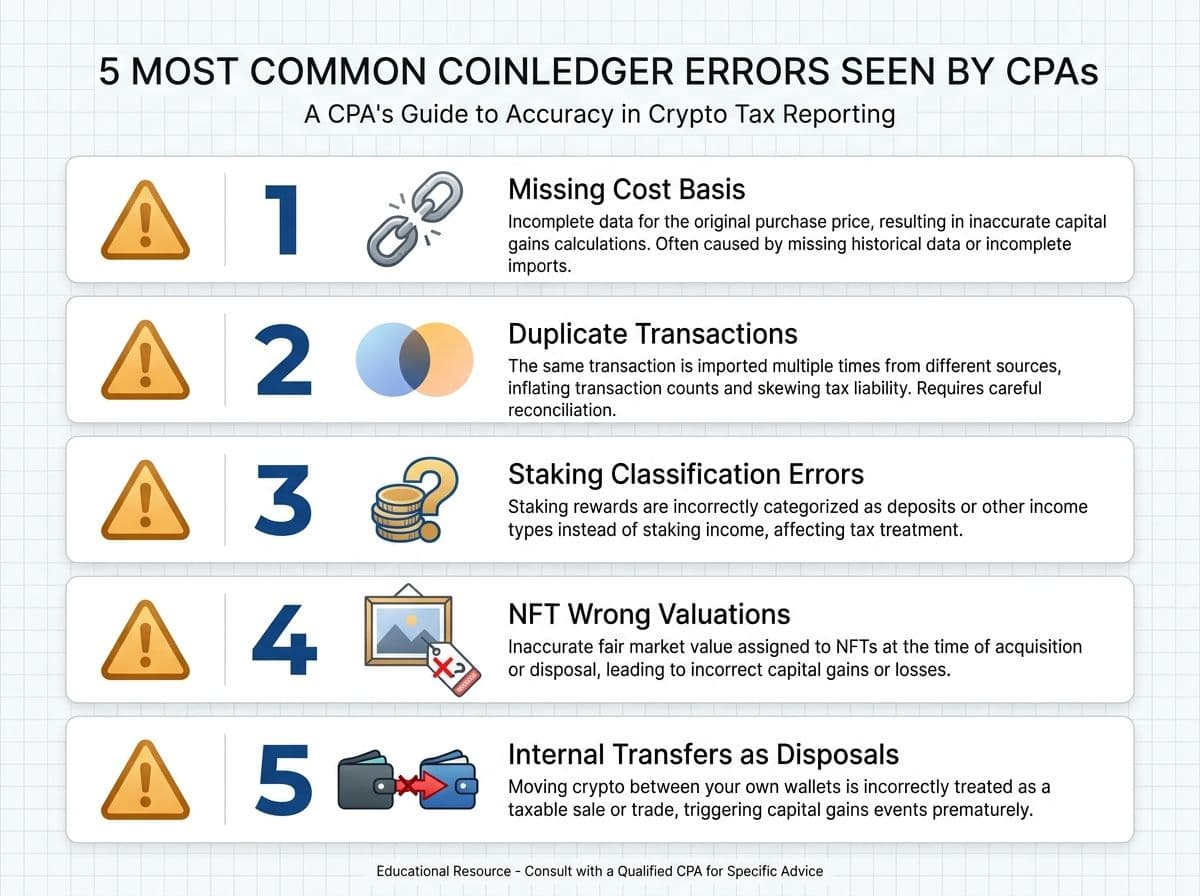
1. Missing Cost Basis on Wallet Transfers
You bought ETH on Coinbase, sent it to MetaMask, then swapped on Uniswap. CoinLedger sees the MetaMask ETH but can't find where you originally bought it. Result: $0 cost basis and a phantom gain.
Fix: Go to the Transactions page, find the unmatched deposit, and manually link it to the Coinbase withdrawal. CoinLedger refers to this process as matching transfers While many transfers are matched automatically, you’ll need to review and correct any that aren’t.
NFT transactions can be difficult to price accurately, especially for illiquid collections or transactions involving non-standard marketplace activity. In some cases, CoinLedger may assign an incorrect value or be unable to determine the proceeds accurately, which can overstate or understate your gain.
Fix: Compare NFT sales in CoinLedger against the actual transaction details on Etherscan and the relevant marketplace (such as OpenSea, Blur, or Magic Eden). If the reported proceeds are incorrect, manually edit the transaction value to match the actual sale.
2. Duplicate Transactions from API + CSV Overlap
If you imported an exchange via API and also uploaded a CSV for the same period, CoinLedger will count everything twice. We've seen this double a client's reported gains.
Fix: Delete the duplicate data source. Use API or CSV for a given exchange, never both.
3. Staking Rewards Classified as Trades
CoinLedger sometimes imports staking rewards as buy/sell events rather than income events. This creates fake capital gains and underreports your ordinary income.
Fix: Find the staking transactions and recategorize them as "Staking" income. This ensures they're taxed as ordinary income at fair market value on the date received, per IRS Revenue Ruling 2023-14.
4. NFT Sales with Incorrect Valuations
5. Internal Transfers Counted as Disposals
Moving crypto from one wallet to another is not a taxable event. But CoinLedger sometimes treats a withdrawal as a sale, especially when it can't identify the receiving wallet as yours.
Fix: Tag these transactions as "Transfer" in CoinLedger. The platform should then zero out the gain/loss on that transaction.
Exchange Sync Issues: What's Real and What's Fixable
CoinLedger has a reputation for exchange sync drama. Some of it is deserved. Some of it is outdated. Like every crypto tax platform, its integrations are only as good as the data provided by exchanges, and users should review imported transactions for accuracy before filing.
Here's the current state of exchange syncing in 2026, based on what we see in our practice:
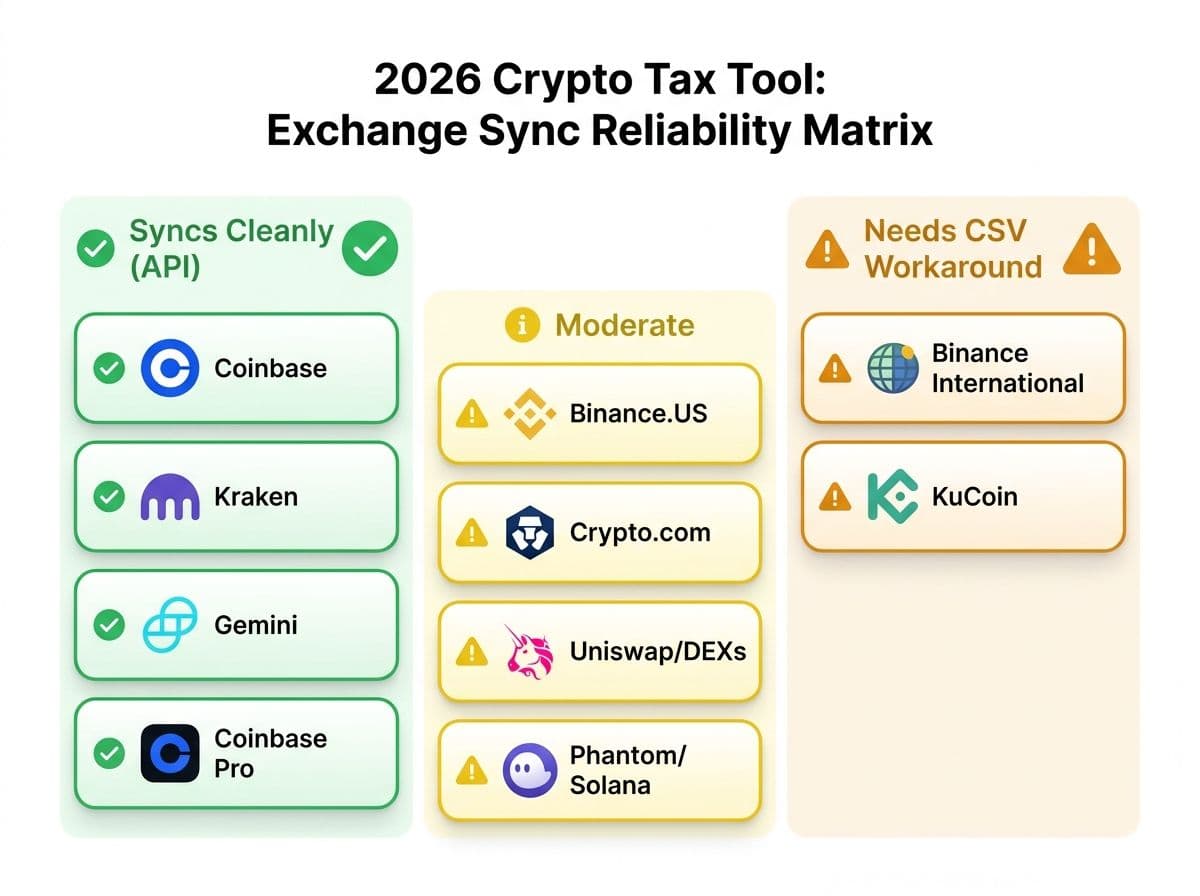
CoinLedger Exchange Sync Reliability (2026)
| Exchange | Sync Method | Reliability | Notes |
|---|---|---|---|
| Coinbase | API | Generally reliable | One of CoinLedger's most commonly used integrations. |
| Coinbase Pro / Advanced | API | Generally reliable | Supported through Coinbase integration |
| Kraken | API | Generally reliable | Typically imports clean trading history. |
| Gemini | API | Generally reliable | Most users report straightforward imports. |
| Binance.US | API | Mixed | Users should verify staking, rewards, and transfer data. |
| Binance (International) | CSV only/ API availability varies by region | Mixed | Import options may depend on jurisdiction and exchange restrictions. |
| KuCoin | API | Mixed | Review imported transactions carefully, especially for complex account structures. |
| Crypto.com | API | Mixed | Verify staking, rewards, and wallet activity after import. |
| Uniswap / DEXs | Wallet sync | Mixed | DeFi transactions often require manual review and categorization. |
| Phantom / Solana | Wallet sync | Mixed | Solana DeFi activity may require additional reconciliation. |
The pattern: Major US exchanges (Coinbase, Kraken, Gemini) sync cleanly. International exchanges and DEXs are where you'll spend your time fixing data.
Pro Tip
For clients using Binance International or KuCoin, skip the API entirely. Download the CSV directly from the exchange, clean it in a spreadsheet first (remove rows with zero amounts, fix date formats), then upload to CoinLedger. It takes 10 extra minutes and eliminates hours of troubleshooting.
The TurboTax Export Workflow: Does It Actually Work?
This is CoinLedger's flagship feature, so let's test the claim.
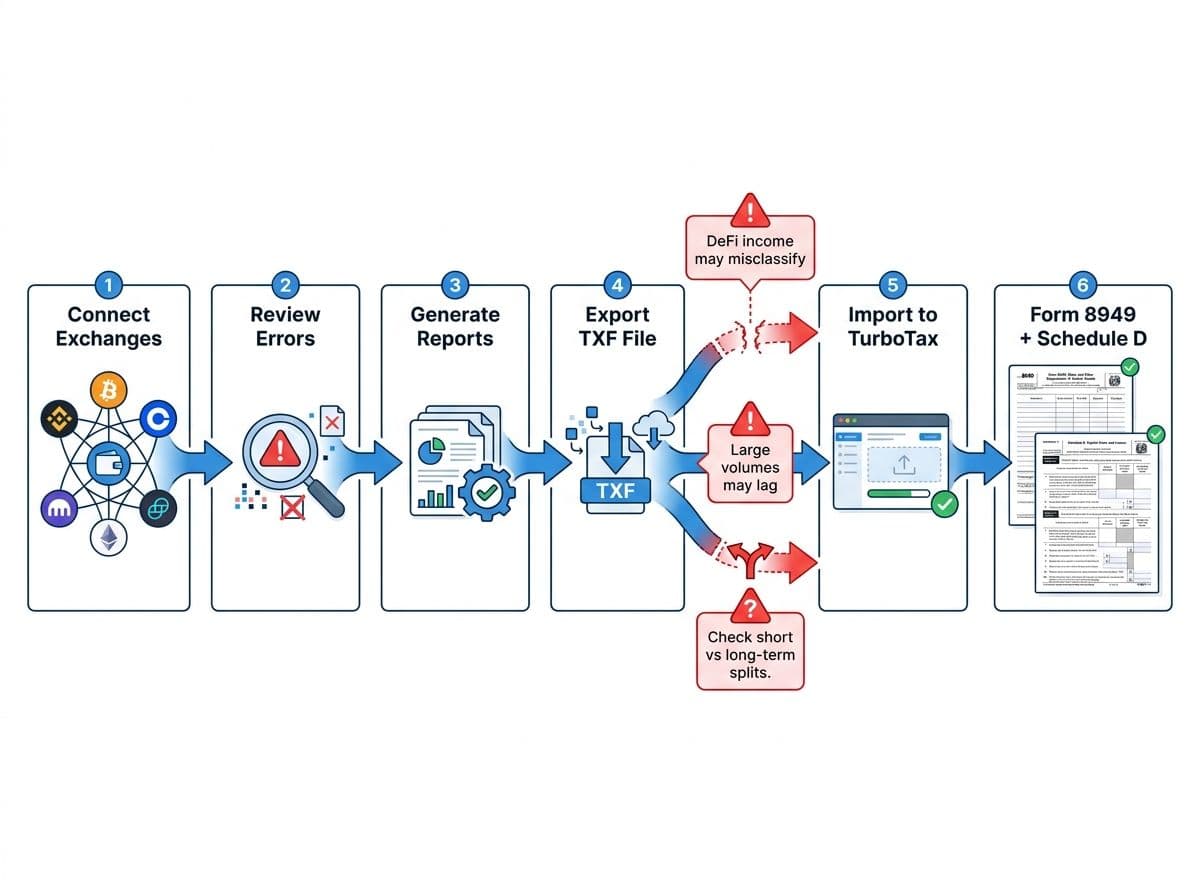
The workflow:
- Connect your exchanges in CoinLedger
- Review and fix any flagged errors
- Click "Generate Tax Reports"
- Select "TurboTax (TXF)" export format
- Download the file
- In TurboTax, go to Wages and Income > Investments and Savings> Select ‘Yes’ to having investment income > Select ‘Enter a different way’ when prompted to connect your financial accounts
- Select ‘Upload’ and import the file you downloaded from CoinLedger
- TurboTax populates Form 8949 and Schedule D automatically
Does it work? Yes, for straightforward trades. The TXF file imports cleanly into TurboTax for simple buy/sell transactions on major exchanges.
Where it breaks:
- DeFi income events sometimes import as capital gains rather than ordinary income. TurboTax doesn't always categorize them correctly.
- Large transaction volumes (5,000+) can cause TurboTax to lag or error. TurboTax's import limit is technically unlimited, but performance degrades.
- Short-term vs long-term splits occasionally misclassify if CoinLedger's holding period calculation disagrees with your cost basis records.
Pro Tip
If you export to TurboTax without reviewing the CoinLedger data first, you're filing with whatever errors CoinLedger generated. TurboTax doesn't validate crypto data. It just reports whatever you import. The IRS will hold you responsible for inaccuracies, not the software.
Our recommendation: The TurboTax export is a genuine time-saver for simple portfolios. But always review the CoinLedger report before exporting. And if you have DeFi income, verify how TurboTax categorized each event after import.
Related reading: crypto tax guide.
Cost Basis Methods in CoinLedger
CoinLedger supports four cost basis methods:
Adjusted Cost Basis (ACB) – Total average cost of each unit of that cryptocurrency at a given time. Common in countries such as Canada, but generally not permitted for U.S. crypto tax reporting.
- FIFO (First In, First Out) - Sells your oldest lots first. The IRS default.
- LIFO (Last In, First Out) - Sells your newest lots first.
- HIFO (Highest In, First Out) - Sells your highest-cost lots first. Usually minimizes your current-year tax bill.
What's missing: CoinLedger does not support Specific Identification (Spec ID), which lets you pick exactly which lot to sell for maximum tax optimization. Both Koinly and CoinTracking offer Spec ID.
Pro Tip
Specific Identification can save thousands on a single large trade. Imagine you bought ETH at $1,200, $2,400, and $3,600 across different dates. You sell 1 ETH at $3,800. With HIFO, you sell the $3,600 lot ($200 gain). With Spec ID, you could choose the $3,600 lot AND ensure it qualifies for long-term treatment if held over a year, cutting your rate from 24% to 15%. CoinLedger can't do that.
For most investors, HIFO is fine. But if you're managing a portfolio over $250K or making large individual trades, the lack of Spec ID is a meaningful limitation.
Related reading: how to choose crypto tax CPA.
The 1099-DA Reconciliation Workflow in CoinLedger (2026)
Starting in 2026, exchanges issue Form 1099-DA reporting your crypto dispositions directly to the IRS. This changes everything about how crypto tax software works.
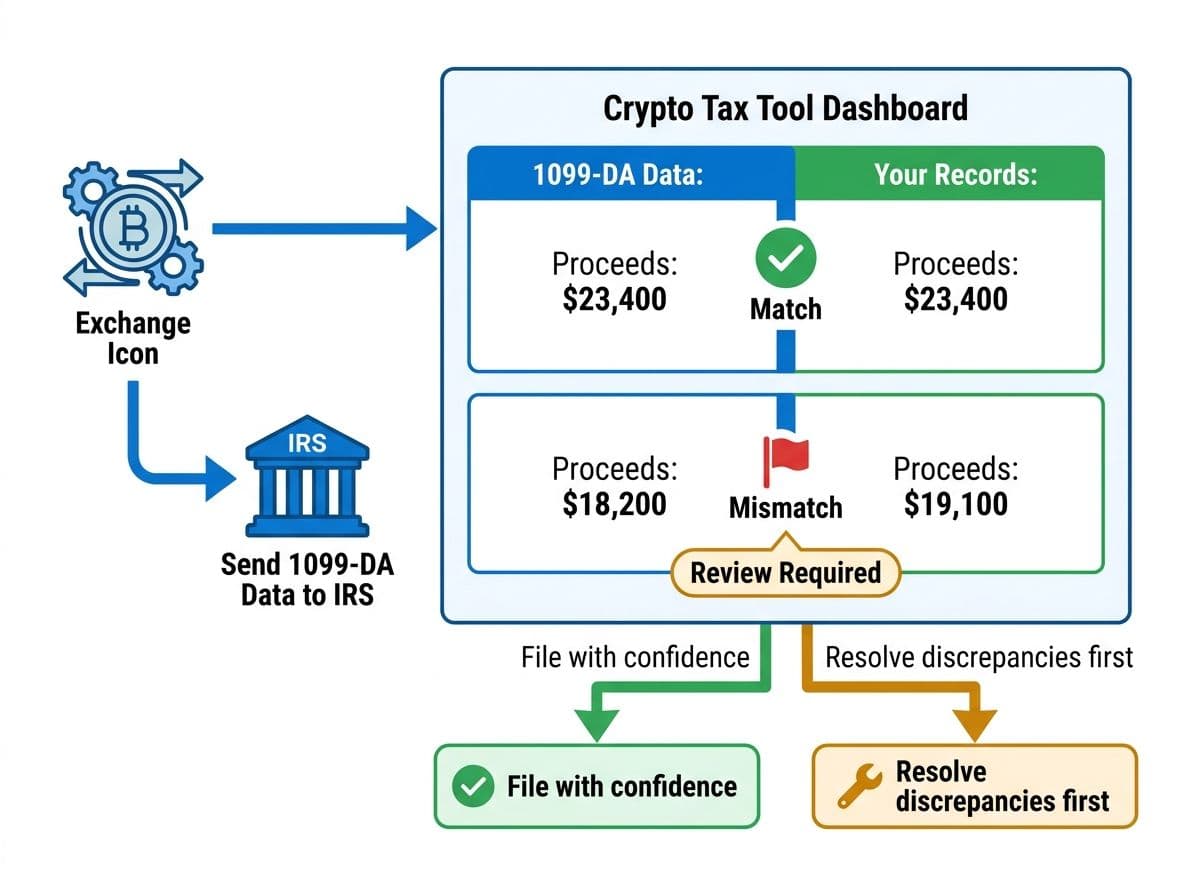
Here's the 2026 reality: The IRS now receives your transaction data independently from your exchange. If your tax return doesn't match, you'll get a CP2000 notice.
CoinLedger's 1099-DA workflow:
- Import your exchange data normally (API or CSV)
- Upload your 1099-DA (CoinLedger added a dedicated upload tool in January 2026)
- CoinLedger compares the two data sets and flags discrepancies
- Click ‘View Matches’ and compare the exchange’s reported gains to CoinLedger’s transactions
What we're seeing in practice: The 1099-DA reconciliation in CoinLedger is functional but basic. It catches major discrepancies (different proceeds amounts, missing transactions) but misses nuance.
For example, if your exchange reports gross proceeds on the 1099-DA but CoinLedger calculates net proceeds (after fees), CoinLedger flags this as a mismatch even though both are technically correct depending on how you report.
Pro Tip
The 1099-DA is in its first year. Exchanges are still adapting to the digital asset reporting requirements under Section 6045 of the Internal Revenue Code as amended by the Infrastructure Investment and Jobs Act. Expect inconsistencies between exchanges. Your job is to make sure your return matches what the IRS receives, or have a documented explanation for why it differs. This is where a CPA earns their fee.
DeFi Import Quality: Honest Assessment
CoinLedger's DeFi support is one of its weaker areas.
If you're making occasional swaps on Uniswap or participating in basic staking activities, CoinLedger generally handles those transactions well. However, as DeFi activity becomes more complex, including liquidity pools, yield farming, cross chain bridges, lending protocols, and other advanced strategies, the likelihood of requiring manual review and cleanup increases. Users with significant DeFi exposure should expect to spend time verifying transaction classifications, cost basis calculations, and transfer matching.
What works:
- Simple token swaps on Ethereum-based DEXs
- Basic staking rewards (with manual recategorization)
- Token approvals (correctly ignored as non-taxable)
What doesn't work well:
- Liquidity pool entry/exit - Often tagged as disposals, creating phantom gains
- Yield farming rewards - Inconsistently categorized between income and trades
- Cross-chain bridges - Frequently treated as a sell on Chain A and a buy on Chain B, generating a taxable event where none exists
- Lending deposits/withdrawals (Aave, Compound) - Sometimes treated as sales
- Wrapped token conversions - ETH to WETH flagged as a taxable swap
Compared to competitors: Koinly handles DeFi significantly better, with more automatic categorization and better chain coverage. CoinTracker is roughly on par with CoinLedger. CoinTracking offers the most granular manual control but requires more expertise.
Pro Tip
Do not file based on CoinLedger's output without manual review. Every single LP entry, bridge transaction, and lending event needs to be checked and potentially recategorized. This is non-negotiable.
Related reading: Koinly guide.
CoinLedger vs Koinly: Side-by-Side
This is the comparison most people searching for a CoinLedger review actually want. Here's an honest, CPA-perspective breakdown.
CoinLedger vs Koinly (2026)
| Feature | CoinLedger | Koinly |
|---|---|---|
| Exchange integrations | 500+ | 1,000+ |
| DeFi quality | Basic | Strong |
| NFT handling | Basic | Good |
| TurboTax export | Excellent | Good |
| Cost basis methods | FIFO, LIFO, HIFO, ACB | FIFO, LIFO, HIFO, Spec ID |
| 1099-DA reconciliation | Basic | Advanced |
| CPA collaboration | Email export/ read-only access | Full access -review transactions, fix missing data, and generate tax reports |
| Free tier | Unlimited transactions (no reports) | 10,000 imports (no reports) |
| Error detection | Basic flags | Detailed warnings with fix suggestions |
| Starting price (paid) | $49. | $49 |
| Interface simplicity | Very easy | Moderate |
| No | ||
| Best for | TurboTax filers, simple portfolios | All-around investors, DeFi users |
The quick summary:
Choose CoinLedger if: You file with TurboTax, your portfolio is mostly buy/sell on centralized exchanges, and you want the simplest possible workflow. CoinLedger's interface is cleaner and the TurboTax integration is smoother.
Choose Koinly if: You have DeFi activity, trade on 3+ exchanges, want Specific ID for cost basis, or work with a CPA who wants direct account access. Koinly gives you more control and better accuracy on complex portfolios.
Related reading: Koinly guide and CoinTracker review.
When CoinLedger Isn't Enough
There's a point where any DIY software stops being the right tool. Here's how to know you've hit that point with CoinLedger:
- Your CoinLedger report shows warnings you don't understand how to fix
- You have more than $100K in crypto across multiple platforms
- You've received an IRS notice (CP2000, Letter 6173, or Letter 6174)
- You have international exchange accounts that trigger FBAR (FinCEN Form 114) requirements
- You want to optimize cost basis beyond what HIFO provides
- Your DeFi activity spans multiple chains and protocols
- You need to amend a prior-year return because of crypto errors
Action Steps
Here's what to do next, based on where you are:
If you're evaluating CoinLedger:
- Create a free account and import your exchanges
- Check your transaction count against the plan limits
- Review the flagged errors before committing to a paid plan
- If you have DeFi activity, test whether CoinLedger categorizes it correctly
If you're already using CoinLedger:
- Run through the 5 common errors above and check your data
- Reconcile against your exchange 1099-DAs before filing
- If using TurboTax export, verify each line item after import
- Keep a log of every manual adjustment you make
If you want a professional to handle it: Book a call. We'll review your CoinLedger data, catch errors, optimize your cost basis, and file your return.
Frequently Asked Questions
Is CoinLedger free to use?
CoinLedger has a free tier, but it doesn't include downloadable tax reports, DeFi support, or TurboTax export. Most real-world filers need the Investor plan ($99/year) or Pro plan ($199/year) to actually file.
Is CoinLedger accurate for crypto taxes?
CoinLedger is accurate for straightforward buy/sell trades on major exchanges. DeFi, internal transfers, and NFTs typically need manual review.
Does CoinLedger work with TurboTax?
Yes. CoinLedger's TurboTax integration is its strongest feature. You export a TXF file from CoinLedger and import it directly into TurboTax, which populates Form 8949 and Schedule D automatically.
Is CoinLedger better than Koinly?
It depends on your situation. CoinLedger is better for TurboTax filers with simple portfolios. Koinly is better for DeFi users, high-volume traders, and anyone working with a CPA, due to broader exchange support (1,000+ vs 500+), Specific ID cost basis, and direct CPA collaboration tools.
What cost basis methods does CoinLedger support?
CoinLedger supports FIFO, LIFO, and HIFO. It does not support Specific Identification, which lets you choose exactly which tax lot to sell for optimal tax treatment.
How does CoinLedger handle the new 1099-DA form?
CoinLedger added a 1099-DA upload and reconciliation tool in January 2026. It compares your exchange-reported data against your imported transaction history and flags discrepancies.
Should I use CoinLedger or hire a crypto tax CPA?
It's not either/or. The best approach for portfolios with any complexity is to use CoinLedger for data aggregation and then have a CPA review the output. For simple buy-and-sell-only portfolios under $50K, CoinLedger alone is usually sufficient.

About the author
Garrett Taylor, CPA
Former Big Four CPA. CPA #133092. Garrett answers his phone. Led by expertise. Powered by precision.
Related Articles

Best Crypto Tax Software 2026: A CPA's Honest Review of Every Major Platform
A CPA who files 500+ crypto returns reviews Koinly, CoinTracker, CoinLedger, CoinTracking, ZenLedger, and Summ. No affiliate links. Just honest verdicts.
Koinly Guide: A Crypto Tax CPA's Complete Walkthrough (2026)
A CPA's step-by-step Koinly walkthrough. Learn how to set up Koinly, avoid the 7 most common errors, and know when DIY is enough vs. when you need a pro.
CoinTracker Review 2026: A Crypto Tax CPA's Honest Walkthrough
A CPA's honest CoinTracker review for 2026. Common errors, DeFi import quality, 1099-DA reconciliation, pricing, and when you need professional help.