Koinly Guide: A Crypto Tax CPA's Complete Walkthrough (2026)

By Garrett Taylor, CPA #133092
Reviewed by Leanne Grant, EA #00167954-EA
Key Takeaways
- ✓Koinly is one of the best crypto tax tools for individual investors, but it requires a CPA's eye to catch the errors that cost you thousands
- ✓The platform supports 800+ exchanges and generates IRS-ready Form 8949 and Schedule D reports automatically
- ✓DeFi, staking, and NFT transactions are supported but often need manual review and reclassification
- ✓Most Koinly errors we fix for clients come from missing cost basis, duplicate transactions, and miscategorized DeFi activity
- ✓For portfolios over $100K or 1,000+ transactions, pairing Koinly with a crypto-specialized CPA saves more than it costs
“This guide has been reviewed for accuracy by Leanne Grant, Enrolled Agent, specializing in cryptocurrency tax compliance.”
If you're using Koinly for your crypto taxes, you're already ahead of most people.
Seriously. Most crypto investors are still fumbling with spreadsheets or, worse, ignoring their tax obligations entirely.
But here's the thing:
Koinly is a powerful tool. It's not a replacement for understanding what it's actually doing with your data.
In this guide, I'll walk you through exactly how to use Koinly the right way, from a CPA's perspective. Not a software review. Not an affiliate pitch.
A real walkthrough from someone who files returns using Koinly data every single week.
Let's get into it.
What Is Koinly (and Why CPAs Actually Like It)
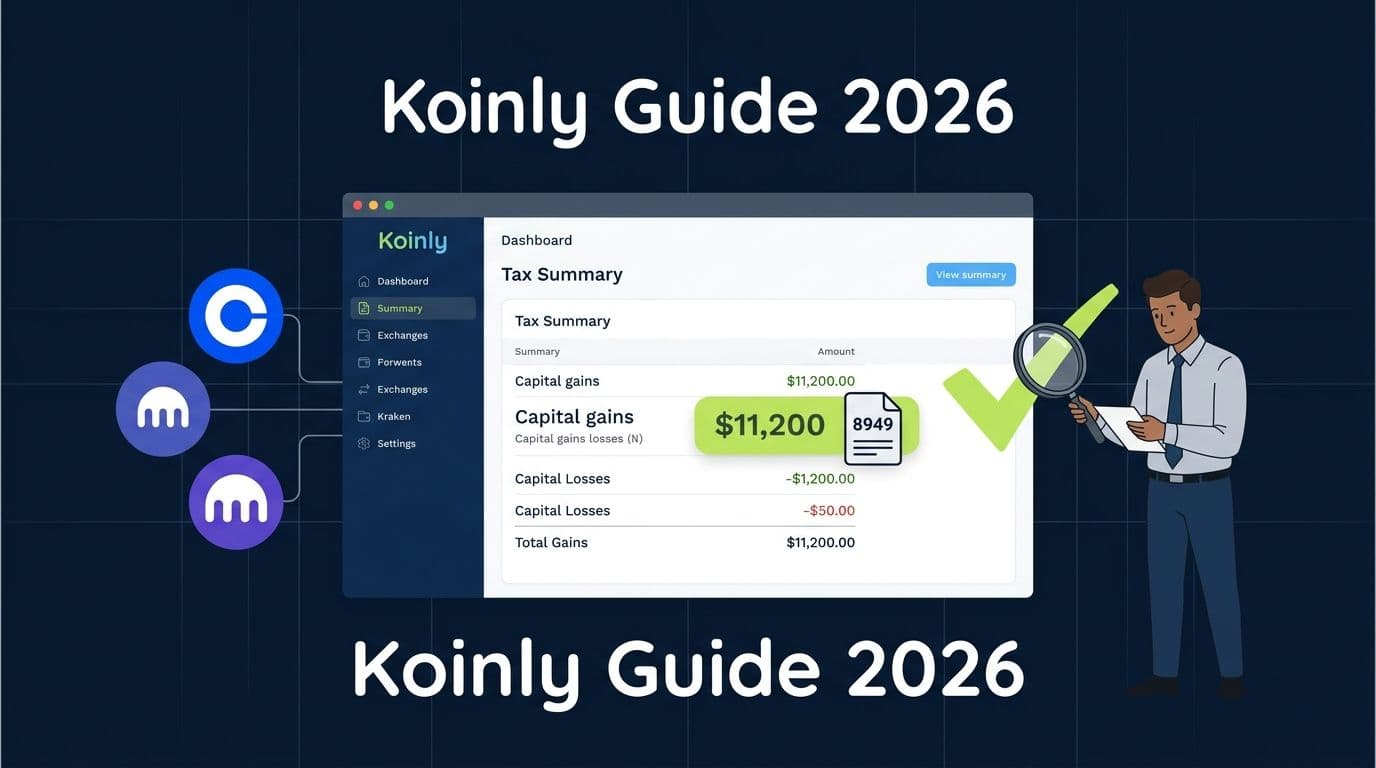
Koinly is a crypto tax software platform that connects to your exchanges, wallets, and DeFi protocols, imports your full transaction history, and calculates your capital gains, losses, and income automatically.
Here's why we recommend it to most of our clients:
- It supports 1,000+ direct integrations across exchanges, blockchains,and wallets. Coinbase, Kraken, Binance, MetaMask, Ledger, Phantom... if you use it, Koinly probably connects to it.
- It generates IRS-ready forms. Form 8949, Schedule D, and a complete tax summary you can hand directly to your CPA.
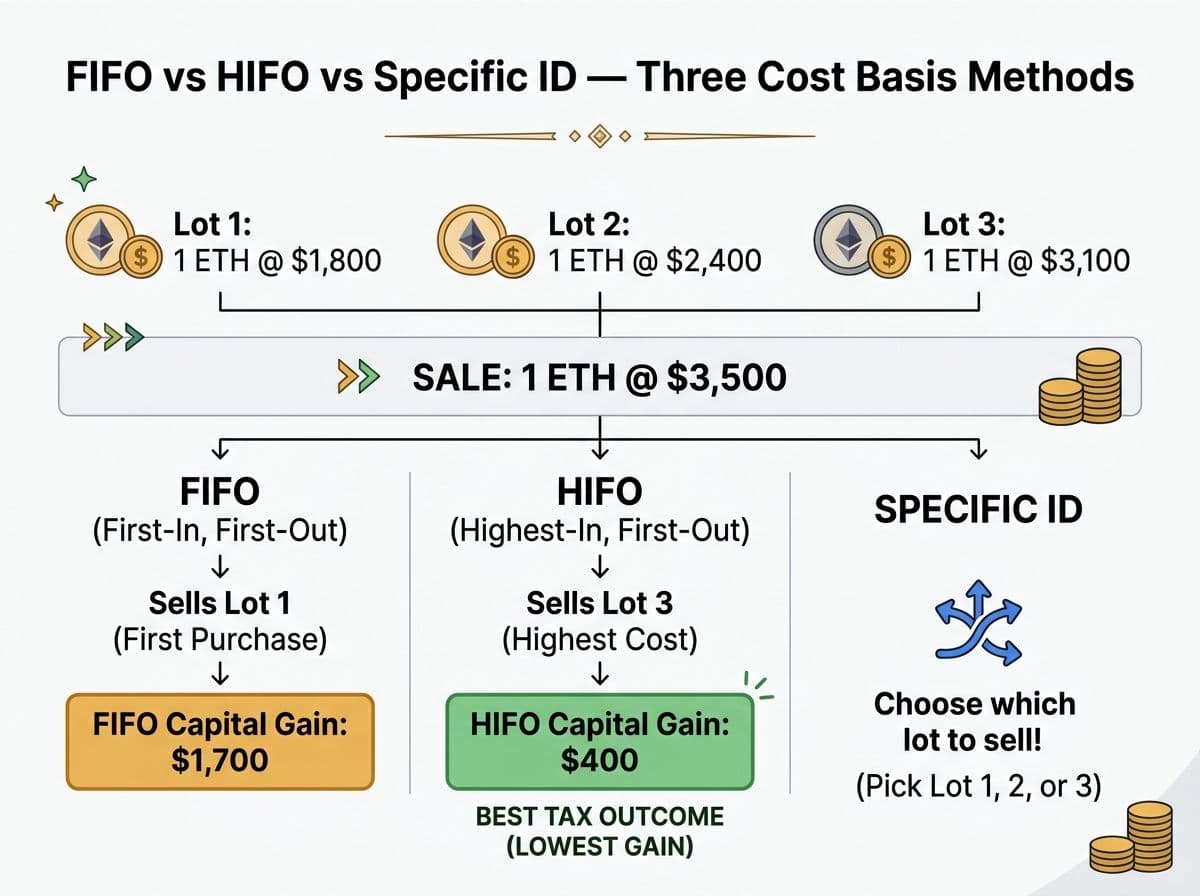
- It handles multiple cost basis methods. FIFO, LIFO, HIFO, Spec ID. You pick the method that minimizes your tax bill.
- It tracks DeFi, staking, and NFTs. Not perfectly (more on that later), but better than most competitors.
Pro Tip
Koinly is a data aggregation tool, not a tax advisor. It does the math. But it can't tell you whether your staking rewards should be taxed at receipt or at disposition (that's the Jarrett v. US question). It can't advise you on whether HIFO saves you more than specific identification this year. That's where a human CPA earns their fee.
The bottom line: Koinly turns your chaotic transaction history into organized tax data. A CPA turns that data into a legally optimized return.
How Koinly Works: The 5-Step Process
Here's the workflow we walk every client through. Takes about 30 minutes for a typical portfolio.
Step 1: Create Your Account and Set Your Tax Settings
Go to koinly.io and create a free account. Before you import anything, configure these settings:
- Country: United States
- Currency: USD
- Cost basis method: We generally recommend HIFO (Highest In, First Out) for most clients because it minimizes your current-year tax liability by selling your highest-cost lots first. But talk to your CPA before locking this in.
- Tax year: 2025 (for returns you're filing now in 2026)
Pro Tip
Once you choose a cost basis method and file with it, the IRS expects consistency. You can change methods, but you need to document the switch. Don't flip between FIFO and HIFO year to year without professional guidance.
Step 2: Connect Your Exchanges and Wallets
Koinly offers three ways to import data:
- API connection (recommended) - Automatic sync, stays updated
- CSV upload - Manual but works for every exchange
- Blockchain sync - Enter your public wallet address, Koinly reads on-chain data
Here's what we tell clients: Use API for your main exchanges (Coinbase, Kraken, Binance). Use blockchain sync for your self-custody wallets (MetaMask, Ledger). Use CSV only as a last resort.
Pro Tip
**API keys should be read-only.** Never give any tax software trading or withdrawal permissions. Koinly only needs read access to your transaction history. If you see a prompt asking for trade permissions, you're doing it wrong.
Let me walk you through a real example.
Say you have:
- Coinbase with 150 trades
- Kraken with 80 trades
- MetaMask with 45 DeFi transactions
- A Ledger wallet holding long-term positions
You'd connect Coinbase and Kraken via API. Sync MetaMask and Ledger via public addresses. Total time: about 10 minutes.
Step 3: Let Koinly Process Your Data
Once everything is connected, Koinly needs time to process. For most portfolios, this takes 5-15 minutes.
What it's doing behind the scenes:
- Matching internal transfers (so moving ETH from Coinbase to your Ledger isn't counted as a sale)
- Calculating cost basis for every lot
- Identifying taxable events (trades, sales, income events)
- Flagging potential issues (missing cost basis, unmatched transfers)
Pro Tip
After processing, check the dashboard for warnings. The most common one is "missing purchase history." This means Koinly found tokens in your wallet but can't find the original purchase. If you don't fix these, Koinly assigns a $0 cost basis, and you get hit with a massive phantom gain.
Step 4: Review and Fix Errors (This Is Where Most People Mess Up)
This step separates a good tax filing from a disaster.
After Koinly processes your data, go to the Transactions tab. Look for:
- Yellow warning icons - Missing cost basis or unmatched transfers
- Red flags - Duplicate transactions or negative balance warnings
- Miscategorized transactions - DeFi swaps labeled as "deposits," staking rewards labeled as "trades"
I cannot overstate this: Do not skip the review step.
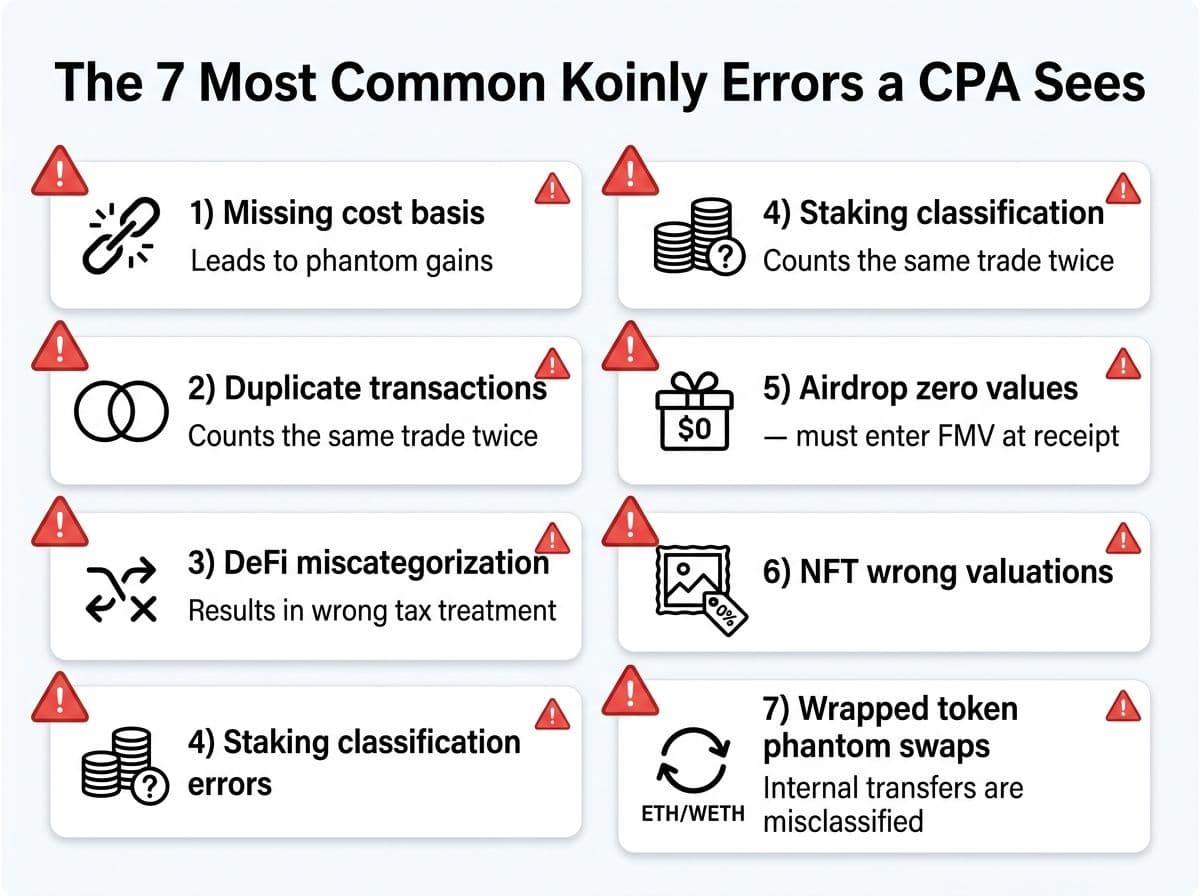
Here are the 7 most common errors we fix for clients:
1. Missing cost basis on transferred tokens
You bought ETH on Coinbase, sent it to MetaMask, then sold it on Uniswap. Koinly sometimes can't match the Coinbase purchase to the MetaMask ETH. Result: $0 cost basis and a huge phantom gain.
Fix: Manually merge the transfer. In Koinly, find the withdrawal from Coinbase and the deposit to MetaMask, then tag them as an internal transfer.
2. Duplicate transactions from overlapping imports
If you connect both the exchange API and the blockchain sync for the same wallet, Koinly may import the same transaction twice.
Fix: Delete the duplicate wallet. Use either API or blockchain sync, not both for the same source.
3. DeFi liquidity pool transactions miscategorized
Adding liquidity to Uniswap gets imported as a "send" (which Koinly may treat as a disposal/sale). Removing liquidity gets imported as a "receive" (treated as income).
Fix: Recategorize the LP deposit as "send to pool" and the LP withdrawal as "receive from pool." Koinly has specific tags for this. Use them.
4. Staking rewards classified incorrectly
Some staking rewards appear as "trades" instead of "income." This messes up both your capital gains calculations and your ordinary income reporting.
Fix: Tag staking rewards as "staking" income type. This ensures they're taxed as ordinary income at fair market value on the date received.
5. Airdrops showing zero cost basis
Airdrops are taxable at FMV when received. But if Koinly can't find the price at the exact time of receipt, it assigns $0 value, meaning you underreport income but then get hit with a higher capital gain when you sell.
Fix: Manually enter the FMV at the time of the airdrop. Use CoinGecko historical data for the price.
6. NFT transactions with wrong valuations
Koinly struggles with NFT pricing, especially on less liquid marketplaces. It may price your NFT sale based on floor price rather than actual sale price.
Fix: Verify every NFT sale against the actual transaction on Etherscan or the marketplace (OpenSea, Blur, etc.) and manually adjust.
7. Wrapped token conversions treated as taxable swaps
Wrapping ETH to WETH, for example, is generally not a taxable event. But Koinly may treat it as a swap (disposing of ETH and acquiring WETH), generating a phantom gain or loss.
Fix: Tag these as "send to self" or merge them as a zero-gain conversion. The IRS hasn't explicitly ruled on wrapping, but many tax professionals treat wrapping and unwrapping ETH as non-taxable.
Step 5: Generate Your Tax Reports
Once your data is clean, go to Tax Reports and generate:
- Form 8949 - Lists every individual trade (required for your return)
- Schedule D - Summary of capital gains and losses
- Complete Tax Report - Full summary including income events
- TurboTax/TaxAct format - If you're filing yourself
Pro Tip
Use the "Complete Tax Report" PDF. It includes the transaction-level detail we need to verify your numbers, plus the summary we use to fill your return. The TurboTax export is fine for DIY filers but doesn't give a CPA enough information to do a proper review.
What's New in Koinly for 2026
Koinly has made several updates that matter for the 2026 tax year:
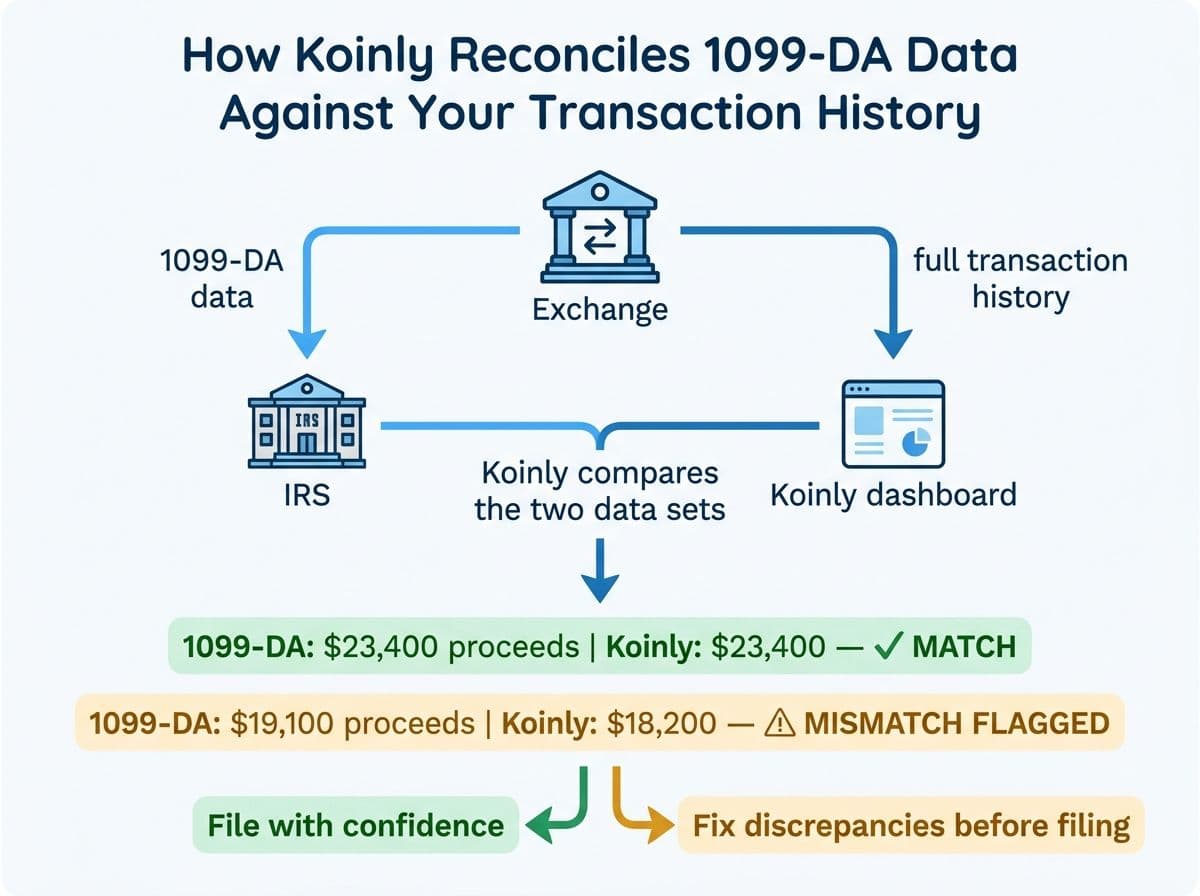
1099-DA Support
Starting in 2026, exchanges are required to issue Form 1099-DA reporting your crypto transactions directly to the IRS. Koinly now imports 1099-DA data and reconciles it against your actual transaction history.
Why this matters: If the numbers on your 1099-DA don't match your tax return, you're going to hear from the IRS. Koinly helps you catch discrepancies before you file.
Improved DeFi Categorization
Koinly's 2026 update improves automatic categorization of DeFi transactions across Ethereum, Solana, Arbitrum, and Base. It's better, but it's still not perfect. Always review.
Koinly Pricing: What You'll Actually Pay
Let's be straightforward about costs.
Koinly Pricing Tiers (2026)
| Plan | Transactions | Price | Best For |
|---|---|---|---|
| Free | 10,000 (no reports) | $0 | Preview your tax summary before paying |
| Newbie | Up to 100 | $49/year | Casual holders with a few trades |
| Hodler | Up to 1,000 | $99/year | Active investors, multiple exchanges |
| Trader | Up to 3,000 | $199/year | Frequent traders, some DeFi |
| Pro | Up to 10,000 | $299/year | High-volume traders, heavy DeFi/NFT |
Key things to know:
- Pricing is per tax year. If you need to amend 2024 and file 2025, that's two separate charges.
- Transactions include internal transfers. Moving crypto between your own wallets counts toward your limit. This catches a lot of people off guard.
- The free tier is genuinely useful. You can import all your data and see your tax summary before paying anything. Only pay when you need to download official forms.
Pro Tip
If you have fewer than 100 transactions but complex DeFi activity, the Newbie plan ($49) may be all you need. The DeFi categorization tools are available on all paid tiers. Don't overpay for transaction count if you don't need it.
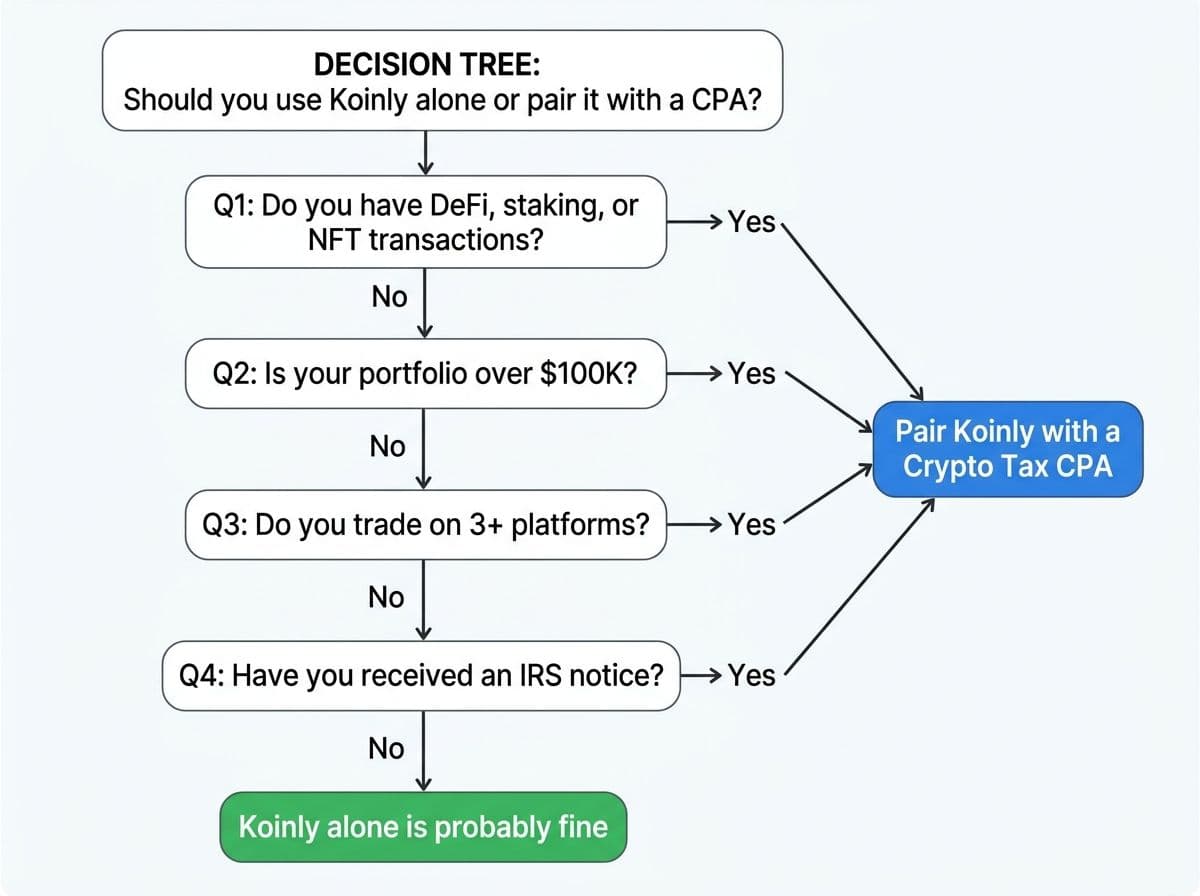
When Koinly Is Enough (and When You Need a CPA)
Here's the honest breakdown.
Koinly alone is probably fine if:
- You have fewer than 200 transactions across 1-2 exchanges
- You only buy, hold, and sell (no DeFi, no staking, no NFTs)
- Your total crypto portfolio is under $50K
- You haven't received any IRS notices
- You don't have complex situations (gifts, donations, lost crypto, business use)
You should pair Koinly with a CPA if:
- You have DeFi transactions (LPs, yield farming, bridges, wrapping)
- You have more than $100K in crypto assets
- You traded on 3+ platforms
- You earned staking or mining income
- You received an IRS letter (CP2000, 6173, 6174)
- You have prior-year returns that need amending
- You have international exchange accounts (FBAR obligations)
- You want to optimize your cost basis method for maximum savings
Setting Up Koinly for Your CPA (the Right Way)
If you're working with a crypto tax CPA, here's how to set up Koinly so your accountant has everything they need:
1. Invite your CPA as a collaborator
Go to Settings > Team > Invite. Enter your CPA's email. They get read-only access to your Koinly account, meaning they can view everything but can't make changes.
2. Complete ALL your imports before inviting your CPA
Don't invite your CPA to a half-imported account. Get all your exchanges and wallets connected first. Clean up the obvious errors. Then invite.
3. Download the CPA-specific report
Under Tax Reports, select "Complete Tax Report" and "Transaction History (CSV)." Send both to your CPA. The PDF gives the overview. The CSV gives the transaction-level detail.
4. Note any manual adjustments you made
If you reclassified any transactions, merged transfers, or manually entered cost basis, write it down. Your CPA needs to know what you changed and why.
Pro Tip
Just connect your Koinly account and we handle everything from there. You don't need to review or fix errors yourself. That's literally what you're paying us for. We review every transaction, fix categorization issues, optimize your cost basis method, and file the return.
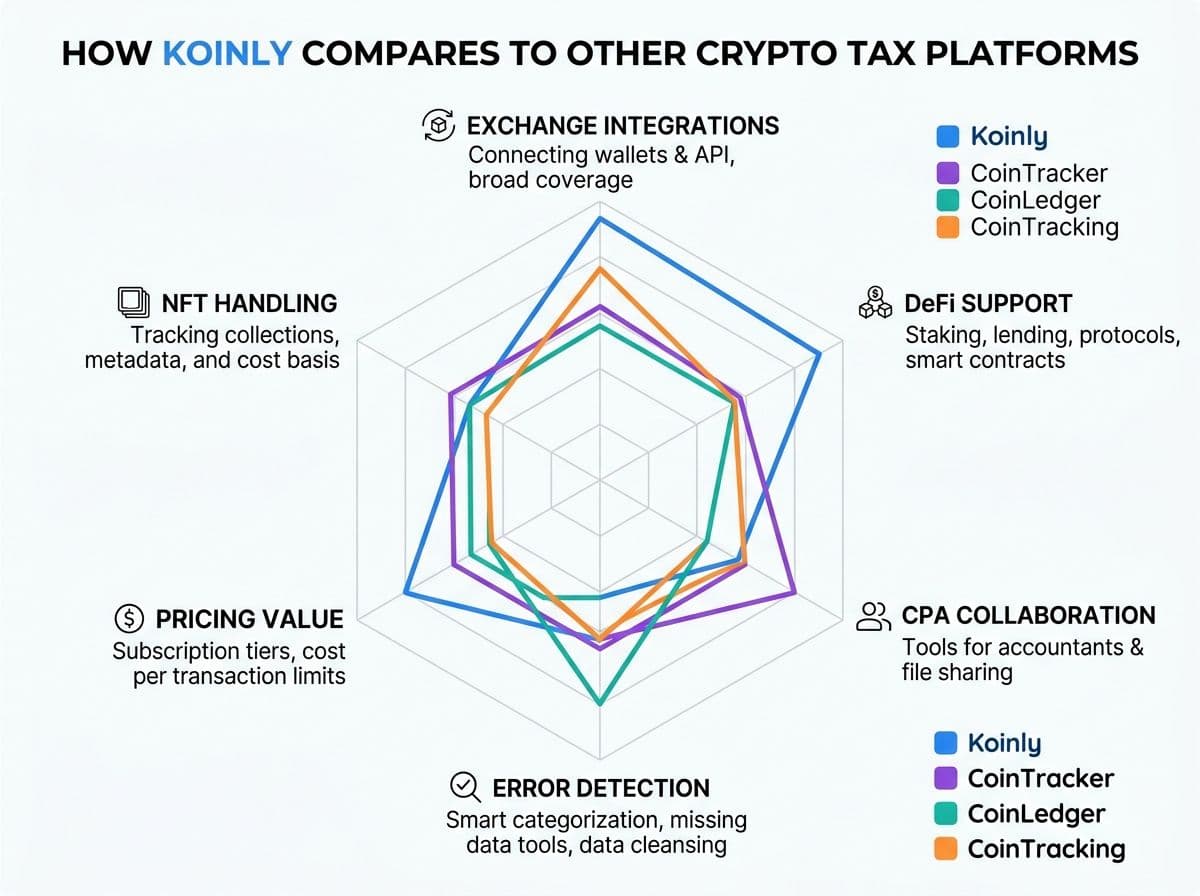
Koinly vs. Other Platforms: A CPA's Quick Comparison
We use multiple platforms in our practice. Here's how Koinly stacks up for the things that actually matter when filing taxes:
Koinly vs Other Crypto Tax Platforms (CPA Perspective)
| Feature | Koinly | CoinTracker | CoinLedger | CoinTracking |
|---|---|---|---|---|
| Exchange integrations | 800+ | 500+ | 400+ | 300+ |
| DeFi support | Strong | Strong | Moderate | Advanced |
| NFT handling | Good | Good | Basic | Good |
| Cost basis methods | FIFO, LIFO, HIFO, Spec ID | FIFO, LIFO, HIFO | FIFO, LIFO, HIFO | FIFO, LIFO, HIFO, ACB |
| 1099-DA reconciliation | Yes (2026) | Yes (2026) | Coming soon | Yes (2026) |
| Error detection | Good | Very good | Basic | Advanced |
| Starting price | $49 | $59 | $49 | Free (basic) |
| Best for | All-around individual investors | Coinbase-heavy portfolios | Simple portfolios | Power users and traders |
Our take: Koinly hits the sweet spot for most individual crypto investors. If you're Coinbase-heavy, CoinTracker's integration is slightly deeper. If you're a power trader with derivatives, CoinTracking gives you more granular control. But for the 80% of crypto holders who trade across a few exchanges and dabble in DeFi, Koinly is our go-to recommendation.
Related reading: Best Crypto Tax Software 2026 and CoinTracker review.
Pro Tips: Getting the Most Out of Koinly
After hundreds of client accounts, here are the tips that consistently save time and money:
1. Import your oldest transactions first.
Koinly calculates cost basis chronologically. If you import 2025 before 2023, it won't have the original purchase prices and will assign $0 cost basis. Always start with the oldest year.
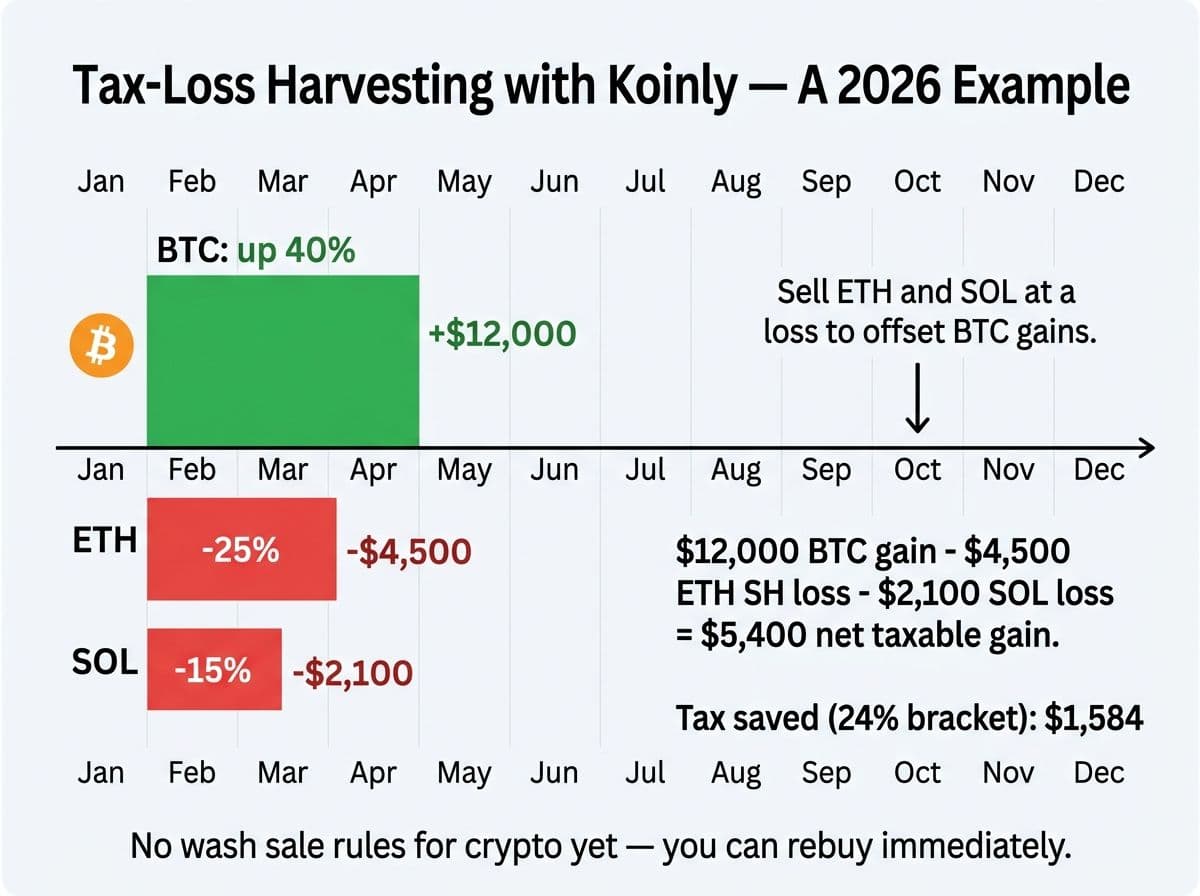
2. Use the tax-loss harvesting tool before year-end.
Koinly shows you unrealized losses in your portfolio. Before December 31, review these and consider selling positions at a loss to offset your gains. Since crypto isn't subject to wash sale rules yet, you can rebuy immediately. (This may change. Watch the legislation.)
3. Export a mid-year preview in Q3.
Don't wait until April to see your tax liability. Run a Koinly report in September or October. If you're looking at a big tax bill, you have time to harvest losses or make estimated payments.
4. Keep a "manual adjustments" log.
Every time you manually change a transaction category or merge a transfer, note it in a Google Doc with the date and reason. If the IRS ever asks, you'll have documentation for every adjustment.
5. Reconcile against your exchange statements.
Exchanges now issue annual statements and 1099-DAs. Download these and compare the numbers to what Koinly reports. If there's a discrepancy, figure out why before filing.
Common Questions About Using Koinly With a CPA
Here are the questions we hear most often from clients using Koinly:
"Do I still need a CPA if I use Koinly?"
It depends on your situation. See the decision framework above. For simple portfolios (buy, hold, sell on one or two exchanges), Koinly alone can handle it. For anything involving DeFi, staking, multiple exchanges, or portfolios over $100K, a CPA review pays for itself in caught errors and optimized cost basis selection.
"Can my CPA access my Koinly account directly?"
Yes. Your CPA can view your full transaction history, review categorizations, and verify reports. This is the setup we use with all COS Elite clients who use Koinly.
"Is Koinly accurate enough to trust for tax filing?"
Koinly's calculation engine is solid for straightforward trades. Where accuracy drops is in complex scenarios: DeFi, cross-chain bridges, NFTs, and internal transfers between wallets. In our experience, Koinly gets about 85-90% of transactions right automatically. The remaining 10-15% need human review.
Action Steps: What to Do Next
Here's your game plan, whether you're a DIY filer or working with a CPA:
If you're filing on your own:
- Create a Koinly account and connect all your exchanges and wallets
- Set your cost basis method (start with HIFO unless you have a reason not to)
- Wait for processing, then review every warning and error flag
- Fix missing cost basis, duplicates, and miscategorized DeFi transactions
- Generate your Form 8949 and Schedule D
- Cross-check against your exchange 1099-DAs before filing
If you're working with a CPA:
- Create a Koinly account and connect everything
- Invite your CPA as a read-only collaborator
- Download the Complete Tax Report and Transaction History CSV
- Let your CPA handle the review, corrections, and optimization
If you want COS Elite to handle it: Book a free Tax Health Check. We'll review your Koinly data, identify errors, optimize your cost basis method, and file your return.
Frequently Asked Questions
Is Koinly free to use?
Koinly offers a free tier that lets you import all your transactions and preview your tax summary. However, you need a paid plan ($49-$299/year depending on transaction volume) to download official tax forms like Form 8949 and Schedule D.
How accurate is Koinly for crypto taxes?
Koinly's calculation engine is highly accurate for straightforward buy/sell trades on major exchanges. In our CPA practice, we find it correctly categorizes about 85-90% of transactions automatically. The remaining 10-15%, especially DeFi, internal transfers, and NFTs, typically need manual review.
Can I use Koinly with my CPA or accountant?
Yes. Koinly offers a feature that lets your CPA or accountant access your full transaction history and reports.
What cost basis method should I use in Koinly?
For most individual investors, HIFO (Highest In, First Out) minimizes your current-year tax liability by selling your highest-cost lots first. However, the best method depends on your specific situation. Consult a CPA before locking in a method.
Does Koinly support DeFi transactions?
Koinly supports DeFi transactions across Ethereum, Solana, Arbitrum, Base, and other major chains. However, complex DeFi activity like liquidity pool entries, yield farming, and cross-chain bridges often requires manual review and reclassification.
How does Koinly handle the new 1099-DA form in 2026?
Koinly now imports 1099-DA data from exchanges and reconciles it against your actual transaction history. This helps catch discrepancies before you file.
What happens if Koinly shows a $0 cost basis for some of my crypto?
A $0 cost basis usually means Koinly can't find the original purchase for tokens in your wallet. Fix it by importing the missing exchange data or manually entering the purchase price and date.
Is Koinly better than CoinTracker?
Both are excellent platforms. Koinly has broader exchange support (800+ vs 500+) and slightly better DeFi categorization. CoinTracker has a deeper Coinbase integration and a more polished accountant portal.
How many transactions can Koinly handle?
Koinly's Pro plan supports up to 10,000 transactions per tax year. For users exceeding 10,000, Koinly offers custom enterprise plans.
Should I use Koinly or hire a CPA for my crypto taxes?
It's not either/or. The best approach for complex portfolios is to use Koinly for data aggregation and then have a CPA review the output, fix errors, optimize cost basis, and file the return.

About the author
Garrett Taylor, CPA
Former Big Four CPA. CPA #133092. Garrett answers his phone. Led by expertise. Powered by precision.
Related Articles

Best Crypto Tax Software 2026: A CPA's Honest Review of Every Major Platform
A CPA who files 500+ crypto returns reviews Koinly, CoinTracker, CoinLedger, CoinTracking, ZenLedger, and Summ. No affiliate links. Just honest verdicts.

How to Choose a Crypto Tax CPA in 2026 (From a CPA Who Files 500+ Crypto Returns a Year)
A CPA's guide to finding the right crypto tax professional. 10 interview questions, real pricing, red flags, and when you need a CPA vs EA vs tax attorney.

The Ultimate Guide to Crypto Tax (2026 Edition)
The most comprehensive crypto tax guide online, written by a CPA who files 500+ crypto returns a year. Every taxable event, form, strategy, and 2026 update.