CoinTracker Review 2026: A Crypto Tax CPA's Honest Walkthrough

Written by Garrett Taylor, CPA #133092
Reviewed by Leanne Grant, EA #00167954-EA
Key Takeaways
- ✓CoinTracker is a polished, reliable crypto tax platform that works especially well for Coinbase users and portfolios under 1,000 transactions
- ✓✓The platform supports FIFO, LIFO, HIFO, ACB and Specific Identification cost basis methods with easy mid-year switching
- ✓✓DeFi import quality is hit-or-miss: Ethereum Mainnet works well, but L2s and newer chains often need manual cleanup
- ✓The 2026 1099-DA reconciliation tool is one of CoinTracker's strongest features, catching mismatches before you file
- ✓For portfolios over $100K or heavy DeFi usage, CoinTracker's data still needs a CPA's review to avoid costly errors
“This guide has been reviewed for accuracy by Leanne Grant, Enrolled Agent, specializing in cryptocurrency tax compliance.”
If you've searched "CoinTracker review" hoping someone will give you a straight answer, you're in the right place.
Most reviews you'll find are written by affiliates who've never actually filed a tax return using CoinTracker data. They'll tell you it's "great" and drop a referral link.
That's not what this is.
In this walkthrough, I'll show you exactly what CoinTracker does well, where it falls short, and how to avoid the common mistakes.
Let's dig in.
The 30-Second Verdict
CoinTracker is a strong crypto tax platform for individual investors, especially if you're in the Coinbase ecosystem. The interface is clean, the Coinbase integration is best-in-class, and the 2026 1099-DA reconciliation feature is genuinely useful.
But it's not magic.
For simple portfolios (buy, hold, sell on one or two exchanges), CoinTracker handles things well. For anything involving serious DeFi activity, cross-chain bridging, or complex staking setups, you're going to hit friction.
Who CoinTracker Is (Actually) Best For
Not every crypto tax tool fits every investor. Here's who gets the most out of CoinTracker, based on what we see in practice:
The Coinbase-Centric Investor
You hold most of your crypto on Coinbase or Coinbase Pro. Maybe you also use one or two other exchanges. Your transactions are straightforward: buy, hold, sell, maybe some staking rewards.
Why CoinTracker works here: The Coinbase integration is the deepest of any crypto tax platform. Direct API sync, automatic categorization, near-instant import. If 80% of your activity is on Coinbase, CoinTracker feels seamless.
The Multi-Exchange Portfolio Manager
You trade on Coinbase, Kraken, and Gemini. You might have a Ledger or Trezor for cold storage. Under 1,000 transactions per year.
Why CoinTracker works here: The exchange support covers 500+ platforms, and the portfolio tracking dashboard gives you a real-time view of your holdings across all accounts. CoinTracker doubles as a portfolio tracker and a tax tool, which is a nice bonus.
The Tax-Conscious Long-Term Holder
You bought Bitcoin and ETH a few years ago. You've made a handful of sales. Now you want to figure out your cost basis and make sure you're filing correctly.
Why CoinTracker works here: For straightforward long-term capital gains calculations, CoinTracker is fast and accurate. Connect your accounts, pick your cost basis method, and generate Form 8949 in under 15 minutes.
Pro Tip
If you're running 5,000+ DeFi transactions across Arbitrum, Optimism, and Solana, CoinTracker will get you started but you'll spend hours on manual cleanup. Platforms like Koinly or CoinTracking handle high-volume DeFi more gracefully out of the box. [Internal link: Koinly Guide → /blog/koinly-guide] (FIX LINK –DOESN’T WORK)
The 5 Most Common CoinTracker Errors (and How to Fix Each)
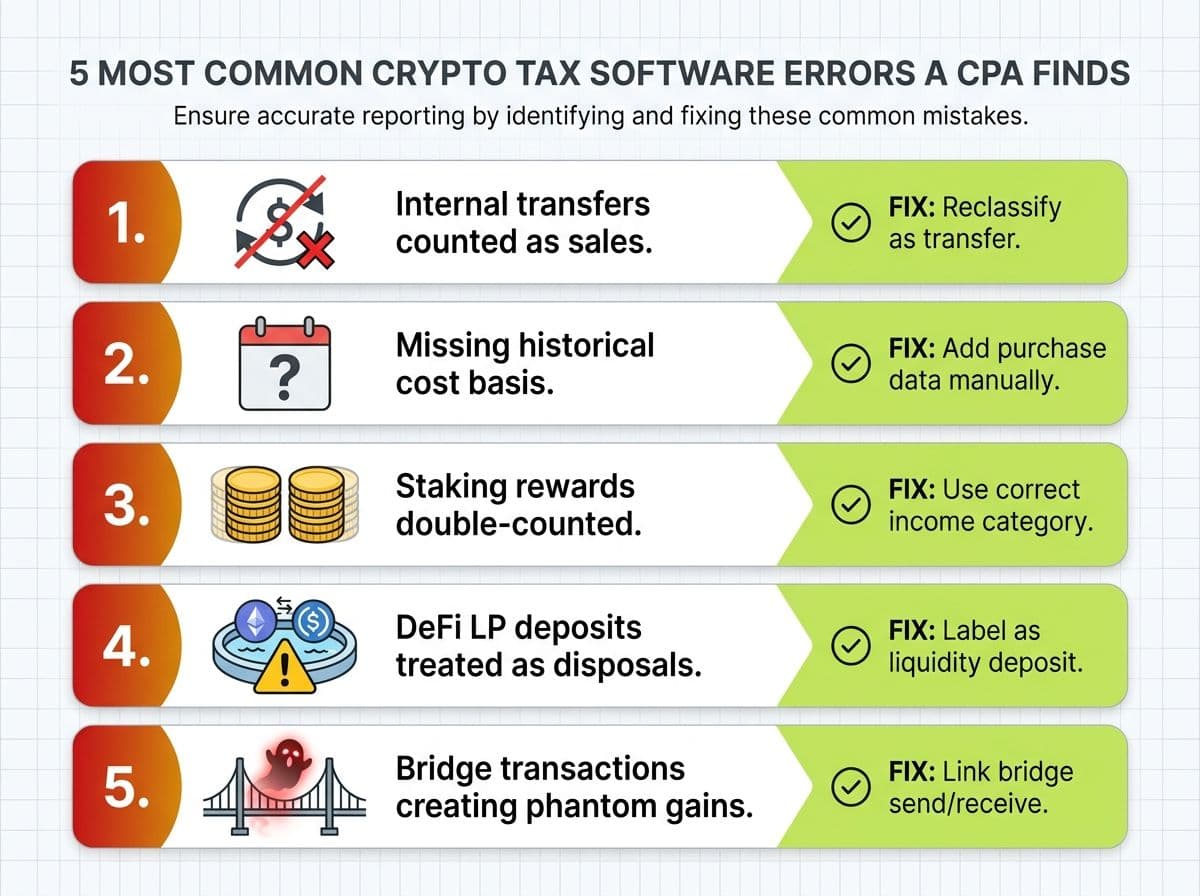
Here's the part no other CoinTracker review will give you. These are the five errors we fix most often for clients who come to us after trying to file with CoinTracker alone.
Error #1: Internal Transfers Counted as Sales
What happens: You bridge ETH from Ethereum to Arbitrum. If CoinTracker cannot automatically match the withdrawal and deposit, it may treat the transaction as a disposal on one chain and a new acquisition on the other. This can create artificial gains, losses, or cost basis discrepancies even though you still own the same asset.
The fix: Review how CoinTracker categorized the transaction and verify that it matches the substance of the activity. In some cases, CoinTracker's liquidity pool classifications are appropriate. In others, you may need to recategorize the transaction, merge related transactions, or manually adjust the treatment to avoid duplicate disposals or incorrect gains. Always confirm the tax treatment before changing a transaction to "Transfer."
Skipping this step can cause transfers to be misclassified as taxable sales, potentially resulting in gains being reported on assets you still hold.
Error #2: Missing Historical Cost Basis
What happens: You started using CoinTracker in 2025, but you've been buying crypto since 2021. CoinTracker doesn't have your older purchase data. Every token that predates your CoinTracker account shows a $0 cost basis.
How common: Nearly every client who switches to CoinTracker mid-stream.
The fix: Review bridge transactions to ensure the withdrawal and corresponding deposit are linked correctly. In most cases, the movement should be treated as an internal transfer rather than a taxable disposition. Once properly matched, the original cost basis and holding period should carry over to the bridged asset.
Error #3: Staking Rewards Double-Counted
What happens: Some exchange APIs report staking rewards as both an "income" event and a "trade." CoinTracker imports both, so you get taxed on the income when received AND hit with a capital gain based on a $0 cost basis when the reward appears as a separate acquisition.
The fix: Search your transactions for duplicate entries on staking reward dates. Delete the phantom "trade" entry and keep the "income" classification. Make sure the income event reflects the fair market value at the time of receipt.
Error #4: DeFi LP Deposits Treated as Disposals
What happens: You add liquidity to a Uniswap or Aave pool. CoinTracker reads the on-chain transaction as you "sending" tokens (a disposal) and "receiving" LP tokens (a new acquisition). This triggers a capital gains event on your deposited tokens.
Error #5: Bridge Transactions Creating Phantom Gains
Cost Basis Methods in CoinTracker
This is where CoinTracker gives you real flexibility. The platform supports four cost basis methods, and switching between them is straightforward.
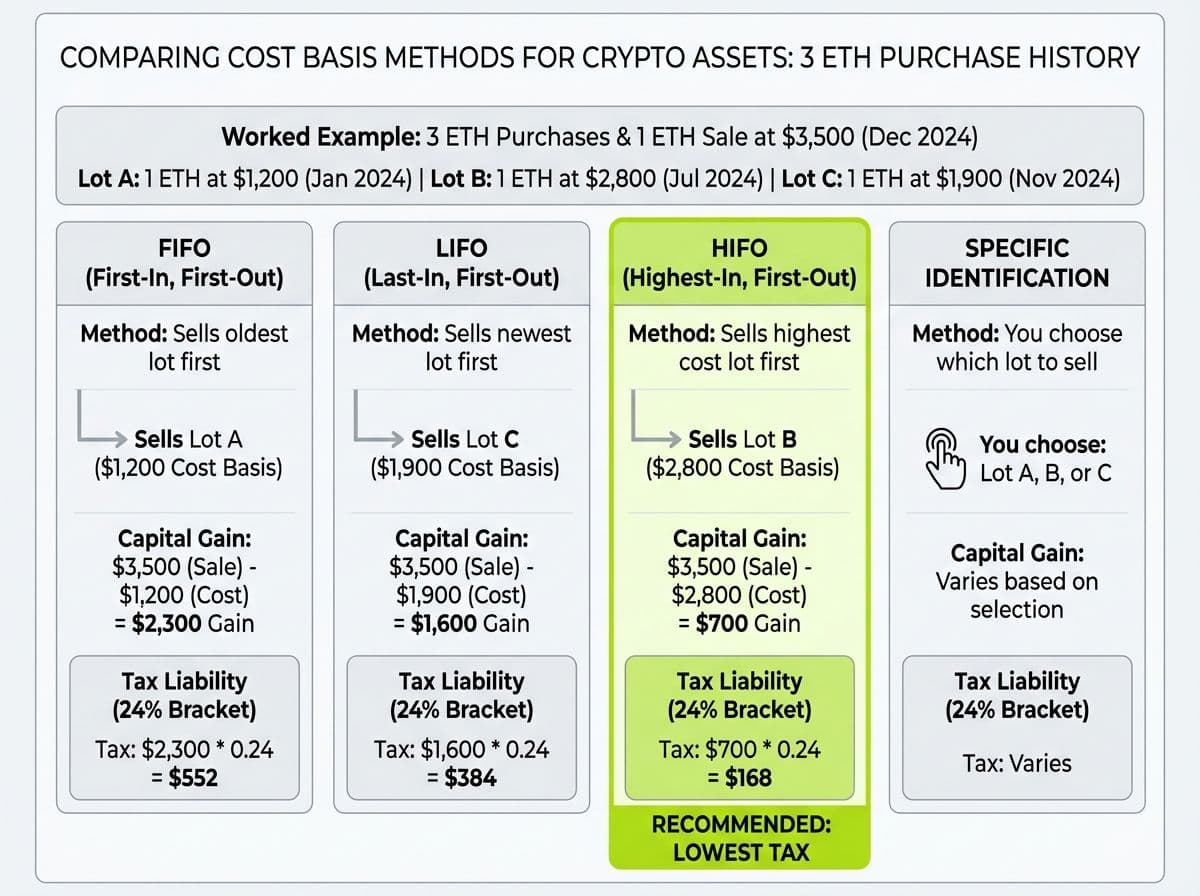
FIFO (First In, First Out) — Sells your oldest lots first. Simple, but often results in higher gains because your oldest purchases tend to have the lowest cost basis.
LIFO (Last In, First Out) — Sells your most recently purchased lots first. Can reduce gains if recent purchases were at higher prices.
HIFO (Highest In, First Out) — Sells your highest-cost lots first. This is what we recommend for most clients. It minimizes your current-year tax liability by using up your most expensive purchases.
Specific Identification — You choose exactly which lot to sell for each transaction. Maximum control, but requires documentation and consistency.
How to switch in CoinTracker: Go to Settings > Taxes > Cost Basis Method. Select your method and hit Save. CoinTracker recalculates your entire history instantly.
If you're using FIFO, HIFO, LIFO, or Specific Identification, make sure your reporting is supported by adequate records and applied consistently to your transactions. While taxpayers can change cost basis methods in certain circumstances, doing so may affect gain and loss calculations and should be carefully documented. If you're considering a change, consult a tax professional to understand the implications.
Real example: Imagine you bought 1 ETH at $1,200 in January 2024, another at $2,800 in July 2024, and sold 1 ETH at $3,500 in March 2025.
- FIFO sells the $1,200 lot: $2,300 gain
- HIFO sells the $2,800 lot: $700 gain
- Same trade. Same proceeds. Wildly different tax bills.
At a 24% tax bracket, that's the difference between $552 and $168 in federal tax on a single trade. Scale that across a hundred trades and cost basis method selection alone can save thousands.
The 1099-DA Reconciliation Workflow in CoinTracker (2026)
Starting with the 2026 tax year, exchanges are required to issue Form 1099-DA reporting your crypto dispositions directly to the IRS. This is a big deal.
Here's why: if the numbers on your tax return don't match what your exchange reported on the 1099-DA, the IRS matching system flags you automatically. Hello, CP2000 notice.
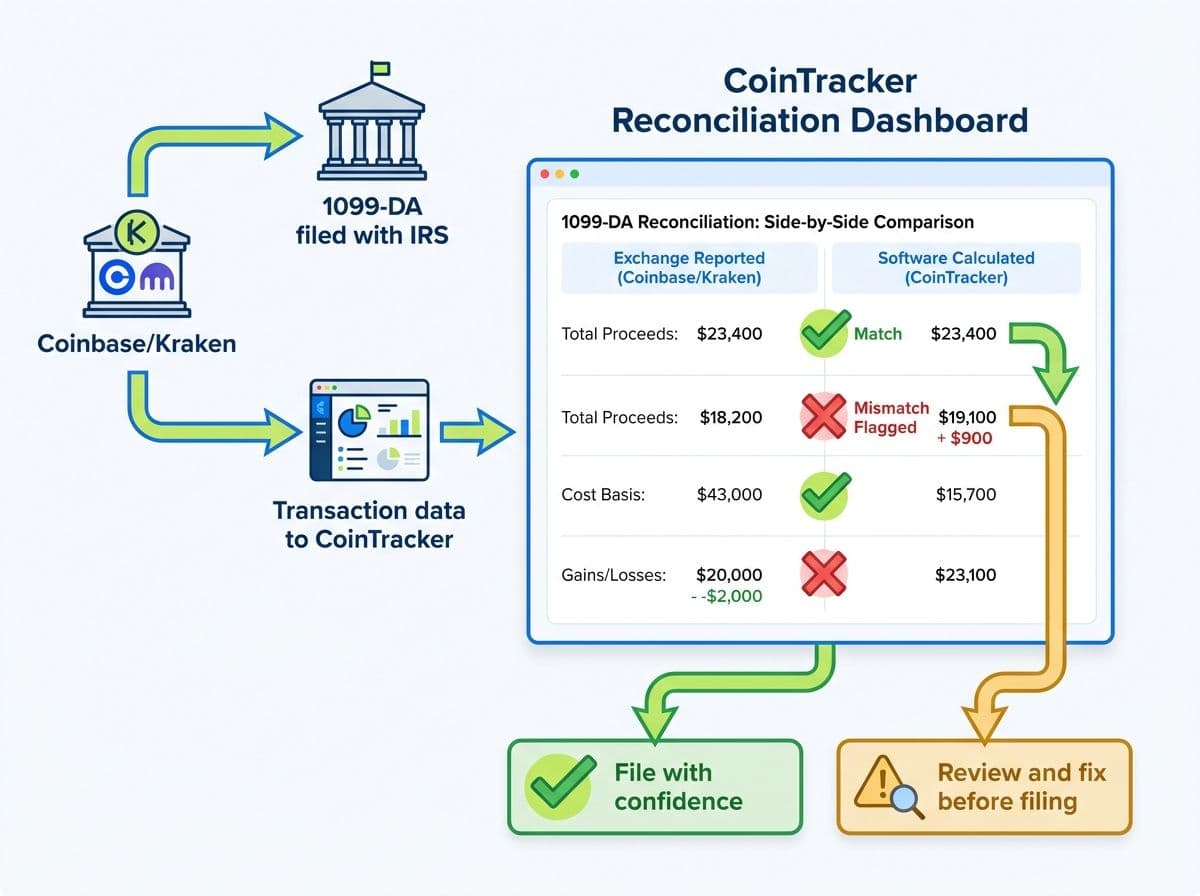
CoinTracker's 1099-DA reconciliation tool is one of its best 2026 features. Here's how it works:
- Import your 1099-DA data. Upload the form from each exchange (Coinbase, Kraken, etc.).
- CoinTracker cross-references. It compares the proceeds and cost basis reported on the 1099-DA against its own calculation of your transaction history.
- Discrepancies get flagged. You'll see a reconciliation dashboard showing three reporting options and flags a recommended one based on your account’s data.
- Fix before filing. For each mismatch, CoinTracker shows both numbers and lets you drill into the specific transactions causing the difference.
Pro Tip
Exchanges report based on their records, which may not include your full cost basis (especially if you transferred crypto in from another exchange or wallet). The exchange sees the sale but doesn't know what you originally paid. CoinTracker, with your full history imported, knows both sides. The reconciliation tool bridges that gap.
What still breaks: The 1099-DA reconciliation works well for centralized exchange transactions. It doesn't cover DeFi activity at all, since decentralized protocols don't issue 1099-DAs. If you're swapping on Uniswap or farming on Aave, those transactions won't appear on any 1099-DA, which means the IRS may not know about them yet. But you're still legally required to report them.
DeFi Import Quality: The Honest Assessment
Let's talk about DeFi. This is where every crypto tax platform earns or loses its credibility.
The reality: CoinTracker's DeFi support is decent for Ethereum Mainnet and improving for L2s, but it's not where it needs to be for power users.
What imports cleanly:
- Simple token swaps on Uniswap (Ethereum mainnet)
- Basic staking on major protocols (Lido, Rocket Pool)
- Coinbase Wallet DeFi transactions
- WETH/ETH wrapping (have to option to treat wrap transactions as non-taxable)
What needs manual cleanup:
- Liquidity pool deposits and withdrawals — LP deposits can be treated as disposals and LP withdrawals as acquisitions, creating duplicate gains or incorrect basis if not reviewed.
- Yield farming rewards — Reward transactions may be missing, grouped incorrectly, or categorized as unknown income depending on the protocol.
- Cross-chain bridges (Arbitrum, Optimism, Base) — Bridge withdrawals and deposits sometimes fail to match automatically, which can create phantom gains, losses, or basis breaks.
- Solana DeFi — Coverage has improved, but SPL token and program interactions can still import as unknown or require manual classification.
- Complex multi-step DeFi (Flash loans, leveraged positions, perpetuals, and other advanced strategies often need significant manual review and sometimes custom adjustments.
Pro Tip
If DeFi makes up more than 20% of your transaction volume, CoinTracker alone isn't going to cut it. You'll spend hours recategorizing transactions that should have imported correctly. This isn't just a CoinTracker problem. It's an industry-wide challenge. But platforms like Koinly currently handle DeFi categorization slightly better across L2 chains. [Internal link: Koinly Guide → /blog/koinly-guide] (FIX LINK – DOESN’T WORK)
NFT Handling in CoinTracker
CoinTracker supports NFT transactions on Ethereum and a growing list of other chains. Here's what you need to know:
What works:
- Buying and selling NFTs on major marketplaces (OpenSea, Blur) generally imports automatically
- Basic NFT purchases and sales are usually tracked correctly when wallet data is complete.
- Gas fees are usually properly included in your cost basis
What doesn't work well:
- NFT-to-NFT trades (rare but they happen) can be difficult to classify correctly
- Direct mints from smart contracts occasionally import as unknown or uncategorized transactions.
- Creator royalties and revenue from NFT sales often need manual income classification
NFT activity on newer chains and marketplaces may require additional reconciliation.
The 28% collectibles tax question: The IRS hasn't issued final guidance on whether NFTs are taxed at the standard capital gains rate or the 28% collectibles rate. In IRS Notice 2023-27, the IRS proposed a "look-through" approach that would evaluate the asset represented by the NFT to determine whether collectible treatment applies. CoinTracker calculates gains at standard rates. If you hold high-value NFTs, especially digital art, discuss the potential tax treatment with your CPA.
Pricing: What Each Plan Actually Includes
Let's break down what CoinTracker charges and what you actually get.
CoinTracker Pricing Tiers (2026)
| Plan | Transaction Limit | Price | Tax Reports | Portfolio Tracking | DeFi Support | Turbotax Integration |
|---|---|---|---|---|---|---|
| Free | Unlimited | $0 | Yes | Yes | Yes | |
| Base | 100 | $59/year | Yes | No | ||
| Prime | 1,000 | $199/year | Yes | Yes | No | |
| Yes | Yes | Yes | Yes | |||
| Ultra | 10,000+ | $599/year | Yes | Yes | Yes | Yes |
What to know before you buy:
- Internal transfers count toward your limit. Users with multiple wallets often discover that wallet-to-wallet transfers, bridging activity, and other non-taxable transactions can significantly increase their transaction count, potentially pushing them into a higher pricing tier.
- CPA collaboration features are Premium and up. If you're working with an accountant, you need at least the Basetier for shared access.
- The free tier is basically a demo. It lets you test the interface and review your imported transactions, but you'll need a paid plan to generate the tax reports needed to file your return.
Pro Tip
If you have a simple portfolio under 100 transactions and no DeFi, the Base plan at $59 does the job. Don't pay $199 for features you won't use. But if you have DeFi activity, jump straight to Prime — trying to make Base work with DeFi transactions is a waste of your time.
CoinTracker vs Koinly: Side-by-Side
This is the comparison everyone asks about. Here's how they actually stack up from a CPA's perspective.
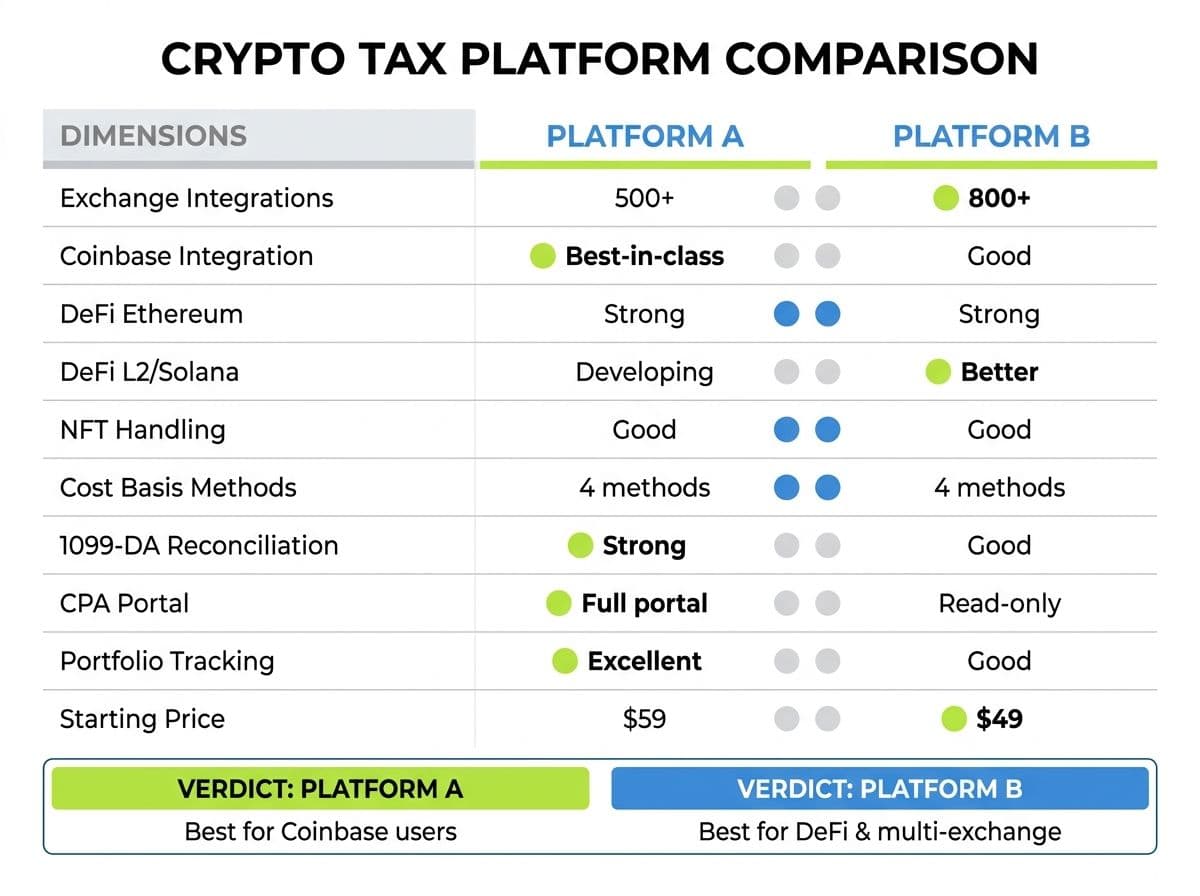
CoinTracker vs Koinly (2026)
| Feature | CoinTracker | Koinly |
|---|---|---|
| Exchange integrations | 500+ | 1,000+ |
| Coinbase integration depth | Best-in-class | Good |
| DeFi support (Ethereum) | Strong | Strong |
| DeFi support (L2s/Solana) | Developing | Better |
| NFT handling | Good | Good |
| Cost basis methods | FIFO, LIFO, HIFO, Spec ID | FIFO, LIFO, HIFO, Spec ID |
| 1099-DA reconciliation | Yes (strong) | Yes (strong) |
| CPA/accountant portal | Full portal (Base+) | Full access |
| Error detection | Very good | Good |
| Portfolio tracking | Excellent | Good |
| Starting price (paid) | $59/year | $49/year |
| Free tier usefulness | Limited (unlimited txns, no imports) | Strong (10,000 txns, no reports) |
| Best for | Coinbase users, portfolio tracking | Broad exchange coverage, DeFi |
The bottom line: If you're heavily in the Coinbase ecosystem and value portfolio tracking alongside your tax reports, CoinTracker has the edge. If you trade across many exchanges or have significant DeFi activity across multiple chains, Koinly's broader support gives it the advantage.
Neither is perfect. Both need a human review for complex portfolios.
Related reading: Koinly Guide: A CPA's Walkthrough and Best Crypto Tax Software 2026.
When CoinTracker Isn't Enough
Here's the honest threshold.
CoinTracker alone is probably fine if:
- You trade on 1-2 centralized exchanges
- You have fewer than 500 transactions per year
- No DeFi activity (or very minimal)
- Your total crypto portfolio is under $50K
- You haven't received any IRS correspondence
You need a CPA alongside CoinTracker if:
- Your portfolio exceeds $100K in crypto assets
- You have DeFi transactions (LPs, farming, bridges, staking beyond simple exchange staking)
- You trade across 3+ platforms or use self-custody wallets
- You've received an IRS notice (CP2000, Letter 6173/6174)
- You have international exchange accounts triggering FBAR requirements
- You want to optimize cost basis method selection across multiple years
- You have NFTs, mining income, or crypto business revenue
Pro Tip
Once your crypto portfolio crosses $100K, the cost of a CPA review ($800-$2,500 depending on complexity) almost always pays for itself in caught errors and tax optimization.
Tax-Loss Harvesting in CoinTracker
CoinTracker includes a tax-loss harvesting tab that shows your unrealized gains and losses across your portfolio in real time. This is useful for year-end tax planning.
How to use it:
- Go to the Tax Loss Harvesting tab in your CoinTracker dashboard
- Review positions showing unrealized losses
- Before December 31, consider selling losing positions to offset your realized gains
- Since crypto is not currently subject to wash sale rules (stocks are, crypto isn't — yet), you can sell and immediately rebuy the same asset
A worked example:
You have $15,000 in realized gains for the year. You also hold SOL and AVAX at a combined unrealized loss of $6,200. If you sell both before year-end and immediately repurchase:
- You lock in the $6,200 loss
- Your net taxable gain drops to $8,800
- At a 24% federal rate, that saves you $1,488 in taxes
- Your portfolio position is unchanged — you still hold the same SOL and AVAX
Pro Tip
Watch the legislation. Under current federal law, wash sale rules do not apply to cryptocurrency transactions because digital assets are treated as property rather than stocks or securities. However, Congress has proposed extending wash sale rules to digital assets multiple times, and several recent legislative proposals would do exactly that. If such legislation is enacted, the common tax-loss harvesting strategy of selling at a loss and immediately repurchasing the same asset could be limited or eliminated. Monitor developments through Congress.gov and discuss year-end tax planning with your CPA.
Related reading: Crypto Tax Guide 2026.
Action Steps: What to Do Next
Here's your playbook, based on where you are right now.
If you're evaluating CoinTracker:
- Create a free account and connect your primary exchange
- Review how your transactions import — look for warnings and miscategorizations
- Check whether your DeFi activity (if any) imports cleanly
- Compare the results with one competitor (we'd suggest Koinly) before committing to a paid plan
If you're already using CoinTracker:
- Verify your cost basis method is set correctly (HIFO for most people)
- Check the Transfers page for unmatched internal transfers
- Review every DeFi transaction for proper categorization
- Run the 1099-DA reconciliation against your exchange statements
- Generate a Complete Tax Report and review it line by line before filing
If you want professional help: Book a free call. Send us your CoinTracker data and we'll identify errors, optimize your cost basis, reconcile against your 1099-DAs, and file a CPA-reviewed return.
Related reading: How to Choose a Crypto Tax CPA.
Frequently Asked Questions
Is CoinTracker free to use?
CoinTracker has a free tier.It lets you see the interface and basic portfolio tracking, but you can't generate tax reports. Paid plans start at $59/year for up to 100 transactions.
Is CoinTracker better than Koinly?
It depends on your setup. CoinTracker has a superior Coinbase integration and better portfolio tracking. Koinly has broader exchange support (1,000+ vs 500+) and handles DeFi on L2 chains more effectively.
What cost basis method should I use in CoinTracker?
For most individual investors, HIFO (Highest In, First Out) minimizes your current-year tax bill. However, the optimal method depends on your tax bracket, holding periods, and whether you've filed with a different method previously.
Does CoinTracker handle DeFi transactions?
CoinTracker supports DeFi on Ethereum mainnet reasonably well. L2 chains and Solana DeFi are developing. Complex DeFi like LP management, yield farming, and bridges almost always needs manual review.
How does CoinTracker handle the 1099-DA form?
CoinTracker's 2026 update includes a 1099-DA reconciliation tool that cross-references exchange-issued 1099-DA data against your full transaction history, flagging mismatches before you file.
Can my CPA access my CoinTracker account?
Yes, but only on the Base plan ($59/year) and above. CoinTracker offers a full accountant portal with access to transaction history, tax reports, and reconciliation data.
How many transactions can CoinTracker handle?
The Ultra plan supports 10,000+ transactions per year. The Full Service plan supports up to 300,000 transactions per year. Internal transfers between your own wallets count toward this limit.
Should I use CoinTracker or hire a CPA?
The best approach for complex portfolios is both. Use CoinTracker for data aggregation and initial calculations, then have a CPA review the output, fix errors, optimize cost basis, and file the return.
Does CoinTracker support tax-loss harvesting?
Yes. CoinTracker includes a tax-loss harvesting dashboard showing unrealized gains and losses in real time, helping you identify positions to sell before year-end to offset gains.

About the author
Garrett Taylor, CPA
Former Big Four CPA. CPA #133092. Garrett answers his phone. Led by expertise. Powered by precision.
Related Articles

Best Crypto Tax Software 2026: A CPA's Honest Review of Every Major Platform
A CPA who files 500+ crypto returns reviews Koinly, CoinTracker, CoinLedger, CoinTracking, ZenLedger, and Summ. No affiliate links. Just honest verdicts.
Koinly Guide: A Crypto Tax CPA's Complete Walkthrough (2026)
A CPA's step-by-step Koinly walkthrough. Learn how to set up Koinly, avoid the 7 most common errors, and know when DIY is enough vs. when you need a pro.
CoinLedger Review 2026: A Crypto Tax CPA's Honest Walkthrough
A CPA's honest CoinLedger review for 2026. Free vs paid breakdown, TurboTax export workflow, DeFi limitations, common errors, and how it compares to Koinly.