Summ Review 2026: A CPA's Honest Walkthrough

By Garrett Taylor, CPA #133092
Reviewed by Leanne Grant, EA #00167954-EA

Key Takeaways
- ✓Summ is impressively polished for a newer platform with genuine AI-driven categorization, but limited exchange support and thin track record make it risky for anything beyond simple portfolios
- ✓The AI auto-categorization handles basic swaps and staking well but misclassifies complex DeFi interactions, wrapped tokens, and multi-step transactions
- ✓Exchange support is significantly narrower than Koinly (800+) or CoinLedger (400+), meaning CSV workarounds for many users
- ✓No CPA collaboration tools, no audit defense, no 1099-DA reconciliation, and no Specific ID cost basis method
- ✓Summ is worth watching as it matures, but we cannot recommend it as a primary tax tool for complex portfolios
“This guide has been reviewed for accuracy by Leanne Grant, Enrolled Agent, specializing in cryptocurrency tax compliance.”
, Leanne Grant, EA, Reviewer
Every tax season, a new crypto tax tool shows up promising to make everything easier. AI-powered. Slick interface. "Just connect your wallet and we'll handle everything."
Sound familiar?
Summ is the latest entry in this space. And honestly? The first impression is good. The onboarding is clean. The AI-driven transaction categorization actually works in basic scenarios. And the interface is one of the best-designed we've seen.
But here's the question that matters: Can you trust a newer platform with limited track record to handle your tax filing correctly?
We've spent the last few weeks putting Summ through real-world testing. Importing actual transaction data. Comparing its output against tools we use daily in our practice. Looking for the gaps that only show up when you push past the marketing demo.
This is a CPA's honest walkthrough. Not a hype piece. Not a hit job. A fair assessment of a tool that shows promise but hasn't proven itself yet.
Let's get into it.
The 30-Second Verdict
Summ is impressively polished for a newer platform, and the AI-driven categorization is genuinely useful for simple portfolios. If you hold crypto on one or two major exchanges and your activity is limited to buying, selling, and maybe some basic staking, Summ can generate a clean tax report with minimal effort.
But the limited exchange list, thin track record, and lack of advanced features make it a risk for anything beyond straightforward buy-and-sell investing.
Here's what concerns us:
The exchange integration list is a fraction of what Koinly or CoinLedger offer. There's no established community of CPAs or EAs using Summ in professional practice. The company is small, and platform longevity is an open question. DeFi coverage is minimal. And there are no audit defense or professional collaboration tools.
Under 50 exchanges
Summ's current integration list. Compare that to Koinly's 800+ and CoinLedger's 400+. If your exchange isn't supported, you're stuck with CSV imports or manual entry.
The bottom line: Summ is an interesting platform to watch. For a narrow use case (simple portfolios, major exchanges, basic activity), it works. For the kinds of clients we typically serve, it's not ready yet.
Summ Free vs Paid: What You Actually Get
Summ uses a tiered pricing model similar to other crypto tax tools, though the exact structure has evolved as the platform has grown. Here's what we've been able to confirm through testing and their published materials.
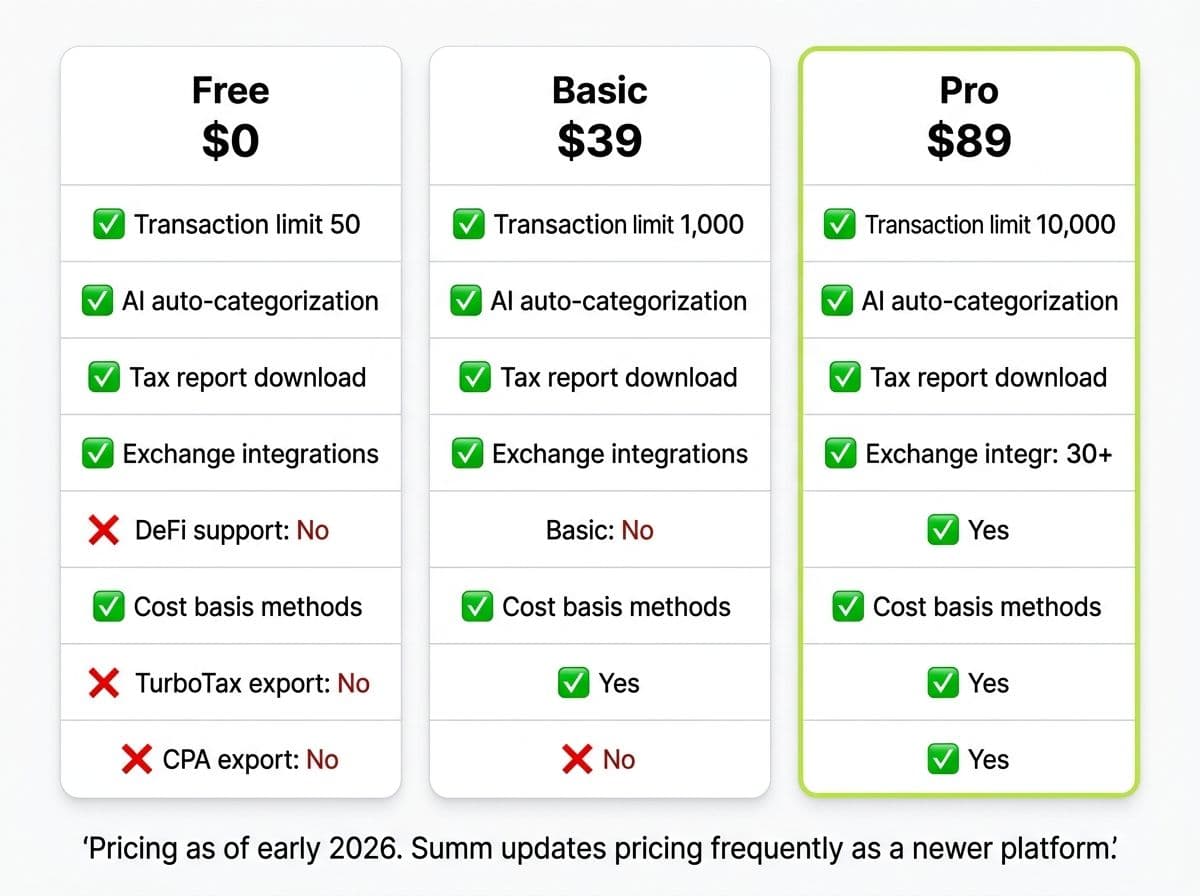
Summ Plans: Free vs Basic vs Pro
| Feature | Free ($0) | Basic (~$49) | Pro (~$99) |
|---|---|---|---|
| Transaction limit | ~50 | ~1,000 | ~10,000 |
| Exchange integrations | All supported | All supported | All supported |
| AI categorization | Preview only | Full | Full + manual override |
| Tax report download | No | Yes (Form 8949, Schedule D) | Yes (all formats) |
| DeFi support | No | Basic | Basic |
| NFT support | No | Limited | Limited |
| TurboTax / TaxAct export | No | Yes | Yes |
| Cost basis methods | FIFO only | FIFO, LIFO, HIFO | FIFO, LIFO, HIFO |
| Priority support | No | Email + chat | |
| CPA collaboration tools | No | No | No |
| Audit defense | No | No | No |
Pro Tip
Summ is a newer platform and its pricing and feature set have shifted during its growth phase. The figures above reflect our best understanding as of early 2026. We recommend checking Summ's current pricing page directly before purchasing. If you notice discrepancies, that itself tells you something about the maturity of the platform.
Here's the honest take on each tier:
Free tier: Slightly more generous than CoinLedger's 25-transaction cap, but still a trial experience. You can preview the AI categorization and see how Summ interprets your transactions, but you can't download reports. It's useful for kicking the tires. Nothing more.
Basic (~$49): This is where most individual users will land. The 1,000-transaction limit covers casual investors on major exchanges. You get downloadable Form 8949 and Schedule D reports, plus TurboTax export. For a simple Coinbase-only portfolio, this tier handles the job.
Pro (~$99): Higher transaction limits and full cost basis method support. But here's the thing: even the Pro tier doesn't include CPA collaboration tools or audit defense. Compare that to CoinLedger's audit defense add-on or Koinly's read-only collaborator access. For a tool at this price point, the professional feature gap is notable.
Pro Tip
Create a free account and import your data first. Check two things: (1) whether your exchanges are actually supported via API, and (2) whether the AI categorization looks reasonable for your transactions. If either answer is no, you've saved yourself a subscription fee.
Who Summ Is (Actually) Best For
After testing Summ across multiple portfolio types, here are the three personas it genuinely serves well:
Persona 1: The Crypto Newcomer Who Wants AI to Do the Work
You bought Bitcoin on Coinbase six months ago. Maybe you traded into a couple of altcoins. You've heard you need to report this on your taxes but you have no idea where to start.
Summ's AI categorization is genuinely helpful here. You connect your exchange, and the AI labels each transaction: buy, sell, swap, income, transfer. For someone who doesn't know the difference between a capital gain and ordinary income, this is the fastest path to a tax report that probably won't get you in trouble.
The key word there is "probably." We'll get to the caveats.
For context: if you bought $5,000 of Bitcoin on Coinbase, traded $2,000 into Ethereum, and earned $150 in staking rewards, Summ will categorize all of that correctly. The AI labels the BTC purchase, flags the ETH swap as a taxable event, calculates your short-term gain, and tags the staking as ordinary income. For a newcomer, that's genuinely useful.
But if you then bridged that ETH to Arbitrum and deposited into an Aave lending pool? The AI starts guessing. And guessing on a tax return is not acceptable.
Persona 2: The Simple Portfolio Holder on 1-2 Major Exchanges
You trade on Coinbase and maybe Kraken. Your activity is buy, sell, hold, and some staking. No DeFi. No yield farming. No cross-chain bridges.
For this profile, Summ works. The AI handles straightforward transactions accurately. The reports are clean. The TurboTax export functions as expected.
Persona 3: The Curious Early Adopter Willing to Try New Tools
You enjoy testing new platforms. You understand the risk of using a less-established tool. You're willing to verify Summ's output against another source before filing.
If that's you, Summ is worth exploring. The UX is genuinely best-in-class. The AI approach is different enough from rule-based competitors to be interesting.
Pro Tip
Anyone with DeFi activity beyond simple swaps. Anyone on exchanges that Summ doesn't support (check the list before signing up). Anyone who needs CPA collaboration tools. Anyone with a high-value portfolio where accuracy is critical. And frankly, anyone who can't afford to verify the output against a second source.
Related reading: best crypto tax software.
The AI-Driven Approach: What's Different?
This is Summ's core differentiator, so let's give it fair treatment.
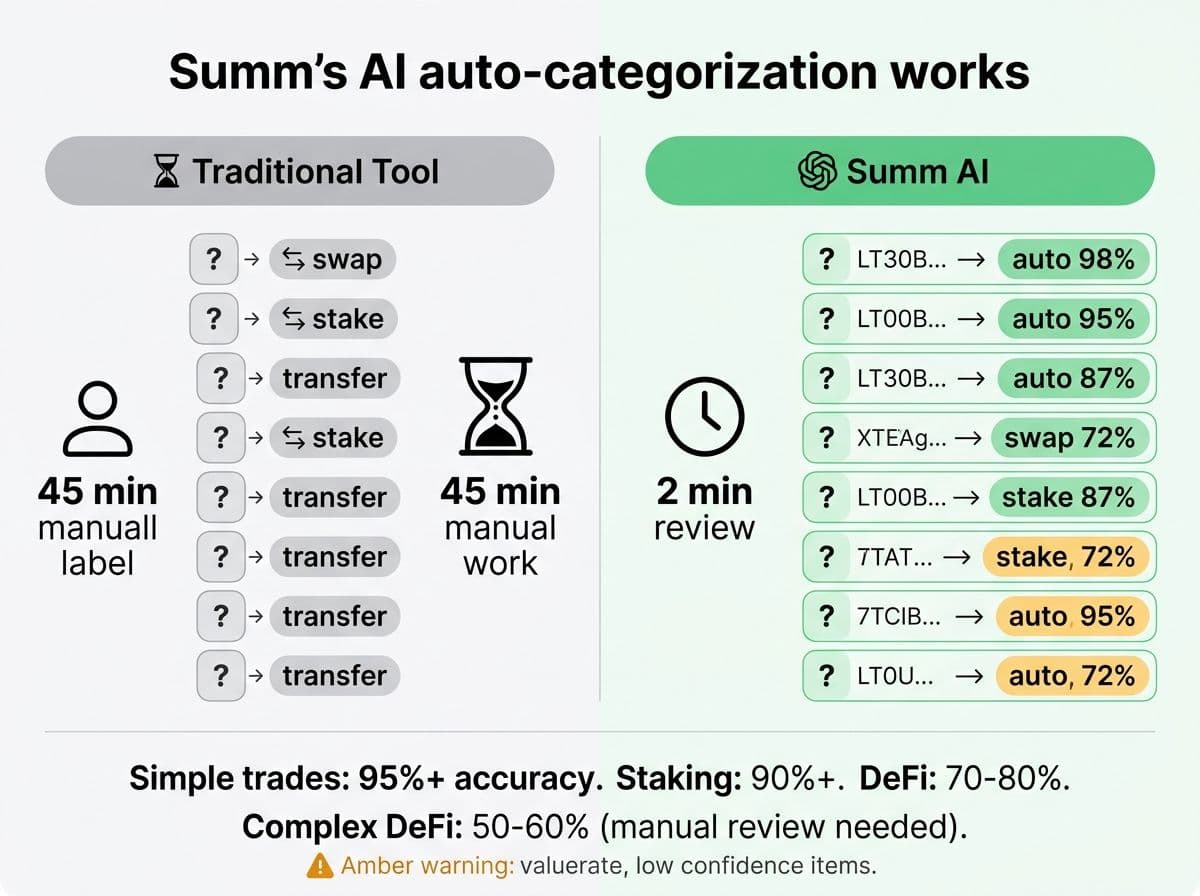
Most crypto tax tools use rule-based systems. They look at transaction metadata (type, source, destination, amount) and apply predetermined rules: "API says this is a trade, so it's a trade." Works most of the time. Fails on edge cases.
Summ takes a different approach. Their AI model analyzes transaction patterns and attempts to categorize them based on context, not just metadata. In theory, this means the system gets smarter over time and handles ambiguous transactions better.
What it gets right:
- Simple swaps and trades. The AI correctly identifies buy/sell events on major exchanges with high accuracy. We tested with Coinbase and Kraken data and saw correct categorization on 95%+ of straightforward trades.
- Basic staking rewards. Summ's AI reliably identified staking income as ordinary income rather than capital gains, which is the correct treatment per IRS Revenue Ruling 2023-14. This is something CoinLedger still fumbles occasionally.
- Internal transfers. The AI does a reasonable job detecting when you're sending crypto between your own wallets. It's not perfect, but it's better than we expected.
What it misses:
- Complex DeFi interactions. Liquidity pool entry/exit, yield farming, and cross-chain bridges are categorized inconsistently. The AI often defaults to "trade" for transactions it can't parse, which creates phantom taxable events.
- Wrapped token conversions. ETH to WETH is flagged as a taxable swap in most of our tests. This is wrong. It's a like-kind representation of the same asset, and while the IRS hasn't issued specific guidance, the professional consensus is that wrapping is not a taxable event.
- Airdrop classification. Airdrops were inconsistently treated. Some were correctly tagged as income, others were classified as trades with zero cost basis. The difference matters for how you report them.
- Multi-step DeFi transactions. A single yield farming interaction that involves approving, depositing, and receiving LP tokens gets split into separate events. The AI doesn't understand they're part of one economic action.
Pro Tip
Don't check the 90% it gets right. Check the 10% it gets wrong. That's where the tax liability hides. With Summ, we recommend reviewing every transaction the AI tagged with low confidence (Summ shows a confidence indicator) and every DeFi interaction manually.
A worked example of where the AI fails:
Imagine you deposit 1 ETH into a Uniswap ETH/USDC liquidity pool. You receive LP tokens representing your position. Three months later, you withdraw and receive 0.8 ETH and 400 USDC (because the pool rebalanced).
The correct tax treatment involves calculating impermanent loss, determining the cost basis of your LP tokens, and reporting the withdrawal as a disposition of the LP tokens with proceeds of 0.8 ETH + 400 USDC. It's complex, and the IRS hasn't issued specific guidance on LP taxation.
In our testing, Summ categorized the deposit as a "sell" of 1 ETH (creating a taxable event that didn't happen) and the withdrawal as two separate "buys." This produced a phantom capital gain on the deposit and an incorrect cost basis on the withdrawal. The total error: roughly $800 in overstated gains on a single LP interaction.
Koinly, by comparison, handled the same transaction correctly by recognizing the LP token mint and burn events.
Our assessment: The AI approach is genuinely promising. For simple portfolios, it's as accurate as established rule-based competitors. For complex portfolios, it's not there yet. And the question of whether a smaller company can train and improve the AI fast enough to compete with Koinly's years of DeFi rule refinement remains unanswered.
The 5 Biggest Risks of Using Summ for Your Taxes
We don't say this to be harsh. We say it because your tax return is a legal document, and trusting it to the wrong tool has real consequences.
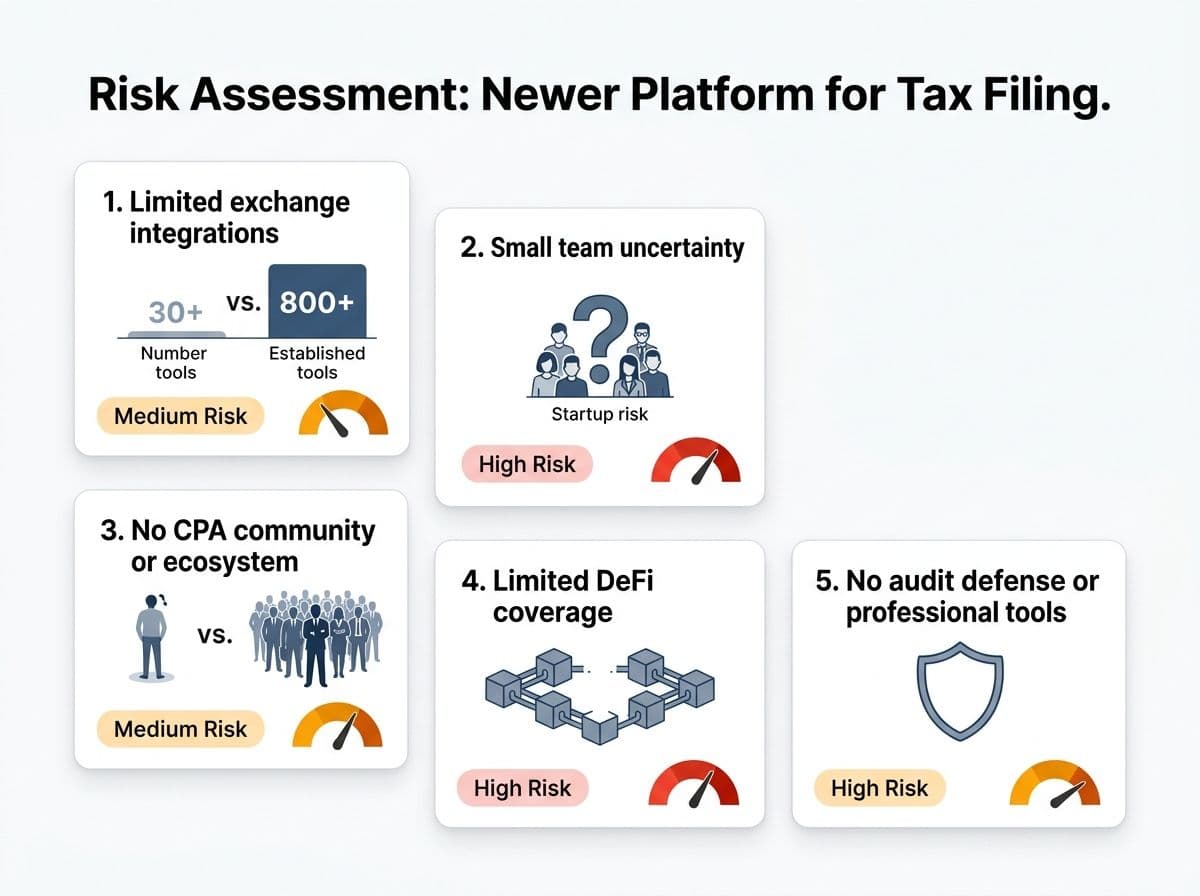
1. Limited Exchange Integrations
This is the most practical problem. Summ supports fewer than 50 exchange and wallet integrations. Koinly supports 800+. CoinLedger supports 400+.
If you trade on Binance International, KuCoin, Gate.io, MEXC, or most mid-tier exchanges, Summ likely doesn't have a direct API integration. That means CSV imports, which means more manual work and more room for error.
Under 50 integrations
Summ's current exchange support list. The crypto ecosystem has 500+ active exchanges and thousands of DeFi protocols. A narrow integration list means most users will hit a gap.
2. Small Team, Uncertain Longevity
Summ appears to be a small, venture-backed startup. That's not inherently bad. Every successful platform started small.
But consider this: your crypto tax data is sensitive. It includes your full transaction history, wallet addresses, and taxable events. If Summ shuts down, pivots, or gets acquired, what happens to that data? What happens to your ability to access prior-year reports?
With CoinLedger or Koinly, you're dealing with companies that have been operating for 5+ years, serve hundreds of thousands of users, and have established data retention practices. With Summ, that track record doesn't exist yet.
We've seen this movie before. In 2023-2024, several smaller crypto tax tools (BearTax, Accointing) either shut down or were acquired, leaving users scrambling to migrate data mid-tax-season. We're not saying Summ will follow that path. We're saying the risk is non-zero, and your tax data is too important to gamble on.
3. No Established CPA or Professional Community
In our practice, when we encounter a quirk in Koinly, we can check the Koinly CPA community, search professional forums, or reach out to their tax team. There's a knowledge base built by thousands of professionals over years.
Summ doesn't have that ecosystem yet. If you hit an edge case, you're largely on your own. There's no CPA-specific documentation. No professional tax advisory board. No established best practices for how to handle Summ output in a professional tax filing workflow.
4. Limited DeFi and Advanced Feature Coverage
As covered above, Summ's DeFi handling is basic at best. But the gap goes beyond DeFi:
- No margin/futures trading support that we could confirm
- No Specific Identification cost basis method
- No 1099-DA reconciliation workflow (critical for 2026 filings under 26 USC Section 6045)
- No international tax form support (8938, FBAR integration)
- Limited NFT coverage
For the 2026 tax year, the 1099-DA gap alone is a dealbreaker for many filers. Exchanges are now reporting your transactions directly to the IRS. If your tax software can't reconcile against that data, you're filing blind.
5. No Audit Defense or Professional Tools
If the IRS sends you a CP2000 notice questioning your crypto return, what's your plan?
Koinly offers detailed transaction logs with source documentation. CoinLedger has an audit defense add-on (overpriced, but it exists). Both platforms export clean professional reports a CPA can use to respond to IRS inquiries.
Summ doesn't offer audit defense. Its export options are basic. And there's no CPA collaboration feature that would let your tax professional access your data directly.
Pro Tip
**The platform risk is real.** We've seen crypto tax startups launch with great UX, attract users, and then shut down or stagnate within 18 months. If Summ is your only record of your transaction categorization and cost basis calculations, and the platform disappears, you'll need to reconstruct everything from scratch. Always export and save your reports locally.
Onboarding Walkthrough: From Signup to Tax Report
Credit where it's due: Summ's onboarding experience is excellent.
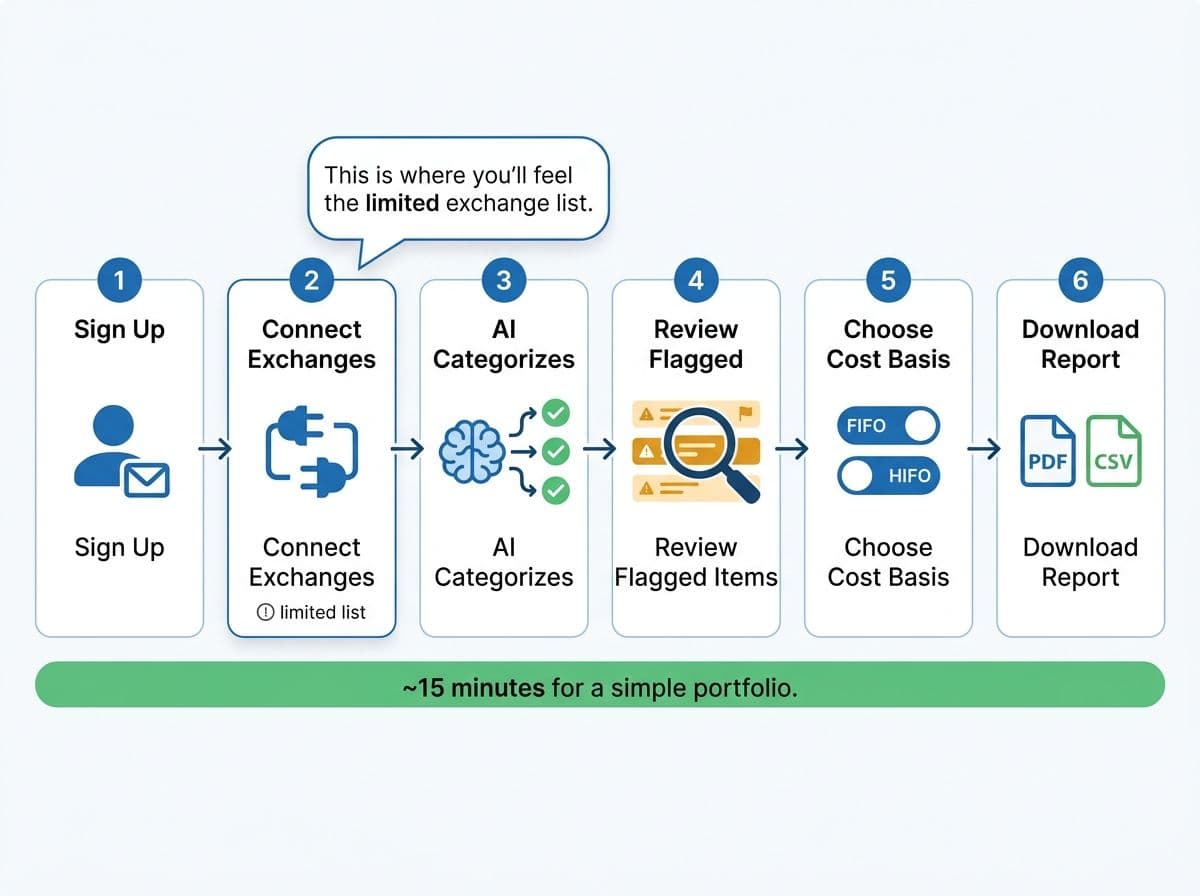
Here's what the process looks like:
Step 1: Account Creation (2 minutes)
Standard email signup. Clean, fast, no bloated profile questionnaire. You're into the dashboard within a minute. This is noticeably faster than CoinLedger's onboarding, which asks several setup questions before you see the main interface.
Step 2: Exchange Connection (3-5 minutes per exchange)
Summ walks you through connecting each exchange with clear, step-by-step instructions for each platform. API key generation is explained with screenshots. For supported exchanges, this is genuinely smooth.
Summ provides guided instructions for connecting supported exchanges via API keys, including screenshots for common platforms. The process is straightforward for supported exchanges, while unsupported exchanges require CSV uploads, which may involve more manual formatting work.
The friction starts when your exchange isn't in the list. There's a CSV upload option, but the documentation for formatting is thin compared to Koinly's detailed CSV templates for 100+ exchanges.
Step 3: AI Categorization (automatic, 1-5 minutes)
This is where Summ shines. Once your data is imported, the AI engine runs through every transaction and applies categories. A progress indicator shows the analysis running in real-time.
Each transaction gets:
- A category label (trade, income, transfer, etc.)
- A confidence score (high, medium, low)
- A flag if manual review is recommended
For a simple Coinbase portfolio with 200 transactions, the AI categorized everything in under 60 seconds. The results were clean. We only found two misclassified transactions (both were staking-related edge cases).
Step 4: Review and Fix (variable)
The review interface is well-designed. Transactions flagged for review are highlighted. You can filter by confidence level, category, or exchange. Editing a transaction's category is straightforward: click the category, select the correct one from a dropdown, done.
Step 5: Generate Report (1-2 minutes)
Select your tax year, cost basis method, and export format. Summ generates Form 8949 and Schedule D. The TurboTax TXF export option is available on paid plans.
Total time for a simple portfolio: 15-25 minutes from signup to downloadable tax report. That's competitive with any tool on the market.
Pro Tip
Before you connect your exchanges, make a list of every platform where you've bought, sold, or held crypto. Then check Summ's integration list. If more than one exchange is missing, you'll spend more time wrestling with CSV imports than the slick onboarding saved you. Know before you commit.
The honest assessment: The onboarding is Summ's strongest feature. It's fast, clear, and the AI categorization provides immediate value. If the rest of the platform were as strong as the first-run experience, Summ would be a serious competitor. But onboarding is the easy part. The hard part is accuracy on complex edge cases, and that's where the gaps show.
Summ vs Koinly: Side-by-Side
This is the comparison that matters. Koinly is the most full-featured crypto tax tool we use in our practice, so it's the right benchmark.
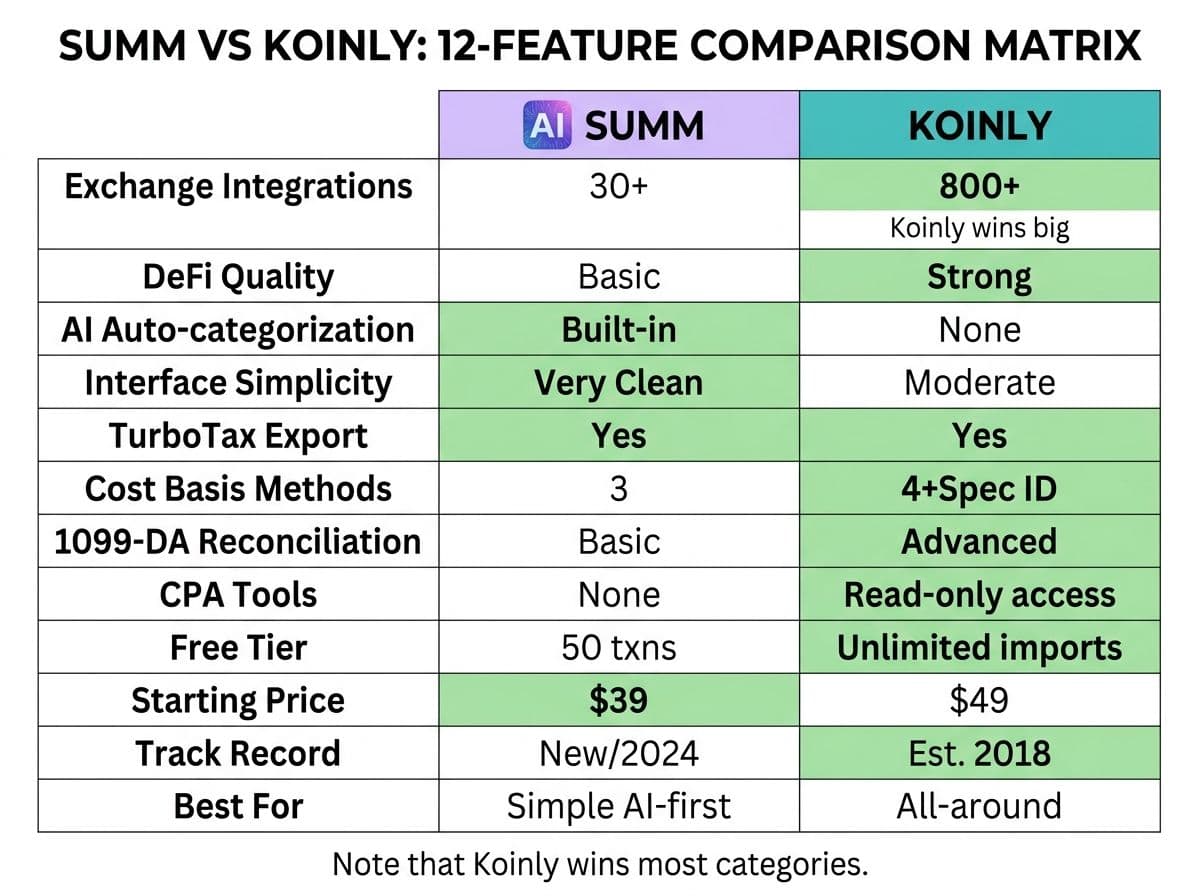
Summ vs Koinly (2026)
| Feature | Summ | Koinly |
|---|---|---|
| Exchange integrations | ~50 | 800+ |
| DeFi quality | Basic | Strong |
| NFT handling | Limited | Good |
| AI categorization | Yes (core feature) | Basic auto-tagging |
| TurboTax export | Yes | Yes |
| Cost basis methods | FIFO, LIFO, HIFO | FIFO, LIFO, HIFO, Spec ID |
| 1099-DA reconciliation | Not available | Advanced |
| CPA collaboration | Not available | Read-only collaborator access |
| Free tier | ~50 transactions (no reports) | Unlimited imports (no reports) |
| Error detection | AI confidence flags | Detailed warnings with fix suggestions |
| Starting price (paid) | ~$49 | $49 |
| Interface design | Excellent | Good |
| Platform maturity | New (1-2 years) | Established (5+ years) |
| Audit support tools | None | Detailed transaction logs |
| International tax forms | None confirmed | Yes |
| Best for | Simple portfolios, AI-curious users | All-around investors, DeFi, professionals |
The quick summary:
Choose Summ if: You have a very simple portfolio on 1-2 major exchanges, you value clean UX over feature depth, and you're comfortable being an early adopter of a newer platform. You should also be willing to verify the output.
Choose Koinly if: You need broad exchange support, have any DeFi activity, want Specific ID cost basis, need 1099-DA reconciliation, or work with a CPA. Which is to say: choose Koinly for most real-world tax situations.
Our practice does not use Summ for client work. The limited exchange support, lack of CPA collaboration tools, and absence of 1099-DA reconciliation make it impractical for professional use. We'd reconsider if those gaps close.
Where Summ wins: Interface design. Hands down. The dashboard is cleaner, the onboarding is faster, and the AI categorization provides more context per transaction than Koinly's default view. If Summ had Koinly's exchange coverage and feature depth with its own UX, it would be the clear market leader. But UX doesn't file your taxes. Accuracy and coverage do.
The price comparison is interesting too. Both start around $49 for their basic paid tier. But Koinly's $49 gets you 800+ exchange integrations, Spec ID, CPA access, and 1099-DA reconciliation. Summ's $49 gets you under 50 integrations and no professional tools. Dollar for dollar, Koinly delivers significantly more value for most users.
Related reading: Koinly guide.
When Summ Isn't Enough
For most of the clients we serve at COS Elite, Summ isn't enough today. Here's how to know if that applies to you:
- You trade on more than two exchanges, and at least one isn't in Summ's integration list
- You have any meaningful DeFi activity (liquidity pools, yield farming, lending, bridges)
- Your portfolio is over $50K and accuracy directly impacts your tax liability
- You've received a 1099-DA from an exchange and need to reconcile against it
- You need to file international reporting forms (FBAR/FinCEN Form 114 or Form 8938)
- You want a CPA to review your data directly inside the platform
- You need to amend a prior-year return and require reliable historical data
- You can't afford the risk of a platform shutting down with your data
Pro Tip
Import your data into Summ's free tier. If more than 10% of your transactions are flagged for manual review, or if any exchange requires a CSV workaround, Summ isn't saving you time. You're better off with a more established tool that handles your specific situation cleanly.
That's a long list, and it covers the majority of active crypto investors. Summ's sweet spot is genuinely narrow right now: simple portfolios, major exchanges, basic activity. If that's you, it works. If it's not, keep looking.
Here's the math that matters: If your crypto portfolio is worth more than $25,000 and you have transactions across 3+ platforms, a single misclassified transaction could cost you more in incorrect taxes than the annual subscription to a more established tool. We've seen clients pay $200-$3,000 in unnecessary taxes because of software errors that went uncaught. The $49 difference between Summ and a better-suited platform is not where you save money.
Related reading: how to choose crypto tax CPA.
Action Steps
Here's what to do next, based on where you are:
If you're curious about Summ:
- Create a free account and import one exchange
- Review the AI categorization for accuracy against your own records
- Check the exchange integration list against every platform you use
- Compare the output against another tool (Koinly's free tier imports unlimited transactions) before relying on it
If you're already using Summ:
- Export and save all reports locally as PDF and CSV (do not rely solely on platform access for your records)
- Verify every AI-categorized DeFi transaction manually, especially anything with a "medium" or "low" confidence score
- Cross-reference your reported totals against your exchange 1099-DAs before filing. If Summ doesn't have a reconciliation tool, do this manually in a spreadsheet. The IRS has your 1099-DA data, and your return needs to match or have a documented explanation for differences.
- If you have more than 500 transactions or any DeFi activity, run the same data through Koinly or CoinLedger as a sanity check. Koinly's free tier lets you import unlimited transactions and preview the report, so this costs you nothing but time.
- Keep a written log of every manual adjustment you make in Summ, including why you changed it. If the IRS questions your return, "the AI said so" is not a defensible position. "I reclassified this as a transfer because both wallets belong to me, per my records on [date]" is.
If you want a professional to handle it: Book a Tax Health Check. We'll look at your portfolio complexity, review what tools you're using (Summ, Koinly, CoinLedger, or nothing at all), identify gaps in your reporting, and give you a straight answer on what your filing actually requires. Fifteen minutes on the phone, no commitment, no billable-hour games. If Summ is right for your situation, we'll tell you that too.
Free Crypto Tax Health Check
Not sure if Summ, Koinly, or CoinLedger is right for your portfolio? We'll review your situation, recommend the right tool, and catch the errors that software misses. 15-minute call, no commitment.
Book Your Free ReviewFree 15 minute call. No commitment.
Frequently Asked Questions
Is Summ legit for crypto taxes?
Summ is a legitimate crypto tax platform, but it's newer and less established than competitors like Koinly or CoinLedger. It produces accurate reports for simple buy/sell portfolios on major exchanges. However, its limited track record, small exchange list, and lack of professional features mean you should verify its output before filing, especially for anything beyond basic trades.
How accurate is Summ's AI categorization?
In our testing, Summ's AI correctly categorized 95%+ of straightforward trades on major exchanges. Basic staking rewards were also handled well. However, complex DeFi interactions (liquidity pools, bridges, wrapped tokens) were frequently misclassified, and airdrop treatment was inconsistent. Always review transactions the AI flags with low confidence.
What exchanges does Summ support?
Summ supports fewer than 50 exchange and wallet integrations as of early 2026. Major platforms like Coinbase and Kraken are covered, but many mid-tier exchanges (Binance International, KuCoin, Gate.io, MEXC) may require CSV imports. Check Summ's current integration list before signing up.
Is Summ better than Koinly?
For most users, no. Koinly offers 800+ exchange integrations, Specific Identification cost basis, CPA collaboration tools, 1099-DA reconciliation, and years of established DeFi rule refinement. Summ wins on interface design and onboarding speed, but Koinly delivers significantly more value for the same price point.
Is Summ better than CoinLedger?
It depends on your situation. CoinLedger has a longer track record, 400+ exchange integrations, a TurboTax export that's been refined over years, and an audit defense add-on. Summ has better AI categorization and a cleaner interface. For simple portfolios, either works. For anything complex, CoinLedger's maturity gives it the edge.
Is Summ safe for complex crypto portfolios?
We don't recommend Summ as a primary tool for complex portfolios. If you have DeFi activity, trade on multiple exchanges, hold over $50K in crypto, or need 1099-DA reconciliation, Summ's current feature set leaves too many gaps. Use a more established platform and consider a CPA review.
How much does Summ cost?
Summ offers a free tier (approximately 50 transactions, no report downloads), a Basic plan (around $49 for up to 1,000 transactions with reports and TurboTax export), and a Pro plan (around $99 for up to 10,000 transactions). Pricing may change as the platform evolves. Check their site for current rates.
Does Summ support DeFi transactions?
Summ offers basic DeFi support on paid plans, but it's limited compared to established competitors. Simple token swaps are handled well. Liquidity pools, yield farming, cross-chain bridges, and lending protocol interactions are frequently misclassified. Heavy DeFi users should use Koinly instead.
Can my CPA use Summ?
Summ does not currently offer CPA collaboration tools like read-only account access or professional dashboards. Your CPA would need to work from exported reports (PDF and CSV). Compare this to Koinly, which offers direct read-only collaborator access for tax professionals.
Does Summ handle the new 1099-DA form?
As of early 2026, Summ does not offer a 1099-DA reconciliation workflow. This is a significant gap for the 2026 tax year, as exchanges now report transactions directly to the IRS under 26 USC Section 6045. You'll need to reconcile your 1099-DA data manually or use a platform like Koinly that has built-in reconciliation.
What happens if Summ shuts down?
This is a real risk with any newer platform. If Summ shuts down or is acquired, you could lose access to your transaction categorization, cost basis calculations, and historical reports. Always export and save your reports locally after generating them. Don't rely solely on platform access for your tax records.
Should I use Summ or hire a crypto tax CPA?
For simple portfolios (buy/sell only, 1-2 exchanges, under $25K), Summ alone may be sufficient. For anything more complex, the best approach is to use an established tool like Koinly for data aggregation and have a CPA review the output. The software handles the math; a CPA handles the judgment calls on categorization, optimization, and IRS compliance.

About the author
Garrett Taylor, CPA
Former Big Four CPA. CPA #133092. Garrett answers his phone. Led by expertise. Powered by precision.
Related Articles

Best Crypto Tax Software 2026: A CPA's Honest Review of Every Major Platform
A CPA who files 500+ crypto returns reviews Koinly, CoinTracker, CoinLedger, CoinTracking, ZenLedger, and Summ. No affiliate links. Just honest verdicts.
Koinly Guide: A Crypto Tax CPA's Complete Walkthrough (2026)
A CPA's step-by-step Koinly walkthrough. Learn how to set up Koinly, avoid the 7 most common errors, and know when DIY is enough vs. when you need a pro.

CoinLedger Review 2026: A Crypto Tax CPA's Honest Walkthrough
A CPA's honest CoinLedger review for 2026. Free vs paid breakdown, TurboTax export workflow, DeFi limitations, common errors, and how it compares to Koinly.